做 web 開發時,除了客戶端與伺服器之間的資料往返,還有幾個訊息傳遞的場景幾乎每個專案都會遇到:
1. 頁面與它開啟的新視窗之間的資料傳遞
2. 多個視窗之間的訊息傳遞
3. 頁面與內嵌 iframe 之間的訊息傳遞
4. 以上三種情境的跨域版本
這些問題歷史上都有各自的土辦法,但 HTML5 引入的 message API 能更簡便、更可靠、也更安全地解決它們。postMessage() 允許來自不同源的腳本以非同步方式進行有限度的溝通,可以實現跨文件、跨視窗、跨域的訊息傳遞。
API 只有兩個參數
postMessage(data, origin)
data:要傳遞的資料。HTML5 規範允許傳任何 JavaScript 的基本型別或可複製的物件,但實作程度上各家瀏覽器並不一致,部分舊版本只吃字串。保險的做法是用 JSON.stringify() 序列化後再送,在低版本 IE 中引入 json2.js 即可獲得同樣能力。
origin:字串參數,指明目標視窗的來源,格式為「協議+主機+埠號」(URL 部分會被忽略,可以不寫)。這個參數是安全設計的一部分:postMessage() 只會把訊息投遞給來源符合的視窗。若設為 "*" 則不檢查、可投給任何視窗;若要限定同源,設為 "/"。
主頁面:向跨域 iframe 說話
假設主頁面在 test.com,內嵌的 iframe 來自 lslib.com:
https://test.com/index.html

<div style="width:200px; float:left; margin-right:200px; border:solid 1px #333;">
  <div id="color">Frame Color</div>
</div>

<div>
  <iframe id="child" src="https://lslib.com/lslib.html"></iframe>
</div>
主頁面可以在 onload 時向跨域的 iframe 送訊息:
window.onload = function () {
  window.frames[0].postMessage('getcolor', 'https://lslib.com');
};
iframe:接收並回覆
接收方只要監聽 window 的 message 事件即可:
https://lslib.com/lslib.html

window.addEventListener('message', function (e) {
  if (e.source != window.parent) return;          // 先確認訊息來源

  var color = container.style.backgroundColor;
  window.parent.postMessage(color, '*');
}, false);
這裡順手用 MessageEvent 的屬性做了一次來源檢查,是很值得養成的習慣。
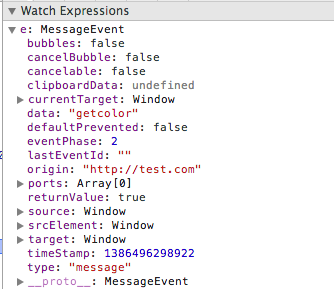
MessageEvent 的三個關鍵屬性
data——傳過來的訊息內容。
source——送出訊息的那個視窗物件,可以拿來比對是否為 window.parent 或 window.opener。
origin——送出方視窗的來源(協議+主機+埠號),這通常是進行白名單驗證時該看的欄位。
關於安全性這裡多說一句:只用 e.source 比對是不够嚴謹的,正式環境請務必檢查 e.origin 是否落在你的白名單裡,處理完敏感操作前也要再確認一次。同理,送出訊息時若非必要,不要圖省事寫 "*"。
完整 demo:兩邊的顏色同步
這個例子中,左邊的 div 會跟著右邊 iframe 內的 div 一起變色。
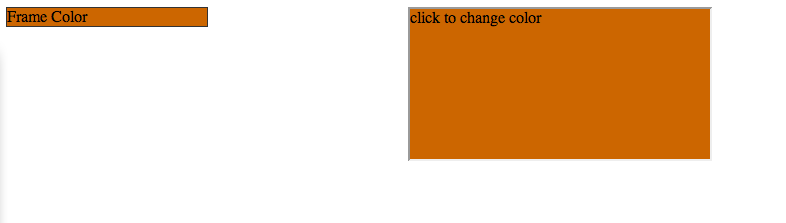
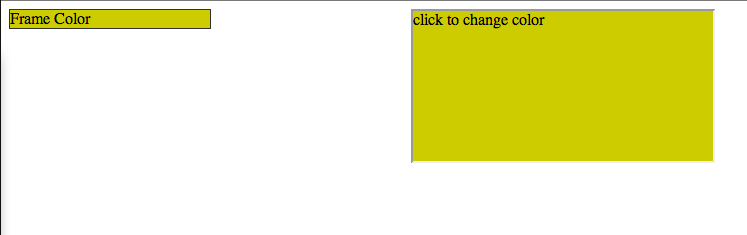
主頁面
<!DOCTYPE html>
<html>
<head>
  <title>Post Message</title>
</head>
<body>
  <div style="width:200px; float:left; margin-right:200px; border:solid 1px #333;">
    <div id="color">Frame Color</div>
  </div>

  <div>
    <iframe id="child" src="https://lslib.com/lslib.html"></iframe>
  </div>

  <script type="text/javascript">
    window.onload = function () {
      window.frames[0].postMessage('getcolor', 'https://lslib.com');
    };

    window.addEventListener('message', function (e) {
      if (e.origin !== 'https://lslib.com') return;   // 白名單驗證

      document.getElementById('color').style.backgroundColor = e.data;
    }, false);
  </script>
</body>
</html>
iframe 頁面
<!doctype html>
<html>
<head>
  <style type="text/css">
    html, body { height: 100%; margin: 0px; }
  </style>
</head>
<body style="height:100%;">
  <div id="container" onclick="changeColor();"
       style="width:100%; height:100%; background-color:rgb(204, 102, 0);">
    click to change color
  </div>

  <script type="text/javascript">
    var container = document.getElementById('container');

    window.addEventListener('message', function (e) {
      if (e.source != window.parent) return;

      var color = container.style.backgroundColor;
      window.parent.postMessage(color, '*');
    }, false);

    function changeColor() {
      var color = container.style.backgroundColor;

      if (color == 'rgb(204, 102, 0)') {
        color = 'rgb(204, 204, 0)';
      } else {
        color = 'rgb(204, 102, 0)';
      }

      container.style.backgroundColor = color;
      window.parent.postMessage(color, '*');
    }
  </script>
</body>
</html>
流程回顧
頁面載入時,主頁面向 iframe 送出一個 'getcolor' 請求(字串本身只是暗號,沒有實際作用):
window.onload = function () {
  window.frames[0].postMessage('getcolor', 'https://lslib.com');
};
iframe 收到後,把當前顏色回傳給主頁面:
window.addEventListener('message', function (e) {
  if (e.source != window.parent) return;

  var color = container.style.backgroundColor;
  window.parent.postMessage(color, '*');
}, false);
主頁面收到後,改變自己那個 div 的顏色:
window.addEventListener('message', function (e) {
  var color = e.data;
  document.getElementById('color').style.backgroundColor = color;
}, false);
使用者點擊 iframe 時觸發變色,並把最新顏色再送給主頁面:
function changeColor() {
  var color = container.style.backgroundColor;

  if (color == 'rgb(204, 102, 0)') {
    color = 'rgb(204, 204, 0)';
  } else {
    color = 'rgb(204, 102, 0)';
  }

  container.style.backgroundColor = color;
  window.parent.postMessage(color, '*');
}
主頁面沿用剛才那個監聽 message 的程式就能完成同步,兩邊其實跑的是同一套邏輯。
相容性與幾個實務提醒
用法簡單卻解決了大問題,社群媒體網站很早就把這套機制用在跨域的登入與分享元件上,Web Workers 的訊息傳遞也是同一個概念。
相容性方面,好消息是它和 localStorage 一樣,IE8 以上都支援。要注意的是部分舊版瀏覽器(例如 Firefox 4)不認 window.onmessage = function () {} 這種寫法,因此請一律使用事件綁定的形式;為了兼容 IE8,還需要判斷 addEventListener 是否存在,不存在時改用 attachEvent('onmessage', ...)。
另外三點實務經驗:
訊息是非同步的。送出的那一刻對方不會立刻收到,別在下一行就假設對方已經處理完,需要序列對話時請設計請求/回應的配對機制。
傳物件記得序列化。現代瀏覽器支援結構化複製,但為了兼容舊環境,跨頁傳物件時包一層 JSON 轉換最省心。
别让訊息無主。為訊息加上 type 或 action 欄位,接收端依類型分派處理。否則同一個頁面裡來自 iframe、彈出視窗、後台 worker 的訊息全部混在同一個事件裡,很快就會難以維護。