HTML5 乒乓球遊戲(碰撞檢測)實例二:方向鍵控制方塊對打球
編輯:HTML5詳解
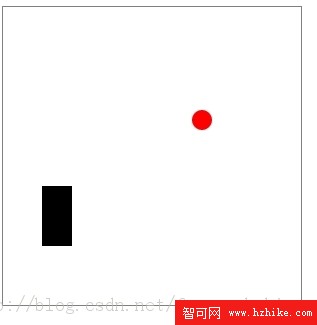
玩法說明
- 小球可以在方框內部自由運動,撞到邊界會反彈。
- 用方向鍵控制黑色磚塊上下左右移動,去和飛行中的小球發生碰撞。
線上演示:https://koking.8u.hanmandarin.com/html5/1.html
程式碼實現
<!DOCTYPE Html>
<Html>
<head>
<title>乒乓球遊戲</title>
<meta http-equiv="Content-Type" content="text/Html; charset=utf-8">
<script>
var ctx, canvas;
var ball_x = 10, ball_y = 10;
var ball_radius = 10;
var ball_vx = 10, ball_vy = 8;

var wall_x = 30, wall_y = 40;
var wall_width = 30, wall_height = 60;

var box_x = 0, box_y = 0;
var box_width = 300, box_height = 300;

var bound_left   = box_x + ball_radius;
var bound_right  = box_x + box_width  - ball_radius;
var bound_top    = box_y + ball_radius;
var bound_bottom = box_y + box_height - ball_radius;

var unit = 10;

// 判斷線段 (sx,sy)-(fx,fy) 是否與圓 (cx,cy,rad) 相交
function intersect(sx, sy, fx, fy, cx, cy, rad)
{
  var dx = fx - sx;
  var dy = fy - sy;
  var t = 0.0 - (((sx - cx) * dx + (sy - cy) * dy) / (dx * dx + dy * dy));

  if (t < 0.0)      { t = 0.0; }
  else if (t > 1.0) { t = 1.0; }

  var dx1 = (sx + t * dx) - cx;
  var dy1 = (sy + t * dy) - cy;
  var rt = dx1 * dx1 + dy1 * dy1;

  return (rt < rad * rad) ? true : false;
}

function move_ball()
{
  ball_x = ball_x + ball_vx;
  ball_y = ball_y + ball_vy;

  // 與方框邊界碰撞
  if (ball_x < bound_left)   { ball_x = bound_left;   ball_vx = -ball_vx; }
  if (ball_x > bound_right)  { ball_x = bound_right;  ball_vx = -ball_vx; }
  if (ball_y < bound_top)    { ball_y = bound_top;    ball_vy = -ball_vy; }
  if (ball_y > bound_bottom) { ball_y = bound_bottom; ball_vy = -ball_vy; }

  // 撞到磚塊上邊
  if (intersect(wall_x, wall_y, wall_x + wall_width, wall_y + wall_height, ball_x, ball_y, ball_radius))
  { ball_y = wall_y - ball_radius; ball_vy = -ball_vy; }

  // 撞到磚塊左邊
  if (intersect(wall_x, wall_y, wall_x, wall_y + wall_height, ball_x, ball_y, ball_radius))
  { ball_x = wall_x - ball_radius; ball_vx = -ball_vx; }

  // 撞到磚塊右邊
  if (intersect(wall_x + wall_width, wall_y, wall_x + wall_width, wall_y + wall_height, ball_x, ball_y, ball_radius))
  { ball_x = wall_x + wall_width + ball_radius; ball_vx = -ball_vx; }

  // 撞到磚塊下邊
  if (intersect(wall_x, wall_y + wall_height, wall_x + wall_width, wall_y + wall_height, ball_x, ball_y, ball_radius))
  { ball_y = wall_y + wall_height + ball_radius; ball_vy = -ball_vy; }
}

function move_wall(ev)
{
  var keyCode;
  if (event == null) {
    keyCode = window.event.keyCode;
    window.event.preventDefault();
  } else {
    keyCode = event.keyCode;
    event.preventDefault();
  }

  switch (keyCode)
  {
    case 37: // left
      wall_x -= unit;
      if (wall_x < bound_left) wall_x = bound_left;
      break;
    case 38: // up
      wall_y -= unit;
      if (wall_y < bound_top) wall_y = bound_top;
      break;
    case 39: // right
      wall_x += unit;
      if (wall_x + wall_width > bound_right) wall_x = bound_right - wall_width;
      break;
    case 40: // down
      wall_y += unit;
      if (wall_y + wall_height > bound_bottom) wall_y = bound_bottom - wall_height;
      break;
    default:
      break;
  }
}

function draw_all()
{
  ctx.beginPath();
  ctx.clearRect(box_x, box_y, box_width, box_height);

  ctx.fillStyle = "rgb(255,0,0)";
  ctx.arc(ball_x, ball_y, ball_radius, 0, Math.PI * 2, true);
  ctx.fill();

  ctx.fillStyle = "rgb(0,0,0)";
  ctx.fillRect(wall_x, wall_y, wall_width, wall_height);

  ctx.strokeRect(box_x, box_y, box_width, box_height);
}

function init()
{
  canvas = document.getElementById('canvas');
  ctx = canvas.getContext('2d');
  draw_all();
  setInterval(draw_all, 100);
  setInterval(move_ball, 50);
  window.addEventListener('keydown', move_wall, false);
}
</script>
</head>
<body onLoad="init();">
<canvas id="canvas" width="300" height="300"></canvas>
</body>
</Html>
難點:小球與磚塊的碰撞檢測與處理
整個範例的技術核心在 intersect 這個函式。做法是把磚塊拆解為四條線段(上、下、左、右),再分別對小球與每條線段做碰撞檢測。這樣一來,方形障礙物的碰撞問題就被轉化成了「線段與圓是否相交」這個更基礎的幾何問題。
intersect 的數學原理
- 先求出圓心到線段所在直線的投影參數 t,並把 t 夾在 0 到 1 之間——這一步確保判斷的是線段而非無限延伸的直線。
- 代入 t 得到線段上離圓心最近的一點。
- 計算該點到圓心的距離平方,與半徑平方比較,小於則相交。
全程只用平方比較,避開了開根號運算,效能上比直接算距離更划算。
碰撞後如何處理
判斷出撞的是哪一條邊之後,除了把速度對應分量取反,還要把小球推到邊界之外(例如撞左邊就令 ball_x = wall_x - ball_radius)。這一步很重要,否則下一幀小球仍留在磚塊內部,會出現連續反彈、卡在裡面出不來的情況。
小球與線段的碰撞檢測原理,在另一篇文章 https://www.jb51.net/html5/93997.html 中有更詳細的介紹。
- 上一篇文章: CSS text-shadow 實戰:三種文字陰影效果寫法示範
- 下一篇文章: HTML5 記憶翻牌遊戲:需求拆解與完整實作程式碼
熱門推薦