表單提交後刷新頁面但不跳轉:iframe target 技巧
編輯:HTML和Xhtml
有些時候我們希望表單送出的同時頁面停留在原處,只刷新局部內容,不跳到 action 指定的頁面。不必寫 Ajax,用一個隱藏的 iframe 當靶子就能做到。
設計源碼
<!DOCTYPE html>
<html>
<head>
<meta http-equiv="Content-Type" content="text/html; charset=utf-8" />
<title>Form 提交表單頁面不跳轉</title>
</head>
<body>
<form action="" id="" method="post" target="id_iframe">
  <input type="text" id="input_text" name="input_text" />
  <input type="submit" id="submit" name="submit" value="提交" />
</form>

<iframe id="id_iframe" name="id_iframe" style="display:none;"></iframe>
</body>
</html>
關鍵在 target
表單的 target 屬性決定回應要載入到哪個瀏覽區。把它指向一個 name 相同的隱藏 iframe,伺服器的回應就會被載入到那個看不見的框架裡,外層頁面完全不動,看起來就像「只刷新不跳轉」。
運行結果
輸入「451」後單擊「提交」:
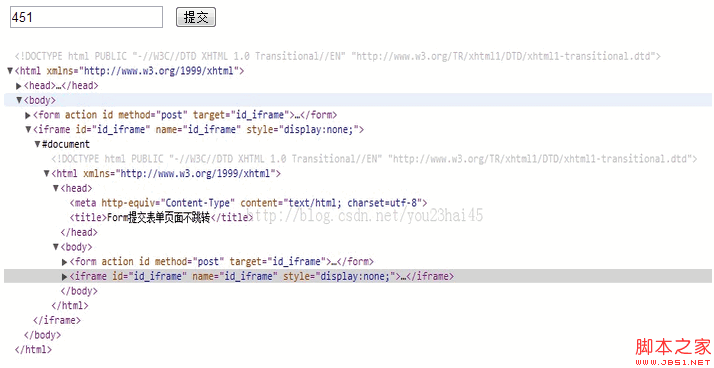
再輸入「45464646」並提交:
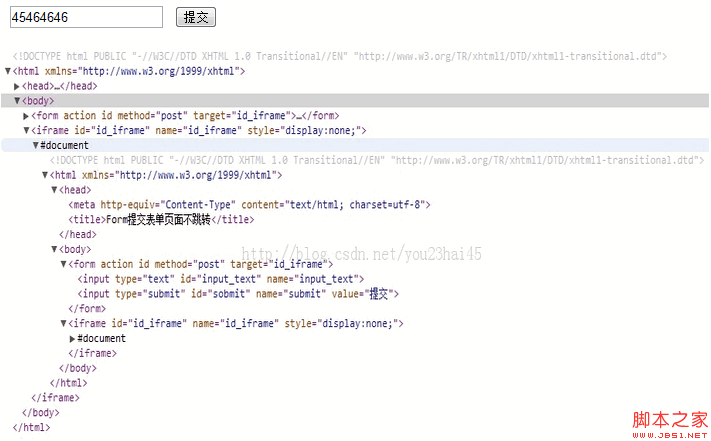
可以看到表單內容被清掉、頁面重新提交刷新,但網址與視窗都沒有跳走。
什麼時候適合這招
它的優點是零依賴、寫法極簡,適合表單等級的小型互動,例如送出留言後清空輸入框、或做簡單的資料寫入。缺點也很明顯:iframe 裡的結果你拿不到,若需要根據伺服器回應更新頁面,還得跨框架傳值,反而更麻煩。這種情況改用 fetch() 送出表單會乾淨得多:
form.addEventListener('submit', async (e) => {
  e.preventDefault();
  await fetch(form.action, { method: form.method, body: new FormData(form) });
  form.reset();
});
另外提醒,iframe 的 name 與 id 若和表單的 id 撞名(原範例兩者都寫成空字串或 "id_iframe"),部分瀏覽器會出現 target 找不到目標的狀況,實作時請確認 name 唯一且與 target 完全一致。
- 上一篇文章: HTML 設定字體顏色的三種做法,以及用 PS 取得準確色碼
- 下一篇文章: HTML 文字效果標籤:加粗、傾斜、下劃線與刪除線