HTML 文字標記標籤全解析:從粗體到 ruby 注音
編輯:HTML和Xhtml
1. 基本的文字標記元素
先看這組標籤的實際呈現:
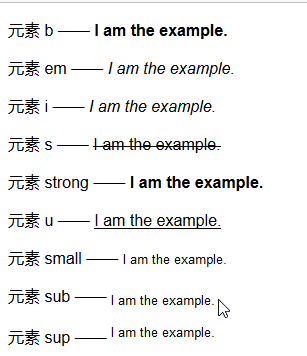
對應的 HTML:
<p>元素 b —— <b>I am the example.</b></p>
<p>元素 em —— <em>I am the example.</em></p>
<p>元素 i —— <i>I am the example.</i></p>
<p>元素 s —— <s>I am the example.</s></p>
<p>元素 strong —— <strong>I am the example.</strong></p>
<p>元素 u —— <u>I am the example.</u></p>
<p>元素 small —— <small>I am the example.</small></p>
<p>元素 sub —— <sub>I am the example.</sub></p>
<p>元素 sup —— <sup>I am the example.</sup></p>
它們的瀏覽器預設樣式,以及各自該被用在什麼場合:
b      { font-weight: bolder; }              /* 關鍵詞、產品名稱 */
em     { font-style: italic; }               /* 需要強調 */
i      { font-style: italic; }               /* 外文詞語、專業術語 */
s      { text-decoration: line-through; }    /* 不再準確或已被更正 */
strong { font-weight: bolder; }              /* 重要內容 */
u      { text-decoration: underline; }       /* 加底線 */
small  { font-size: small; }                 /* 小字體補充說明 */
sup    { vertical-align: super; font-size: smaller; }  /* 上標 */
sub    { vertical-align: sub;   font-size: smaller; }  /* 下標 */
值得留意的是 b/i 與 strong/em 的分工:前者只描述視覺樣式,後者表達語意上的重要性與強調。HTML5 規範建議 b 是最後的選擇,只有在沒有更合適的標籤時才使用。
2. 使用語言相關元素:ruby 注音
ruby、rt、rp 三者搭配,可以為漢字加上注音,日文與中文拼音標注都很常見:
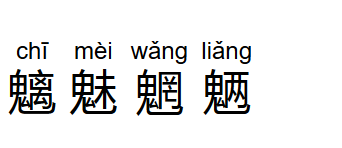
<p style="font-size: 3em;">
  <ruby>魑<rp>(</rp><rt>chī</rt><rp>)</rp></ruby>
  <ruby>魅<rp>(</rp><rt>mèi</rt><rp>)</rp></ruby>
  <ruby>魍<rp>(</rp><rt>wǎng</rt><rp>)</rp></ruby>
  <ruby>魉<rp>(</rp><rt>liǎng</rt><rp>)</rp></ruby>
</p>
rt 放注音文字,rp 則是給不支援 ruby 的舊瀏覽器用的括號後備內容,有支援時會被隱藏。
3. 保留原始格式:pre 元素
HTML 預設會把連續空白與換行折疊成一個空格,pre 元素可以改变這個行為,讓原始文件的排版原樣呈現:

<pre>
<code>
    var fruits = ["apples", "oranges", "mangoes", "cherries"];
    for(var i = 0; i < fruits.length; i++){
        document.writeln("I like " + fruits[i]);
    }
</code>
</pre>顯示程式碼時,pre 通常與 code 一起使用:pre 負責保留排版,code 負責表達「這是程式碼」的語意。
- 上一篇文章: HTML img 元素全解:嵌入圖像、圖像超連結與分區響應圖
- 下一篇文章: HTML 基礎筆記:從頁面骨架到表單與表格的完整清單