Bootstrap 中呈現程式碼:<code> 與 <pre> 標籤用法完整解說
編輯:JQuery入門技巧
技術部落格、文件站、內部系統的說明頁,幾乎都會遇到同一個需求:把程式碼漂漂亮亮地顯示在網頁上。行內的小段關鍵字要用一種樣式,成段的程式碼區塊要用另一種樣式。Bootstrap 內建了兩個標籤來處理這件事。
<code> 與 <pre> 的分工
<code> 負責行內程式碼。它會把字型換成等寬字型,並套用淺色背景,適合用來標示某個變數名、屬性名或指令,例如「本頁使用 <code>HTML5</code> 與 <code>CSS3</code> 開發」。
<pre> 負責成段的程式碼。它保留原始空白與換行,讓縮排不會被瀏覽器壓平,適合貼上一整段 XML、Java 或其他原始碼。
完整示範頁面
以下範例把兩者放在同一頁中使用,並透過 CDN 引入 Bootstrap 3.3.5 與 jQuery。要注意的是,jQuery 一定要放在 bootstrap.min.js 之前,否則 Bootstrap 的元件會失效。
<!DOCTYPE html PUBLIC "-//W3C//DTD HTML 4.01 Transitional//EN" "https://www.w3.org/TR/html4/loose.dtd">
<html>
<% String path = request.getContextPath();
   String basePath = request.getScheme()+"://"+request.getServerName()+":"+request.getServerPort()+path+"/"; %>
<head>
<!-- Bootstrap 核心 CSS -->
<link rel="stylesheet" href="//cdn.bootcss.com/bootstrap/3.3.5/css/bootstrap.min.css">
<!-- 主題樣式(通常不需要) -->
<link rel="stylesheet" href="//cdn.bootcss.com/bootstrap/3.3.5/css/bootstrap-theme.min.css">
<!-- jQuery 必須先於 bootstrap.min.js -->
<script src="//cdn.bootcss.com/jquery/1.11.3/jquery.min.js"></script>
<script src="//cdn.bootcss.com/bootstrap/3.3.5/js/bootstrap.min.js"></script>
<meta http-equiv="Content-Type" content="text/html; charset=UTF-8">
<title>程式碼顯示示範</title>
</head>
<body>
<form action="<%=basePath %>rest/wx" method="post">
<div class="container">
<h1 class="page-header">程式碼 <small><code><pre></code> 的使用</small></h1>

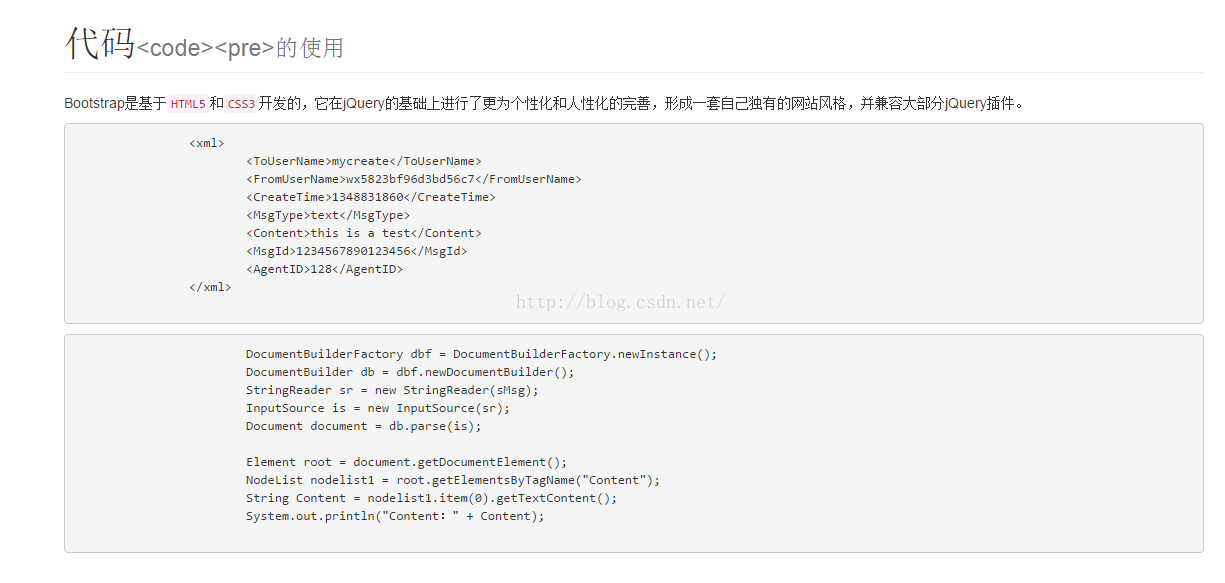
<p>Bootstrap 是基於 <code>HTML5</code> 和 <code>CSS3</code> 開發的,它在 jQuery 的基礎上做了更個性化的完善,形成一套自有風格,並相容大部分 jQuery 外掛。</p>

<pre>
<xml>
  <ToUserName>mycreate</ToUserName>
  <FromUserName>wx5823bf96d3bd56c7</FromUserName>
  <CreateTime>1348831860</CreateTime>
  <MsgType>text</MsgType>
  <Content>this is a test</Content>
  <MsgId>1234567890123456</MsgId>
  <AgentID>128</AgentID>
</xml>
</pre>

<pre>
DocumentBuilderFactory dbf = DocumentBuilderFactory.newInstance();
DocumentBuilder db = dbf.newDocumentBuilder();
StringReader sr = new StringReader(sMsg);
InputSource is = new InputSource(sr);
Document document = db.parse(is);
Element root = document.getDocumentElement();
NodeList nodelist1 = root.getElementsByTagName("Content");
String Content = nodelist1.item(0).getTextContent();
System.out.println("Content:" + Content);
</pre>
</div>
</form>
</body>
</html>
兩個實務上的小提醒
第一,貼進 <pre> 的程式碼如果本身含有 <、> 這些標籤符號,必須轉成 <、> 實體,否則瀏覽器會把它當成真正的 HTML 來解析,畫面上就什麼都看不到。
第二,Bootstrap 的預設樣式只解決了「能看」的問題。如果希望有語法高亮、行號或複製按鈕,可以再搭配 Highlight.js、Prism.js 這類專門的程式碼高亮工具,效果會專業很多。