JSON 入門學習筆記與示例程式碼
編輯:JSON基礎
JSON 簡介:
JSON(JavaScript Object Notation)是一種輕量級的資料交換格式,易於人閱讀與編寫。
json 官方網站:https://www.json.org/
json.net 下載網址:https://json.codeplex.com/releases/view/37810
Demo:
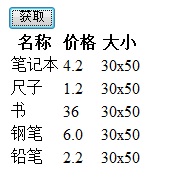
說明:點擊「獲取」按鈕後會發出請求,取得 JSON 資料並填入表格。
HTML 程式碼:
<!DOCTYPE html PUBLIC "-//W3C//DTD XHTML 1.0 Transitional//EN" "https://www.w3.org/TR/xhtml1/DTD/xhtml1-transitional.dtd">
<html xmlns="https://www.w3.org/1999/xhtml">
<head runat="server">
<title></title>
<script type="text/jscript" src="../jquery/jquery-1.4.2.min.js"></script>
<script language="javascript" type="text/javascript">
$(function() {
$("#Button1").click(function() {
$.get("json1.aspx?m=m", null, function(callbackmsg) {
var product = eval(callbackmsg);
ShowProduct(product)
})
});
})
function ShowProduct(callbackmsg) {
var row='';
for (var u in callbackmsg) {
row += '<tr>';
row += '<td>' + callbackmsg[u].Name + '</td>';
row += '<td>' + callbackmsg[u].Price + '</td>';
row += '<td>' + callbackmsg[u].Size + '</td>';
row += '</tr>';
}
$("#body").html(row);
}
</script>
</head>
<body>
<form id="form1" runat="server">
<div>
<input id="Button1" type="button" value="獲取" />
</div>
<table>
<thead>
<tr>
<th>名稱</th>
<th>價格</th>
<th>大小</th>
</tr>
</thead>
<tbody id="body">
</tbody>
</table>
</form>
</body>
</html>
後端程式碼:
public partial class json1 : System.Web.UI.Page
{
protected void Page_Load(object sender, EventArgs e)
{
if (HttpContext.Current.Request.QueryString["m"] != null)
{
List<Product> Products = new List<Product>();
Products.Add(new Product() { Name = "筆記本", Price = "4.2", Size = "30x50" });
Products.Add(new Product() { Name = "尺子", Price = "1.2", Size = "30x50" });
Products.Add(new Product() { Name = "書", Price = "36", Size = "30x50" });
Products.Add(new Product() { Name = "鋼筆", Price = "6.0", Size = "30x50" });
Products.Add(new Product() { Name = "鉛筆", Price = "2.2", Size = "30x50" });
string json = JsonConvert.SerializeObject(Products);
Response.Write(json);
Response.End();
}
}
}
public class Product
{
public string Name { get; set; }
public string Size { get; set; }
public string Price { get; set; }
}
重點整理:
1. json 官方提供了 .NET 操作的 dll 類庫,可用 JsonConvert.SerializeObject 把 .NET 物件序列化為 JSON。
2. JavaScript 端以 var product = eval(callbackmsg) 讀取 JSON 物件。
3. JavaScript 端以 callbackmsg[u].Name 讀取 JSON 的值。
- 上一篇文章: JavaScript JSON 操作入門實例
- 下一篇文章: 用 JS 與 JSON 搭配表格實作網站左側導覽選單