動手實作 AngularJS 的內部國際化環境
編輯:JavaScript綜合知識
AngularJS 內建了三種與國際化相關的過濾器,分別是 currency(貨幣)、date(日期)與 number(數字)。使用時只要依據目標國家的區域設定引入對應的 JS 檔即可,若不特別指定,它會自動沿用瀏覽器本身的語言環境。
如何切換語言環境
舉例來說,若想啟用丹麥語(da-dk)的區域格式,只要多引入一支對應的 locale 腳本:
<script src="https://code.angularjs.org/1.2.5/i18n/angular-locale_da-dk.js"></script>
丹麥語環境實作範例
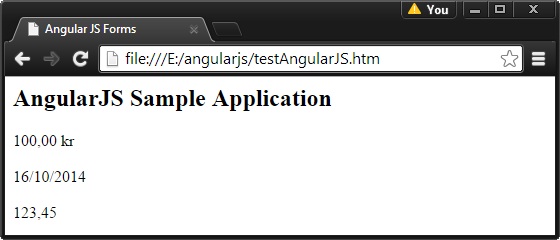
以下建立一個名為 testAngularJS.html 的頁面,示範在丹麥語區域下,貨幣、日期與數字的格式化結果:
<html>
<head>
<title>Angular JS Forms</title>
</head>
<body>
<h2>AngularJS Sample Application</h2>
<div ng-app="mainApp" ng-controller="StudentController">
  {{fees | currency }} <br/><br/>
  {{admissiondate | date }} <br/><br/>
  {{rollno | number }}
</div>
<script src="https://ajax.googleapis.com/ajax/libs/angularjs/1.2.15/angular.min.js"></script>
<script src="https://code.angularjs.org/1.2.5/i18n/angular-locale_da-dk.js"></script>
<script>
var mainApp = angular.module("mainApp", []);
mainApp.controller('StudentController', function($scope) {
  $scope.fees = 100;
  $scope.admissiondate = new Date();
  $scope.rollno = 123.45;
});
</script>
</body>
</html>
在瀏覽器中打開這個頁面,你會看到金額、日期與小數都以丹麥地區的慣用格式呈現:
沿用瀏覽器語言環境
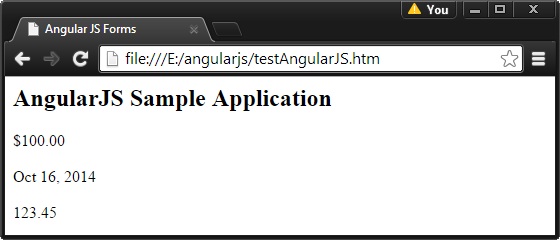
如果不引入任何 locale 檔,AngularJS 就會直接使用瀏覽器預設的語言環境來格式化輸出。做法很簡單,只要把上一支丹麥語腳本註解掉即可:
<html>
<head>
<title>Angular JS Forms</title>
</head>
<body>
<h2>AngularJS Sample Application</h2>
<div ng-app="mainApp" ng-controller="StudentController">
  {{fees | currency }} <br/><br/>
  {{admissiondate | date }} <br/><br/>
  {{rollno | number }}
</div>
<script src="https://ajax.googleapis.com/ajax/libs/angularjs/1.2.15/angular.min.js"></script>
<!-- <script src="https://code.angularjs.org/1.2.5/i18n/angular-locale_da-dk.js"></script> -->
<script>
var mainApp = angular.module("mainApp", []);
mainApp.controller('StudentController', function($scope) {
  $scope.fees = 100;
  $scope.admissiondate = new Date();
  $scope.rollno = 123.45;
});
</script>
</body>
</html>
此時頁面輸出的格式會跟著瀏覽器的語言設定改變:
- 上一篇文章: 詳解AngularJS自定義指令的使用
- 下一篇文章: 用 jQuery 打造核取方塊的全選與反選功能