本文詳細介紹AngularJS自定義指令的使用,包括結合自定義HTML標籤的用法,需要的朋友可以參考。
自定義指令用來擴展AngularJS的HTML功能,透過"指令"函數來定義。自定義指令會替換它被激活的元素。在引導過程中,AngularJS應用找到匹配的元素後,會先使用自定義指令的compile()方法活動一次,再使用基於指令scope的link()方法處理元素。AngularJS支持以下元素類型來創建自定義指令:
元素指令(Element)——遇到匹配的元素時激活。
屬性指令(Attribute)——遇到匹配的屬性時激活。
CSS指令——遇到匹配的CSS樣式時激活。
注釋指令(Comment)——遇到匹配的注釋時激活。
了解自定義指令
定義自定義的HTML標籤:
<student name="Mahesh"></student><br/>
<student name="Piyush"></student>
定義自定義指令來處理上面的自定義HTML標籤:
var mainApp = angular.module("mainApp", []);
// 創建一個指令,第一個參數是要附加的html元素
mainApp.directive('student', function() {
var directive = {};
// restrict = E 表示這是元素指令
directive.restrict = 'E';
// template 會用它的文本替換整個元素
directive.template = "Student: <b>{{student.name}}</b> , Roll No: <b>{{student.rollno}}</b>";
// scope 用於根據標準區分每個student元素
directive.scope = { student : "=name" };
// compile 在應用初始化時調用,頁面加載時AngularJS調用它一次
directive.compile = function(element, attributes) {
element.css("border", "1px solid #cccccc");
// linkFunction 與每個帶scope的元素關聯,以獲得元素特定的數據
var linkFunction = function($scope, element, attributes) {
element.html("Student: <b>"+$scope.student.name +"</b> , Roll No: <b>"+$scope.student.rollno+"</b><br/>");
element.css("background-color", "#ff00ff");
}
return linkFunction;
}
return directive;
});
定義控制器以更新scope為指令。這裡我們使用name屬性值作為子作用域。
mainApp.controller('StudentController', function($scope) {
$scope.Mahesh = {};
$scope.Mahesh.name = "Mahesh Parashar";
$scope.Mahesh.rollno = 1;
$scope.Piyush = {};
$scope.Piyush.name = "Piyush Parashar";
$scope.Piyush.rollno = 2;
});
例子
<html>
<head>
<title>Angular JS Custom Directives</title>
</head>
<body>
<h2>AngularJS Sample Application</h2>
<div ng-app="mainApp" ng-controller="StudentController">
<student name="Mahesh"></student><br/>
<student name="Piyush"></student>
</div>
<script src="https://ajax.googleapis.com/ajax/libs/angularjs/1.2.15/angular.min.js"></script>
<script>
var mainApp = angular.module("mainApp", []);
mainApp.directive('student', function() {
var directive = {};
directive.restrict = 'E';
directive.template = "Student: <b>{{student.name}}</b> , Roll No: <b>{{student.rollno}}</b>";
directive.scope = { student : "=name" };
directive.compile = function(element, attributes) {
element.css("border", "1px solid #cccccc");
var linkFunction = function($scope, element, attributes) {
element.html("Student: <b>"+$scope.student.name +"</b> , Roll No: <b>"+$scope.student.rollno+"</b><br/>");
element.css("background-color", "#ff00ff");
}
return linkFunction;
}
return directive;
});
mainApp.controller('StudentController', function($scope) {
$scope.Mahesh = {};
$scope.Mahesh.name = "Mahesh Parashar";
$scope.Mahesh.rollno = 1;
$scope.Piyush = {};
$scope.Piyush.name = "Piyush Parashar";
$scope.Piyush.rollno = 2;
});
</script>
</body>
</html>
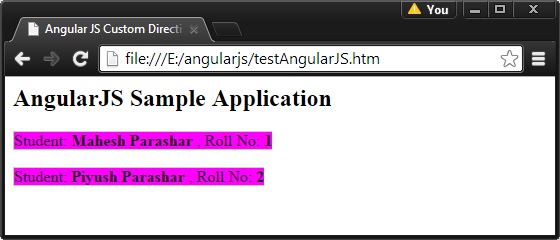
結果
在Web瀏覽器中打開textAngularJS.html,看到的結果如下:
- 上一篇文章: 詳解AngularJS中的依賴注入機制
- 下一篇文章: 動手實作 AngularJS 的內部國際化環境