用原生 JavaScript 打造可配置的 Tab 選項卡元件
編輯:JavaScript綜合知識
jQuery 有很多現成的 Tab 外掛,但為了這麼一個小功能載入整個函式庫並不划算。用原生 JavaScript 實作,程式碼量其實很少,而且完全可控。
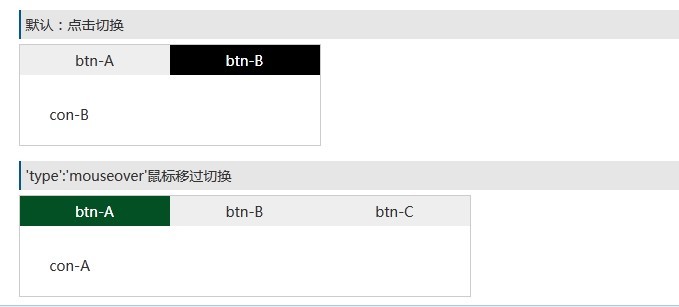
先解決問題:怎麼找 class 元素
getByClassName: function(className, parent){
    var elem = [],
        node = (parent != undefined && parent.nodeType == 1)
             ? parent.getElementsByTagName('*')
             : document.getElementsByTagName('*'),
        p = new RegExp("(^|\\s)" + className + "(\\s|$)");
    for(var n = 0, i = node.length; n < i; n++){
        if(p.test(node[n].className)) elem.push(node[n]);
    }
    return elem;
}
parent 是選填參數,但要先確認它存在且 nodeType == 1——這個判斷很重要,因為在部分瀏覽器中空白也算節點,用 nodeType 可以排除掉它們。正則加上 (^|\s) 與 (\s|$) 邊界,是為了避免搜尋 tab 時誤中 table。
移除 class
var cur = new RegExp(this.sCur, 'g');       // this.sCur 即類名,如 "cur"
this.oTab_btn[n].className = this.oTab_btn[n].className.replace(cur, '');
元件主體
function LGY_tab(option){
    this.oTab_btn  = this.getDom(option.tabBtn);    // 要點擊的切換鈕
    this.oTab_clist = this.getDom(option.tabCon);   // 要切換的內容區
    if(!this.oTab_btn || !this.oTab_clist) return;
    this.sCur = option.cur;                    // 啟用狀態的 class 名
    this.type = option.type || 'click';        // 觸發方式,預設 click
    this.nLen = this.oTab_btn.length;
    this.int();
}

LGY_tab.prototype = {
    getDom: function(s){
        // 只支援 '#id .className' 這種寫法
        var nodeName = s.split(' '),
            p = this.getId(nodeName[0].slice(1)),
            c = this.getByClassName(nodeName[1].slice(1), p);
        if(!p || c.length == 0) return null;
        return c;
    },

    change: function(){
        var cur = new RegExp(this.sCur, 'g');
        for(var n = 0; n < this.nLen; n++){
            this.oTab_clist[n].style.display = 'none';
            this.oTab_btn[n].className = this.oTab_btn[n].className.replace(cur, '');
        }
    },

    int: function(){
        var that = this;
        this.oTab_btn[0].className += ' ' + this.sCur;     // 第一個預設啟用
        this.oTab_clist[0].style.display = 'block';
        for(var n = 0; n < this.nLen; n++){
            this.oTab_btn[n].index = n;
            this.oTab_btn[n]['on' + this.type] = function(){
                that.change();
                that.oTab_btn[this.index].className += ' ' + that.sCur;
                that.oTab_clist[this.index].style.display = 'block';
            };
        }
    }
};
呼叫方式
<script src="tab.js"></script>
<script>
new LGY_tab({
    'tabBtn': '#tabA .tab-i',
    'tabCon': '#tabA .tab-c',
    'cur':    'tab-cur'
});

new LGY_tab({
    'tabBtn': '#tabB .tab-i',
    'tabCon': '#tabB .tab-k',
    'cur':    'tab-cur02',
    'type':   'mouseover'
});
</script>
參數說明:tabBtn 與 tabCon 為必填,寫法限定「#id 空白 .className」;cur 是啟用狀態的 class 名;type 選填,可切換 click 或 mouseover。
現代化改寫建議
這個元件的精神值得沿用,但實作可以用更簡潔的 API:
function initTabs(root, options){
    var btns = root.querySelectorAll('[role="tab"]');
    var panels = root.querySelectorAll('[role="tabpanel"]');
    btns.forEach(function(btn, i){
        btn.addEventListener('click', function(){
            btns.forEach(function(b){ b.setAttribute('aria-selected', 'false'); });
            panels.forEach(function(p){ p.hidden = true; });
            btn.setAttribute('aria-selected', 'true');
            panels[i].hidden = false;
        });
    });
}
改進重點有三:用 querySelectorAll 取代自己寫的正則比對,速度更快也更不易出錯;用 hidden 屬性取代 style.display,語意更清楚;加上 ARIA 屬性(role="tab"、aria-selected、role="tabpanel"),讓螢幕閱讀器能正確朗讀,並記得支援左右方向鍵在頁籤間移動,才算完整的無障礙 Tab 元件。
- 上一篇文章: 四個好用的原生 JavaScript 工具函式
- 下一篇文章: DOM 節點替換:replaceChild() 的三步驟用法