結帳、報名、資料填寫這類多步驟流程,用進度條把「目前在第幾步、總共幾步、哪些已完成」視覺化,使用者會清楚很多。這個範例做成外掛形式,資料驅動、可換皮膚,還能點擊步驟跳回。
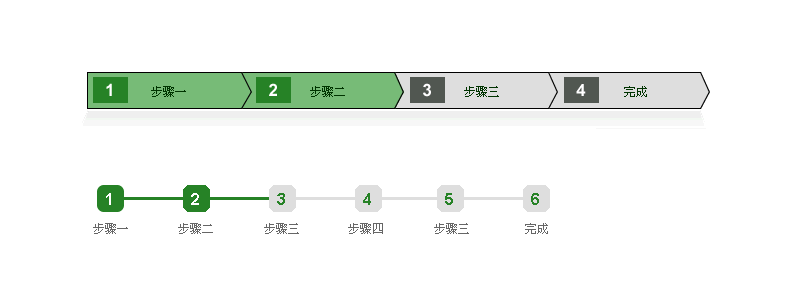
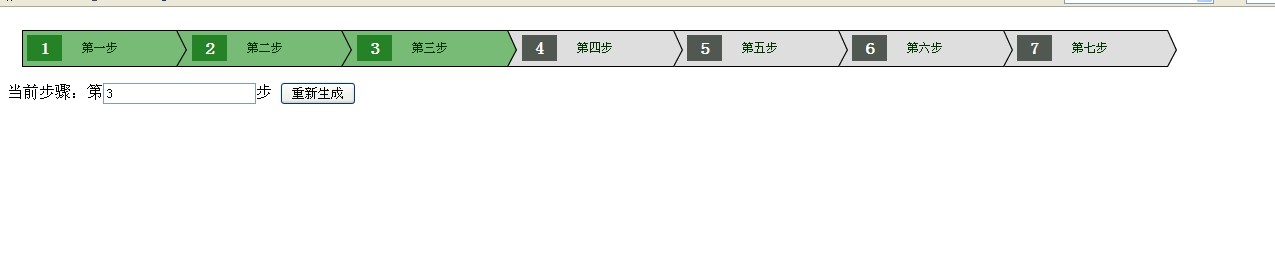
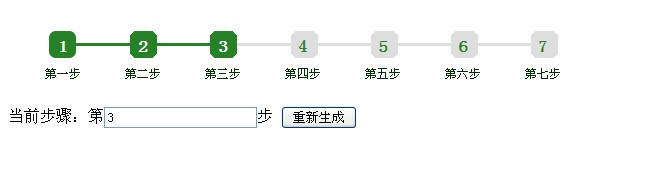
以下是外掛的測試截圖,內建兩套皮膚:
簡單的呼叫方式
// 所有步驟的數據
var stepListJson = [
  { StepNum:1, StepText:"第一步" },
  { StepNum:2, StepText:"第二步" },
  { StepNum:3, StepText:"第三步" },
  { StepNum:4, StepText:"第四步" },
  { StepNum:5, StepText:"第五步" },
  { StepNum:6, StepText:"第六步" },
  { StepNum:7, StepText:"第七步" }
];

// 當前進行到第幾步
var currentStep = 5;

// new 一個工具類
var StepTool = new Step_Tool_dc("test", "mycall");

// 在頁面上繪製流程步驟圖
StepTool.drawStep(currentStep, stepListJson);

// 回呼函式
function mycall(result){
  StepTool.drawStep(result.value, stepListJson);
  // TODO… 這裡可以填充點擊步驟後加載對應資料的程式碼
}
自定義皮膚
外掛內建兩套 CSS 供選擇,若都不合用,自己寫一份樣式表替換掉即可,JavaScript 完全不必動:
<title>流程步驟</title>
<!--<link rel="stylesheet" href="css/step-dc-style1.css" />-->
<link rel="stylesheet" href="css/step-dc-style2.css" />
<script type="text/javascript" src="./step-jquery-dc.js"></script>
<script type="text/javascript" src="js/jquery.min.js"></script>
</head>
<body>
<div class="step_context test"></div>

當前步驟:第
<input type="text" value="5" id="currentStepVal" />步
<button onclick="StepTool.drawStep(jQuery('#currentStepVal').val(), stepListJson);"
        type="button">重新生成</button>
</body>
</html>
JavaScript 主體
/**
 * @author DangChengcheng 請保留作者
 * @mailTo dc2002007@163.com
 */
var Step_Tool_dc = function(ClassName, callFun){
  this.ClassName = ClassName,
  this.callFun   = callFun,
  this.Steps     = new Array(),
  this.stepAllHtml = "";
}

Step_Tool_dc.prototype = {
  /** 建立步驟資料陣列 */
  createStepArray: function(currStep, stepListJson){
    this.currStep = currStep;
    for (var i = 0; i < stepListJson.length; i++){
      var Step_Obj = new Step(this.currStep,
                              stepListJson[i].StepNum,
                              stepListJson[i].StepText,
                              stepListJson[i].length);
      Step_Obj.createStepHtml();
      this.Steps.push(Step_Obj);
    }
  },

  /** 繪製到目標位置 */
  drawStep: function(currStep, stepListJson){
    this.clear();
    this.createStepArray(currStep, stepListJson);
    if (this.Steps.length > 0){
      this.stepAllHtml += "<ul>";
      for (var i = 0; i < this.Steps.length; i++){
        this.stepAllHtml += this.Steps[i].htmlCode;
      }
      this.stepAllHtml += "</ul>";
      jQuery("." + this.ClassName).html(this.stepAllHtml);
      this.createEvent();
    } else {
      jQuery("." + this.ClassName).html("沒有任何步驟");
    }
  },

  /** 綁定點擊事件 */
  createEvent: function(){
    var self = this;
    jQuery("." + this.ClassName + " ul li a").click(function(){
      var num  = jQuery(this).attr("data-value");
      var text = jQuery(this).attr("data-text");
      result = { value: num, text: text };
      eval(self.callFun + "(result)");
    });
  },

  clear: function(){
    this.Steps = new Array();
    jQuery("." + this.ClassName).html("");
    this.stepAllHtml = "";
  }
}

var Step = function(currStep, StepNum, StepText, totalCount){
  this.currStep  = currStep,
  this.StepNum   = StepNum,
  this.StepText  = StepText,
  this.totalCount = totalCount,
  this.htmlCode  = "";
}

Step.prototype = {
  createStepHtml: function(){
    var stepHtml = "<span>" + this.StepNum + "</span>";
    stepHtml = stepHtml + "<a href='#' data-value='" + this.StepNum +
               "' data-text='" + this.StepText + "' >" + this.StepText + "</a>";

    if (this.currStep > this.totalCount){
      this.currStep = this.totalCount;
    } else if (this.currStep <= 0) {
      this.currStep = 1;
    }

    if (this.currStep > this.StepNum && this.StepNum == 1){
      classSype = "firstFinshStep";
    } else if (this.currStep == this.StepNum && this.StepNum == 1){
      classSype = "firstFinshStep_curr1";
    } else if (this.currStep == this.StepNum && this.currStep != this.totalCount){
      classSype = "coressStep";          // 當前步驟,且不是最後一步
    } else if (this.currStep == this.StepNum && this.StepNum == this.totalCount){
      classSype = "finshlast";           // 當前步驟且是最後一步
    } else if (this.currStep < this.StepNum && this.StepNum == this.totalCount){
      classSype = "last";                // 未進行,且是最後一個
    } else if (this.currStep < this.StepNum){
      classSype = "loadStep";            // 未進行的步驟
    } else if (this.currStep > this.StepNum){
      classSype = "finshStep";           // 已進行的步驟
    }

    stepHtml = "<li class='" + classSype + "'>" + stepHtml + "</a>";
    this.htmlCode = stepHtml;
  }
}
設計架構說明
這個外掛分成兩個「類別」:Step_Tool_dc 負責管理整體(清空、組裝、綁事件),Step 負責單一步驟的 HTML 生成。這種分工讓步驟的呈現邏輯可以獨立調整,不影響整體流程。
Step.createStepHtml() 裡那一串 if/else 是視覺狀態的核心:依「當前步驟」與「這個步驟的序號」的關係,決定要套哪個 class——已完成、當前進行中、尚未開始、已完成的最後一步等等。全部交給 CSS 上色,程式只負責挑 class。
drawStep() 每次都先 clear() 再重畫,所以傳入不同的 currentStep 就能重新渲染,這也是那個「重新生成」按鈕的原理。
值得改進的地方
eval 呼叫回呼:eval(self.callFun + "(result)") 用字串拼出程式碼再執行,既不安全也不利除錯。直接傳函式就好:new Step_Tool_dc("test", mycall),內部改成 this.callFun(result)。
stepListJson[i].length 應為 stepListJson.length:範例中建立 Step 時傳入的是元素自身的 length(undefined),導致 totalCount 失效、最後一步的判斷永遠不成立。這是一個會實際影響輸出的 bug。
classSype 缺少 var:宣告時沒加 var,會變成全域變數,多組進度條同時存在時會互相干擾。
HTML 標籤不閉合:stepHtml 開了 <a> 卻用 </a> 收尾在 <li> 之後,結構是錯的,應為 <li><span>1</span><a>第一步</a></li>。
另外建議為目前的步驟加上 aria-current="step",讓輔具能告知使用者身在何處,這是流程類元件最常被忽略的無障礙細節。