用 Ajax 呼叫 SOAP Web 服務(三):Hello World 完整實例
編輯:AJAX詳解
一個簡單範例
我準備了一個範例專案來展示 Web Services JavaScript Library 的基本功能。這個 demo 使用的 Web 服務已在 WebSphere Application Server 上實作,功能很單純,就是 Hello World。
package example;

public class HelloWorld {
    public String sayHello(String name) {
        return "Hello " + name;
    }
}
部署到 WebSphere Application Server 之後,該服務的 WSDL 描述就定義了呼叫時需要傳送的 SOAP 訊息:
<wsdl:portType name="HelloWorld">
  <wsdl:operation name="sayHello">
    <wsdl:input  message="impl:sayHelloRequest"  name="sayHelloRequest" />
    <wsdl:output message="impl:sayHelloResponse" name="sayHelloResponse" />
  </wsdl:operation>
</wsdl:portType>
寫出呼叫方法
有了 ws.js,就能寫出一個呼叫 Hello World 服務的方法。關鍵是引入函式庫、組出 RPC 請求,再指定成功後的回呼:
<html>
<head>
  <script src="ws.js"></script>
  <script>
  function sayHello(name, outputElement) {
    var call = new WS.Call(serviceURI);
    var nsuri = 'urn:foo';
    call.invoke_rpc(
      new WS.QName('sayHello', nsuri),
      new Array({ name: 'name', value: name }),
      SOAP.NOENCODING,
      function(call, envelope) {
        // 從回應信封取出結果並寫入頁面
        var result = envelope.get_body().get_first_child();
        outputElement.innerHTML = result.get_first_child().node_value;
      }
    );
  }
  </script>
</head>
<body>
  ...
</body>
</html>
接著就能在應用程式的任何位置呼叫 sayHello 函式:
<input id="name" name="name" />
<input value="Invoke the Web Service"
       type="button"
       onclick="sayHello($('name').value, $('result'))" />
Result:
<div id="result"></div>
呼叫成功後的結果如下圖。在 Mozilla、Firefox 與 Internet Explorer 中執行這個範例,應該會得到相同的結果——這正是把瀏覽器 XML 實作差異抽象掉的價值所在。
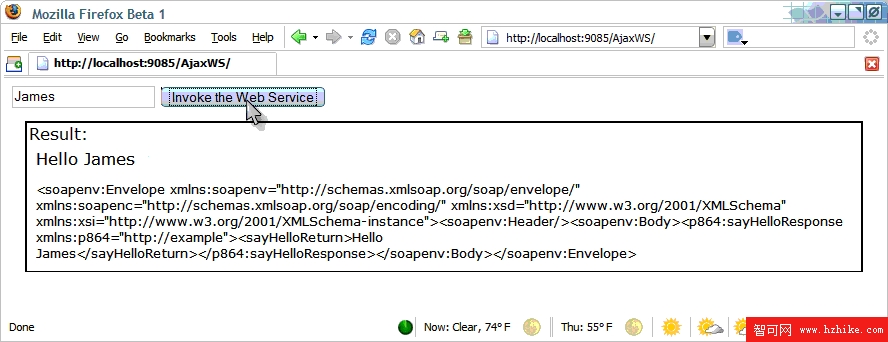 圖 3. Firefox 中的 Hello World 範例
後續
有了 Web Services JavaScript Library,我們可以用簡單且獨立於瀏覽器的方式,把基本的 SOAP Web 服務整合進 Web 應用程式。在系列的下一部分,除了探討如何呼叫更多奠基於 Web 服務資源框架(WS-Resource Framework)系列規範的進階服務,也會說明如何擴充這個 Web 服務的功能並把它整合進應用程式。