jQuery 入門筆記(三):事件綁定、命名空間與觸發機制
編輯:AJAX詳解
jQuery 對事件的處理可以歸納成幾個核心方法,把這些搞熟,日常九成的互動需求都能應付。
- bind():為事件掛上處理函數。同一個方法可以一次綁多個事件類型。
$("p").bind("mouseenter mouseleave", function (e) { $(this).toggleClass("over"); }); - unbind():取消已綁定的處理函數。不帶參數時會清掉該元素上的所有事件。
$("#unbind").click(function () { $("#theone").unbind('click', aClick); }); // 移除 ready 上的處理函數 $(document).unbind('ready'); - trigger():主動觸發某類事件,並會連帶執行瀏覽器的預設行為。
$("button:first").trigger('click'); - triggerHandler():只觸發處理函數,不觸發預設行為。例如不會真的讓 a 連結跳頁、不會真的讓輸入框取得焦點。
$("input").triggerHandler("focus"); - one():綁定只會被觸發一次的處理函數,第一次執行後自動解除。
$("div").one("click", function () { }); - ready() / click() / change() / toggle(fn, fn) / dblclick() 等:各類常見事件的快捷寫法。帶參數 xxx(fn) 是綁定,不帶參數 xxx() 則是觸發。
1.2 版起的事件命名空間
jQuery 1.2 引入了命名空間機制,讓你能替同一事件的不同處理函數分類,之後可以只移除或觸發特定命名空間下的處理函數,不會誤傷其他程式:
$("div").bind("click", function () { alert("hello"); });
$("div").bind("click.plugin", function () { alert("goodbye"); });
$("div").trigger("click!");   // 只觸發沒有命名空間的,結果是 hello
完整範例
<!DOCTYPE html PUBLIC "-//W3C//DTD XHTML 1.0 Transitional//EN"
 "https://www.w3.org/TR/xhtml1/DTD/xhtml1-transitional.dtd">
<html xmlns="https://www.w3.org/1999/xhtml">
<head>
<title>Events</title>
<script src="../scripts/jquery-1.2.3.intellisense.js" type="text/javascript"></script>
<style type="text/css">
textarea { height: 118px; width: 280px; }
</style>
<script type="text/javascript">
$(function () {
    $('textarea')
        .bind('propertychange', function () {
            $('#result').html($('textarea').val());
        })
        .bind('change', function () {
            alert($('textarea').val());
        });
});
</script>
</head>
<body>
<textarea></textarea>
<div id='result'></div>
</body>
</html>
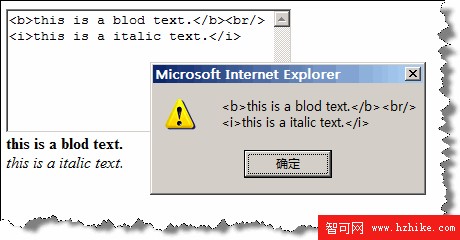
實際運行後,在 textarea 中輸入內容時,右方的 div 會即時同步顯示;離開輸入框時則跳出提示。
更多事件方法可參考官方文件:https://docs.jquery.com/Events
- 上一篇文章: jQuery 入門筆記(四):鏈式寫法與 end() 的範圍還原
- 下一篇文章: jQuery 入門筆記(二):選擇器與 CSS 操作實戰