本文示範一個以 Ajax 做到「邊填邊驗證、送出不重載」的註冊頁,並把前後端的職責切開來說明。整體可以拆成五個部分。
一、把註冊頁面做出來(HTML + CSS)
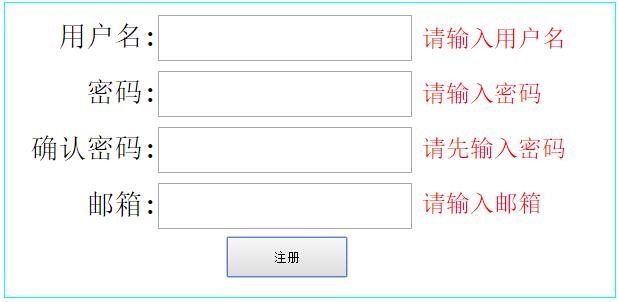
幾個設計決定:不使用 form 元素,直接用 div 包住;準備四個標籤分別顯示各欄位的正確/錯誤訊息;不用 submit 按鈕,改用 button,避免預設的表單提交行為。
二、把 Ajax 包成一個函式
把非同步請求封裝成共用函式,只要傳入簡單參數就能與伺服器交換資料。這個函式需要三個參數:url(此處固定為 regProcess.php)、jsonData(要送去驗證的資料)、getMsg(取得回應後的處理函式)。重複呼叫三次,就能完成三個欄位的驗證。
三、後端處理檔 regProcess.php
這個檔案負責接收 Ajax 送來的資料。要特別注意:前端用 POST 送出,後端就要用 $_POST 接收。
這裡有個實務上常踩的坑:某些特殊字元傳到伺服器後會顯示不正確,例如 + 會被解讀成空格。若欄位可能包含這類字元,前端可用 encodeURIComponent() 編碼,PHP 端則可用 urlencode() 處理,兩端約定一致才不會出錯。
四、把驗證邏輯抽到 myFunc.php
把各項檢查各寫成獨立函式,再於 regProcess.php 中引入使用:
驗證帳號是否含非法字元、是否已被註冊;驗證密碼是否合法並評估強度;驗證兩次密碼是否一致;驗證信箱格式與是否已被註冊;最後把資料寫入資料庫。regProcess.php 只要依序呼叫這些函式、彙整錯誤碼即可。
五、回傳資料並解析
這裡以字串形式的 JSON 回傳,前端再用 JS 解析。要注意「JSON 物件」與「JSON 字串」是兩回事:伺服器輸出的必須是字串,例如 '{"name1":"value1","name2":"value2"}',前端收到後再轉為物件。範例使用 eval('(' + str + ')'),但正式環境請改用 JSON.parse(),eval 會執行字串中的任意程式碼,是明確的資安風險。
HTML
<div id="reg">
  <label>用戶名:<input type="text" id="username" /></label><label></label><br /><br />
  <label>密碼:<input type="password" id="passw" /></label><br /><br />
  <label>確認密碼:<input type="password" id="repassw" /></label><br /><br />
  <label>郵箱:<input type="text" id="email" /></label><br /><br />
  <button id="btn">注冊</button>
  <span id="user"></span>
  <span id="pass"></span>
  <span id="rep"></span>
  <span id="em"></span>
</div>
CSS
#reg{ width:400px; height:300px; position:relative; margin:10px auto; }
#reg label{ float:right; position:relative; margin-top:10px; font-size:28px; }
#reg label input{ width:250px; height:40px; font-size:24px; }
#reg #btn{ width:120px; height:40px; position:absolute; right:65px; margin-top:80px; }
#reg span{ width:200px; position:absolute; right:-210px; font-size:24px; }
#reg #user{ top:20px; }
#reg #pass{ top:75px; }
#reg #rep{ top:130px; }
#reg #em{ top:185px; }
.error{ color:red; }
.ok{ color:greenyellow; }
JavaScript
<script src="../../../ajax.js"></script>
<script>
window.onload = function () {
    bgProcess();   // 逐欄即時驗證

    // 按下註冊:一次送出全部資料
    $('btn').onclick = function () {
        var jsonData = {
            username: $('username').value,
            passw:    $('passw').value,
            repassw:  $('repassw').value,
            email:    $('email').value
        };
        ajax('regProccess.php', jsonData, getInfo, 'json');
    };

    function getInfo(info) {
        var a = ['username', 'passw', 'repassw', 'email'];
        var b = ['user', 'pass', 'rep', 'em'];
        var flag = true;
        for (var i = 0; i < info.length; i++) {
            if (info[i].state == 'false') {
                flag = false;
                displayInfo(info[i], b[i], a[i]);
            }
        }
        if (flag) alert('恭喜你注冊成功');
    }
};

// 逐欄驗證
function bgProcess() {
    $('username').onblur = function () {
        ajax('regProccess.php', { username: this.value }, getUser, 'json');
    };
    function getUser(msg) { displayInfo(msg[0], 'user', 'username'); }

    $('passw').onkeyup = $('passw').onblur = function () {
        ajax('regProccess.php', { passw: this.value }, getPass, 'json');
    };
    function getPass(msg) { displayInfo(msg[1], 'pass', 'passw'); }

    $('repassw').onblur = function () {
        ajax('regProccess.php', { passw: $('passw').value, repassw: this.value }, getRepass, 'json');
    };
    function getRepass(msg) { displayInfo(msg[2], 'rep', 'repassw'); }

    $('email').onblur = function () {
        ajax('regProccess.php', { email: this.value }, getEmail, 'json');
    };
    function getEmail(msg) { displayInfo(msg[3], 'em', 'email'); }
}

function displayInfo(msg, id, name) {
    $(id).className = (msg.state == 'true') ? 'ok' : 'error';
    $(id).innerHTML = msg[name];
}

function $(id) { return document.getElementById(id); }
</script>
myFunc.php
<?php
/**
 * 驗證用戶名
 * @return array 依序為 [格式是否錯誤, 是否為空, 是否已存在]
 */
function verifyUser($username) {
    $res = array();
    // 只允許 6-16 位字母、數字、底線
    $res[] = (preg_match("/^\\w{6,16}$/", $username) == 0) ? 1 : 0;
    $res[] = empty($username) ? 1 : 0;
    $res[] = verifyData($username, '用戶名') ? 1 : 0;
    return $res;
}

/** 驗證密碼合法性與強度:0 非法、-1 空、1 弱、2 中、3 強 */
function verifyPassw($passw) {
    $reg1 = '/^[0-9]{8,16}$/';            // 純數字
    $reg2 = '/^[a-zA-Z]{8,16}$/';         // 純字母
    $reg3 = '/^[a-zA-Z\+]{8,16}$/';       // 字母加符號
    $reg4 = '/^[0-9a-zA-Z]{8,16}$/';      // 數字加字母
    $reg5 = '/^[0-9a-zA-Z\+]{8,16}$/';    // 數字、符號、字母
    if (empty($passw))            $res = -1;
    else if (preg_match($reg1, $passw)) $res = 1;
    else if (preg_match($reg2, $passw)) $res = 1;
    else if (preg_match($reg3, $passw)) $res = 2;
    else if (preg_match($reg4, $passw)) $res = 2;
    else if (preg_match($reg5, $passw)) $res = 3;
    else $res = 0;
    return $res;
}

/** 驗證信箱:-1 空、1 已註冊、2 格式正確、0 格式錯誤 */
function verifyEmail($email) {
    $reg = '/^([\w-*\.*])+@(\w-?)+(\.\w{2,})+$/';
    if (empty($email))                  $res = -1;
    else if (verifyData($email, '郵箱')) $res = 1;
    else if (preg_match($reg, $email))  $res = 2;
    else                                $res = 0;
    return $res;
}

/** 檢查資料是否已存在:存在回傳 1,否則 0 */
function verifyData($data, $query) {
    @$db = new MySQLi('localhost', 'root', 'root', 'user_passd');
    if (mysqli_connect_errno()) die("連接數據庫失敗");
    $sql = "select $query from login where $query = '{$data}'";
    $res = $db->query($sql);
    $row = $res->fetch_assoc();
    $db->close();
    return is_null($row) ? 0 : 1;
}

/** 儲存註冊資料 */
function saveRegInfo($data) {
    @$db = new MySQLi('localhost', 'root', 'root', 'user_passd');
    if (mysqli_connect_errno()) die("連接數據庫失敗");
    $sql = "insert into login values('{$data[0]}','{$data[1]}','{$data[2]}')";
    $res = $db->query($sql);
    $db->close();
    return $res;
}
regProcess.php
<?php
header("Content-Type:text/html;charset=utf-8");
// 停用快取,確保資料相同時仍能正常送出
header("Cache-Control:no-cache");
include('myFunc.php');

$username = isset($_POST['username']) ? $_POST['username'] : '';
$passw    = isset($_POST['passw'])    ? urlencode($_POST['passw']) : '';
$repassw  = isset($_POST['repassw'])  ? urlencode($_POST['repassw']) : '';
$email    = isset($_POST['email'])    ? $_POST['email'] : '';

$info = '[';
$isSucceed = 0;   // 四項皆通過時為 4

// 1. 用戶名
$res1 = verifyUser($username);
if ($res1[1])          $info .= '{"username":"請輸入用戶名","state":"false"}';
else if ($res1[0])     $info .= '{"username":"用戶名非法","state":"false"}';
else if ($res1[2])     $info .= '{"username":"用戶名已存在","state":"false"}';
else { $info .= '{"username":"用戶名可用","state":"true"}'; ++$isSucceed; }
$info .= ',';

// 2. 密碼
$res2 = verifyPassw($passw);
if ($res2 == -1)       $info .= '{"passw":"請輸入密碼","state":"false"}';
else if ($res2 == 0)   $info .= '{"passw":"密碼非法","state":"false"}';
else {
    if     ($res2 == 1) $info .= '{"passw":"密碼強度較弱","state":"true"}';
    else if($res2 == 2) $info .= '{"passw":"密碼強度中等","state":"true"}';
    else if($res2 == 3) $info .= '{"passw":"密碼強度較強","state":"true"}';
    ++$isSucceed;
}
$info .= ',';

// 3. 確認密碼
if (empty($repassw))            $info .= '{"repassw":"請先輸入密碼","state":"false"}';
else if ($passw == $repassw) {  $info .= '{"repassw":"密碼一致","state":"true"}'; ++$isSucceed; }
else                            $info .= '{"repassw":"密碼不一致","state":"false"}';
$info .= ',';

// 4. 信箱
$res3 = verifyEmail($email);
if     ($res3 == -1) $info .= '{"email":"請輸入郵箱","state":"false"}';
else if($res3 == 0)  $info .= '{"email":"郵箱非法","state":"false"}';
else if($res3 == 1)  $info .= '{"email":"此郵箱已被注冊","state":"false"}';
else if($res3 == 2) { $info .= '{"email":"此郵箱可用","state":"true"}'; ++$isSucceed; }

if ($isSucceed == 4) saveRegInfo(array($username, $passw, $email));
echo $info .= ']';
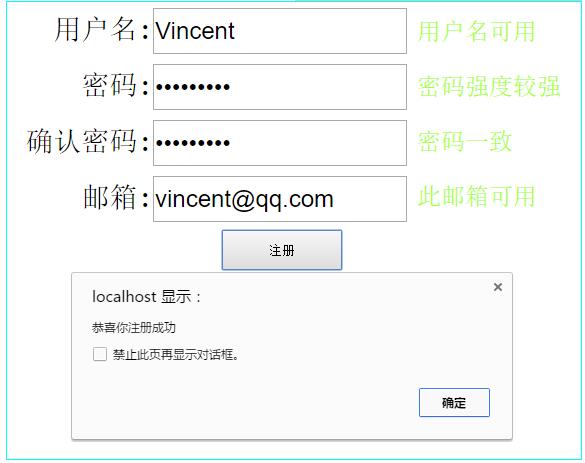
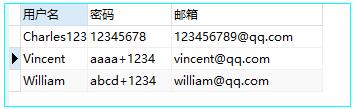
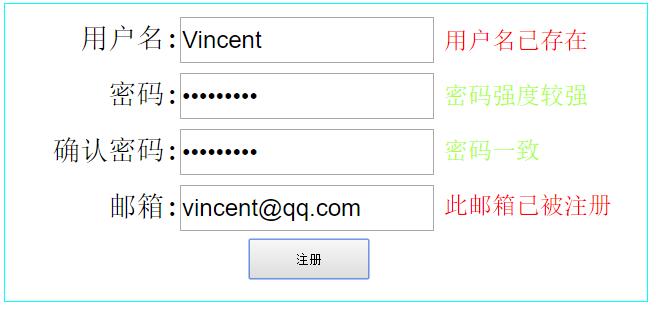
成功與失敗的畫面如下:
上線前務必修正的三件事
這個例子足以讓新手理解前後端如何往返資料,但程式碼本身有幾處不能直接用於正式環境:
第一,verifyData() 與 saveRegInfo() 都把變數直接拼進 SQL,存在 SQL Injection 風險,請改用 MySQLi 的 prepared statement 綁定參數。
第二,密碼目前是明文寫入資料庫(只做了 urlencode,那不是加密)。請改用 password_hash(),並以 password_verify() 驗證。
第三,saveRegInfo() 的 INSERT 欄位數與陣列元素數量不一致(三欄位對三個值但表結構可能不同),實際使用前請核對資料表定義,並在欄位上加上 UNIQUE 約束以避免重複註冊。