SpringMVC 中實現 Ajax 異步請求並返回 JSON 數據
編輯:AJAX基礎知識
在 SpringMVC 項目裡,讓前端通過 Ajax 異步請求後端並拿到 JSON 數據,是非常常見的需求。本文從環境搭建到完整示例,一步步演示整個過程。
一、環境搭建
常規的 Spring MVC 搭建這裡不再贅述,需要特別注意的是:要引入 Jackson 相關 jar 包,並在 Spring 配置文件 springmvc-servlet.xml 中添加 JSON 解析相關配置。完整配置如下:
<?xml version="1.0" encoding="UTF-8"?> <beans xmlns="https://www.springframework.org/schema/beans" xmlns:xsi="https://www.w3.org/2001/XMLSchema-instance" xmlns:context="https://www.springframework.org/schema/context" xmlns:mvc="https://www.springframework.org/schema/mvc" xsi:schemaLocation="https://www.springframework.org/schema/beans https://www.springframework.org/schema/beans/spring-beans-4.0.xsd https://www.springframework.org/schema/context https://www.springframework.org/schema/context/spring-context-4.0.xsd https://www.springframework.org/schema/mvc https://www.springframework.org/schema/mvc/spring-mvc-4.0.xsd"> <!-- 避免IE執行AJAX時,返回JSON出現下載文件 --> <bean id="mappingJacksonHttpMessageConverter" class="org.springframework.http.converter.json.MappingJacksonHttpMessageConverter"> <property name="supportedMediaTypes"> <list> <value>text/html;charset=UTF-8</value> <value>application/json;charset=UTF-8</value> </list> </property> <property name="objectMapper"> <bean class="org.codehaus.jackson.map.ObjectMapper"> <property name="dateFormat"> <bean class="java.text.SimpleDateFormat"> <constructor-arg type="java.lang.String" value="yyyy-MM-dd HH:mm:ss"></constructor-arg> </bean> </property> </bean> </property> </bean> <!-- 啟動Spring MVC的注解功能,完成請求和注解POJO的映射 --> <bean class="org.springframework.web.servlet.mvc.annotation.AnnotationMethodHandlerAdapter"> <property name="messageConverters"> <list> <ref bean="mappingJacksonHttpMessageConverter" /><!-- json轉換器 --> </list> </property> </bean> <mvc:annotation-driven content-negotiation-manager="contentNegotiationManager" /> <bean id="contentNegotiationManager" class="org.springframework.web.accept.ContentNegotiationManagerFactoryBean"> <!-- true,開啟擴展名支持,false關閉支持 --> <property name="favorPathExtension" value="false" /> <!-- 用於開啟 /userinfo/123?format=json的支持 --> <property name="favorParameter" value="true" /> <!-- 設置為true以忽略對Accept Header的支持 --> <property name="ignoreAcceptHeader" value="false" /> <property name="mediaTypes"> <value> atom=application/atom+xml html=text/html json=application/json xml=application/xml *=*/* </value> </property> </bean> <context:annotation-config /> <!-- 啟動自動掃描該包下所有的Bean(例如@Controller) --> <context:component-scan base-package="cn.zifangsky.controller" /> <mvc:default-servlet-handler /> <!-- 定義視圖解析器 --> <bean id="jspViewResolver" class="org.springframework.web.servlet.view.InternalResourceViewResolver"> <property name="requestContextAttribute" value="rc" /> <property name="viewClass" value="org.springframework.web.servlet.view.JstlView" /> <property name="prefix" value="/WEB-INF/jsp/" /> <property name="suffix" value=".jsp" /> <property name="order" value="1"></property> </bean> </beans>
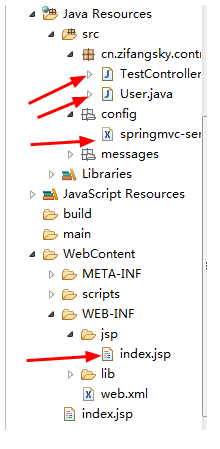
項目結構:
二、測試實例
(1)在 WEB-INF/jsp 目錄下新建 index.jsp,包含一個簡單的 jQuery Ajax 請求,請求數據格式為 JSON:
<%@ page language="java" contentType="text/html; charset=UTF-8" pageEncoding="UTF-8"%> <% String path = request.getContextPath(); String basePath = request.getScheme() + "://" + request.getServerName() + ":" + request.getServerPort() + path + "/"; %> <html> <head> <meta http-equiv="Content-Type" content="text/html; charset=UTF-8"> <base href="<%=basePath%>"> <script type="text/javascript" src="scripts/jquery/jquery-1.6.2.min.js"></script> <script type="text/javascript" src="scripts/jquery/jquery.i18n.properties-min-1.0.9.js"></script> <script type="text/javascript" src="scripts/jquery/jquery.autocomplete.js"></script> <script type="text/javascript" src="scripts/jquery/jquery.loadmask.js"></script> <script type="text/javascript" src="scripts/jquery/jquery.form.js"></script> <script type="text/javascript" src="scripts/jquery/jquery.timers.js"></script> <title>jQuery i18n</title> <script type="text/javascript"> $().ready( function() { $("#sub").click( function() { var name = $("#username").val(); var age = 18; var user = {"username":name,"age":age}; $.ajax({ url : 'hello.json', type : 'POST', data : JSON.stringify(user), // Request body contentType : 'application/json; charset=utf-8', dataType : 'json', success : function(response) { //請求成功 alert("你好" + response.username + "[" + response.age + "],當前時間是:" + response.time + ",歡迎訪問:https://www.zifangsky.cn"); }, error : function(msg) { alert(msg); } }); }); }); </script> </head> <body> <input type="text" id="username" style="width: 100px; height: 30px; font-size: 20px; font-weight: bold;"> <input type="button" id="sub" value="Go" style="height: 40px; height: 30px;"> <br> </body> </html>
(2)一個簡單的 model 類 User:
package cn.zifangsky.controller; public class User { private String username; private int age; public String getUsername() { return username; } public void setUsername(String username) { this.username = username; } public int getAge() { return age; } public void setAge(int age) { this.age = age; } }
(3)controller 類 TestController.java:
package cn.zifangsky.controller; import java.text.Format; import java.text.SimpleDateFormat; import java.util.Date; import java.util.HashMap; import java.util.Map; import org.springframework.context.annotation.Scope; import org.springframework.stereotype.Controller; import org.springframework.web.bind.annotation.RequestBody; import org.springframework.web.bind.annotation.RequestMapping; import org.springframework.web.bind.annotation.RequestMethod; import org.springframework.web.bind.annotation.ResponseBody; import org.springframework.web.servlet.ModelAndView; @Controller @Scope("prototype") public class TestController { /** * 轉到頁面 */ @RequestMapping(value = "/hello.html") public ModelAndView list() { ModelAndView view = new ModelAndView("index"); return view; } /** * ajax異步請求, 請求格式是json */ @RequestMapping(value = "/hello.json", method = { RequestMethod.POST }) @ResponseBody public Map<String, String> hello(@RequestBody User user) { // 返回數據的Map集合 Map<String, String> result = new HashMap<String, String>(); Format format = new SimpleDateFormat("yyyy-MM-dd HH:mm:ss"); // 返回請求的username result.put("username", user.getUsername()); // 返回年齡 result.put("age", String.valueOf(user.getAge())); // 返回當前時間 result.put("time", format.format(new Date())); return result; } }
執行步驟簡述如下:
i)項目啟動後,浏覽器訪問 https://localhost:8089/SpringDemo/hello.html,會執行 controller 中的 list 方法,隨後轉到 /WEB-INF/jsp/index.jsp(controller 返回的是邏輯視圖,會與配置文件中定義的前後綴拼接成真正的路徑)。
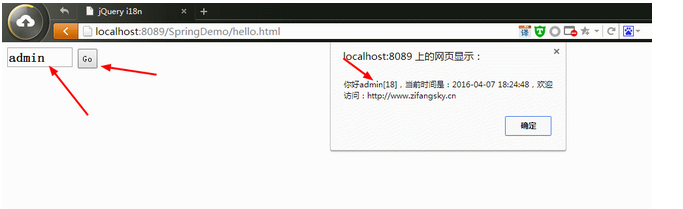
ii)在 index.jsp 輸入文字並點擊按鈕,觸發 Ajax 請求,把輸入框數據與默認的 age 參數拼成 JSON 字符串,提交到 hello.json,也就是執行 controller 的 hello 方法。
iii)hello 方法執行完畢後返回數據,最終在頁面顯示。
(4)效果如下:
以上就是 SpringMVC 環境下實現 Ajax 異步請求 JSON 數據的完整流程,希望對你有所幫助!
- 上一篇文章: 搆建 Ajax 參數:表單元素與 JSON 互轉的實用技巧
- 下一篇文章: 如何使用 Ajax 讀取 JSON 文件中的數據
相關文章
-
微信小程序串接 WebSocket:SpringMVC + Spring + MyBatis 實作 SpringMVC 與 Bootstrap 模態框分頁查詢 SpringMVC 搭配 Ajax:後端回傳 JSON、前端拼接表格字串 localStorage 存取 JSON 對象的完整實現思路與代碼 Ajax 的真正特徵:重點是異步交互,不是「無刷新」 AJAX 學習筆記:從同步到異步的思維轉變 Ajax 請求 JSON 數據並用 JS 渲染表格的完整示例 為什麼你的 return 總是比 ajax 回調先執行 ajaxSubmit 異步上傳圖片並保存表單資料的完整實作 jQuery Ajax 異步處理 JSON 數據詳解