本文整理在 ASP.NET 平台上幾種具代表性的 AJAX 開發方法,用實際程式碼示範各自的使用方式,順一遍 AJAX 的演化路徑。以下把這些方法粗略分成四代(分代純屬個人觀點,只為方便區分),且不討論完全不借助任何框架的裸 XHR 寫法。
目錄
- 第一代:生成客戶端代理腳本呼叫伺服端
- 新技術的改進方向
- 第二代:jQuery 直接呼叫 WebService
- 第三代:更簡單的資料格式
- 第四代:直接提交表單
- 多 submit 按鈕、批量輸入、複雜表單的實作
- 四代方法的對比與總結
第一代:讓伺服器為前端生成代理腳本
這代框架的核心思想是:由伺服器為客戶端產生代理腳本,前端呼叫這些腳本即可,不必知道底層的請求是怎麼發出去的,而且呼叫風格幾乎與伺服器端程式碼一致。代表作是 ASP.NET AJAX 與 AjaxPro。
先寫一個普通的 WebService,唯一特別的是類別上多掛了 ScriptService 特性:
[WebService(Namespace = "https://tempuri.org/")] [WebServiceBinding(ConformsTo = WsiProfiles.BasicProfile1_1)] [System.Web.Script.Services.ScriptService] public class WebService1 : System.Web.Services.WebService { [WebMethod] public int Add(int a, int b) { return a + b; }
接著在 ASPX 頁面用 ScriptManager 為它產生客戶端代理:
<asp:ScriptManager ID="ScriptManager1" runat="server"> <Services> <asp:ServiceReference Path="/WebService1.asmx" InlineScript="true" /> </Services> </asp:ScriptManager>
InlineScript="true" 並非必要,只是為了讓我們看清楚它究竟生成了什麼。
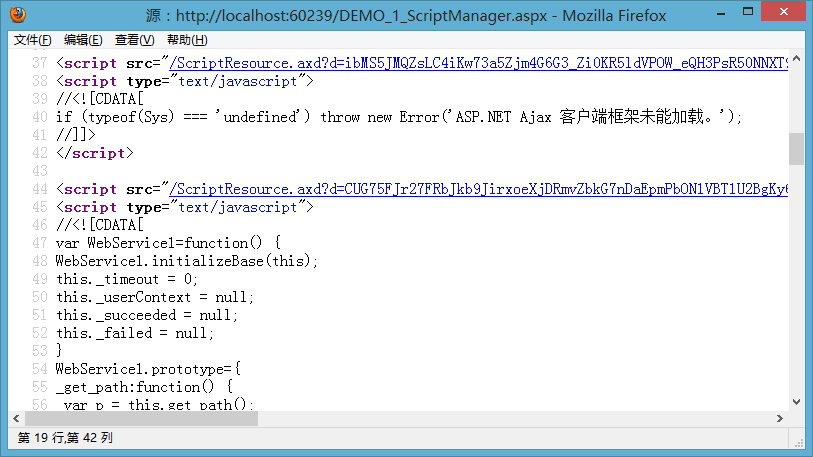
除了引入兩個必要的 Ajax 客戶端函式庫,還在客戶端為 WebService1 生出了代理腳本。有了這些,前端呼叫就變成:
function Call_Add(){ WebService1.Add(1,2, ShowResult); } function ShowResult(result){ document.getElementById("output").value = result; }
再來個複雜參數的版本。先定義型別:
public class Customer { public string Name { get; set; } public int Age { get; set; } public string Address { get; set; } public string Tel { get; set; } public string Email { get; set; } }
[WebMethod] public string AddCustomer(Customer customer) { if( customer == null ) return "customer is null."; return XmlHelper.XmlSerialize(customer, Encoding.UTF8); }
前端的呼叫方式與伺服器幾乎如出一轍:
function Call_AddCustomer(){ var customer = {Name: document.getElementById("txtName").value, Age: document.getElementById("txtAge").value, Address: document.getElementById("txtAddress").value, Tel: document.getElementById("txtTel").value, Email: document.getElementById("txtEmail").value}; WebService1.AddCustomer(customer, ShowResult); }
在 2006 年之前,裸寫 AJAX 的門檻非常高,這種「前端寫起來跟後端一樣」的設計確實了不起。但十幾年後回頭看,它被淘汰了——而淘汰的原因,恰恰藏在它的優點裡。
它為什麼會退場
仔細拆會看到兩個致命傷:
1. 前端程式碼無法獨立,是強耦合。你必須先在頁面掛上 ScriptManager 指向某個服務,代理腳本存在,那段呼叫程式碼才跑得起來。想像一個「取得目前使用者資訊」的功能,很多地方都要用,於是你把它抽到 public.js 裡——結果每個頁面引入 public.js 之後還是不能用,因為代理腳本不一定存在。解法只能是:為每個引入 public.js 的頁面,再補上 ScriptManager 引用那個服務。共用性越高的功能,重複的引用程式碼反而越多。WebService、aspx 頁面、js 三者被綁死在一起,越用越難受。
2. 前端框架自己進步了。當 jQuery 這類工具把 DOM 操作與參數收集變成一兩行的事,後端再「好心」代勞前端的事,就顯得多餘且碍手碍腳。前端與後端畢竟是兩種語言、兩種關注點,硬把後端的風格套到前端上,最終只會限制前端的發展。
請記住上面那段收集 customer 的程式碼,第四代會讓它消失。
第二代:jQuery 直接呼叫 WebService
HTTP 呼叫本來就是很透明的事:指定一個 URL、組一個請求體即可。代理腳本把這個過程封裝起來,代價是耦合。第二代的做法就是丟掉代理,直接呼叫:
$.ajax({ type:"POST", url: "/WebService1.asmx/Add", contentType:"application/json", data:"{a: 1, b: 2}", dataType:'json', success:function(result){ $("#output").val(result.d); } });
因為走 JSON,客戶端得多指定 contentType 與 dataType,這些以前是代理腳本替你做的。程式碼看似多了一點,但耦合沒了,公用程式碼終於可以抽得出來。而且 jQuery 支援設定全域預設值,寫多了自然可以精簡。
複雜參數的版本:
var customer = {Name: $("#txtName").val(), Age: $("#txtAge").val(), Address: $("#txtAddress").val(), Tel: $("#txtTel").val(), Email: $("#txtEmail").val()}; var jsonStirng = $.toJSON( {customer: customer} ); $.ajax({ type:"POST", url: "/WebService1.asmx/AddCustomer", contentType:"application/json", data: jsonStirng, dataType:'json', success:function(result){ $("#output").val(result.d); } });
這套做法不只可用於 WebService,也能呼叫 WCF(basicHttpBinding),因為它們都走 HTTP。至於 WCF 那一堆惱人的設定,那是伺服器端框架的問題,不是 jQuery 的。
第三代:更簡單的資料格式
JSON 的轉換過程總讓人覺得累贅——瀏覽器提交表單時根本沒這一步。所以第三代的改動重點是資料格式:直接送 key=value&key=value,與瀏覽器原生行為一致。這也代表伺服器框架必須跟著調整,ASP.NET MVC 與 MyMVC 都支援這種方式。
[Action] public int Add(int a, int b) { return a + b; } [Action] public string AddCustomer(Customer customer) { return XmlHelper.XmlSerialize(customer, Encoding.UTF8); }
注意這種寫法與客戶端完全解耦,只要知道一個 URL 就能呼叫:
$.ajax({ type:"POST", url: "/AjaxDemo/Add.cspx", data: {a: 1, b: 2}, success:function(result){ $("#output").val(result); } }); // 第二個呼叫 var customer = {Name: $("#txtName").val(), Age: $("#txtAge").val(), Address: $("#txtAddress").val(), Tel: $("#txtTel").val(), Email: $("#txtEmail").val()}; $.ajax({ type:"POST", url: "/AjaxDemo/AddCustomer.cspx", data: customer, success:function(result){ $("#output").val(result); } });
用 Fiddler 看請求內容,會發現格式已是 key=value,與瀏覽器一致。這段程式碼的主要複雜度落在哪裡?還是收集參數那一塊。那就讓它消失。
第四代:直接提交表單
既然伺服器不再要求序列化格式,那收集參數這件事為什麼還要自己寫?表單裡已經有全部資料了。範例表單:
<form id="form1" action="/AjaxDemo/AddCustomer.cspx" method="post"> <p><b>新增客戶資料</b></p> <span>Name: </span><input type="text" name="Name" value="abc" /><br /> <span>Age: </span><input type="text" name="Age" value="20" /><br /> <span>Address: </span><input type="text" name="Address" value="武漢" /><br /> <span>Tel:</span> <input type="text" name="Tel" value="12345678" /><br /> <span>Email: </span><input type="text" name="Email" value="test@163.com" /><br /> <br /> <input type="submit" name="btnAddCustomer" value="保存客戶資料" /> </form>
前三代都在手忙腳亂地收集這些欄位,第四代只需要一行:
$(function(){ //只需要這一個呼叫,就能把表單改成非同步提交! $("#form1").ajaxForm({ success:function(result){ $("#output").val(result); } }); });
ajaxForm 是 jQuery.form 外掛提供的功能。伺服器端程式碼沿用上一代,完全不用改。
更真實的場景驗證
多個 submit 按鈕——通常有人會說這下非得為每個按鈕指定不同 URL 不可了:
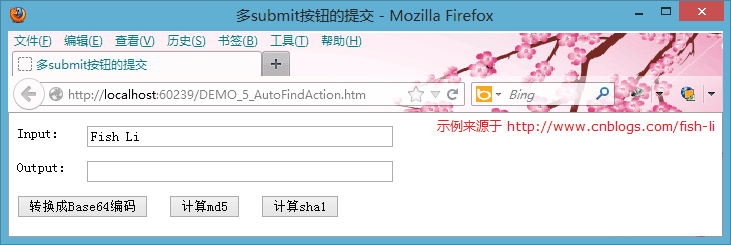
<form id="form1" action="/AjaxTestAutoAction/submit.cspx" method="post"> <p><span>Input:</span> <input type="text" name="input" style="width: 300px" value="Fish Li" /></p> <p><span>Output:</span> <input type="text" id="output" style="width: 300px" readonly="readonly" /></p> <input type="submit" name="Base64" value="轉換成 Base64 編碼" /> <input type="submit" name="Md5" value="計算 md5" /> <input type="submit" name="Sha1" value="計算 sha1" /> </form> <script type="text/javascript"> $(function(){ $("#form1").ajaxForm(function(result) { $("#output").val(result); }); }); </script>
public class AjaxTestAutoAction { [Action] public string Base64(string input) { return Convert.ToBase64String(Encoding.Default.GetBytes(input)); } [Action] public string Md5(string input) { byte[] bb = Encoding.Default.GetBytes(input); byte[] md5 = (new MD5CryptoServiceProvider()).ComputeHash(bb); return BitConverter.ToString(md5).Replace("-", string.Empty); } [Action] public string Sha1(string input) { byte[] bb = Encoding.Default.GetBytes(input); byte[] sha1 = (new SHA1CryptoServiceProvider()).ComputeHash(bb); return BitConverter.ToString(sha1).Replace("-", string.Empty); } }
伺服器定義三個方法對應三個按鈕,前端永遠只有一個 ajaxForm 呼叫。這是因為外掛會正確辨識「成功控制項」——瀏覽器原生表單規則裡,被點擊的那個 submit 按鈕才會被送出,其他的不會。這個細節自己刻很容易漏掉。
批量輸入表單——大量同質欄位的送出:
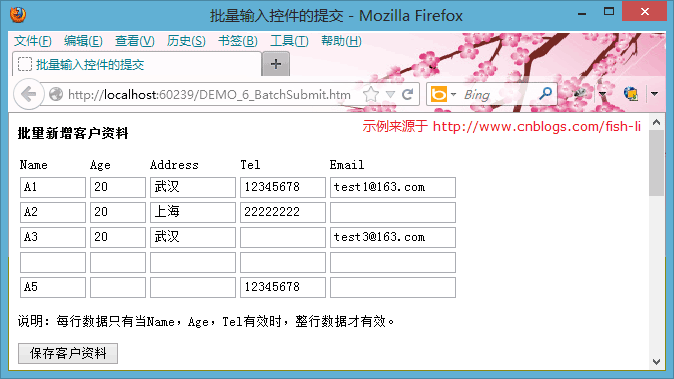
$(function(){ $("#form1").ajaxForm({ success:function(result){ $("#output").val(result); } }); });
程式碼就這麼多。想也知道用其他方式會膨脹成什麼樣子。
複雜表單(含驗證):
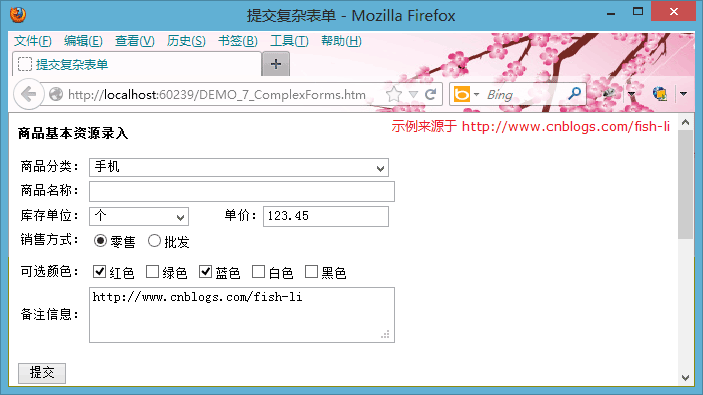
$(function(){ $("#form1").ajaxForm({ beforeSubmit: ValidateForm, success:function(result){ $("#output").val(result); } }); function ValidateForm(formData, jqForm, options) { if( jqForm.context.ProductName.value.length == 0 ){ alert("商品名稱不能為空。"); $(jqForm.context.ProductName).focus(); return false; } return true; } });
[Action] public string AddProduct(Product product) { return XmlHelper.XmlSerialize(product, Encoding.UTF8); }
四代方法的對比與總結
- 生成代理腳本(ASP.NET AJAX):為了包裝裸 XHR 的複雜度,由後端生成代理。呼叫風格與後端一致,門檻低,但後端包辦了前端的事,也限制了前端技術的演進,最終退場。
- jQuery 直接呼叫 WebService:丟掉代理腳本,改由前端準備資料格式。解決了頁面、伺服器、JS 三方的耦合,但資料格式被序列化方式綁住,寫起來別扭。
- 更簡單的資料格式:後端框架跟進(ASP.NET MVC、MyMVC),不再需要 asmx 檔,直接用類別回應請求,資料格式回歸
key=value。簡單化為後續改進留出了空間。 - 直接提交表單:jQuery.form 模擬瀏覽器的提交行為,正確辨識成功控制項並送出,程式碼量壓到最低,同時把 jQuery 的呼叫細節也封裝妥當。
一句話總結這段演進:好的抽象不是把複雜藏起來,而是讓複雜消失在你不需要它消失的地方。前三代都在想辦法「包裝」HTTP,第四代則是直接「成為」瀏覽器——順著平台既有的行為走,反而最省力。
- 上一篇文章: IE 快取 Ajax 請求結果的問題剖析與四種解法
- 下一篇文章: 用 HTML5 FormData 實現無刷新檔案上傳(不靠任何外掛)