本文探討在 ASP.NET MVC 裡使用 Ajax 的兩種做法:一是用框架內建的 System.Web.Mvc.Ajax,二是自己刻一套「非侵入式(unobtrusive)」的腳本。兩者各有適用場景,值得都會。
一、使用 System.Web.Mvc.Ajax
這個命名空間提供了兩個主要成員:Ajax.BeginForm 與 Ajax.ActionLink。
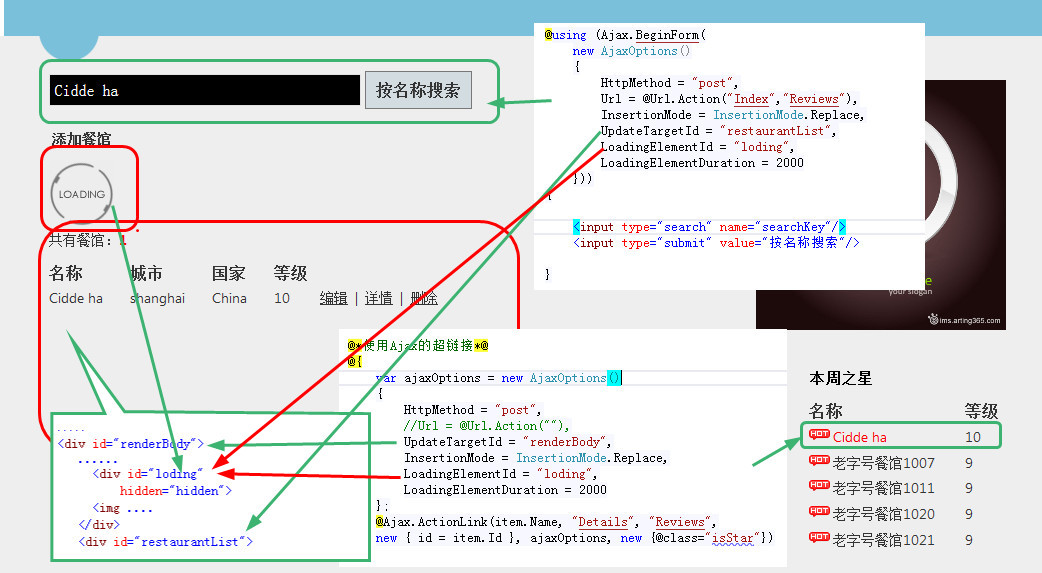
1.1 Ajax.BeginForm
第一步:用 Ajax.BeginForm 建立表單
@using (Ajax.BeginForm( new AjaxOptions() { HttpMethod = "post", Url = @Url.Action("Index","Reviews"), InsertionMode = InsertionMode.Replace, UpdateTargetId = "restaurantList", LoadingElementId = "loding", LoadingElementDuration = 2000 })) { <input type="search" name="searchItem"/> <input type="submit" value="按名稱搜索"/> }
它最終渲染出來的 HTML 是這樣:
<form id="form0" method="post" data-ajax-url="/Reviews" data-ajax-update="#restaurantList" data-ajax-mode="replace" data-ajax-method="post" data-ajax-loading-duration="2000" data-ajax-loading="#loding" data-ajax="true" action="/Reviews" novalidate="novalidate">
看到重點了嗎?所有設定都變成了 data-ajax-* 屬性。這正是「非侵入式 JavaScript」的標準做法——HTML 自己攜帶行為描述,JavaScript 只負責在頁面載入時找出這些標記並掛上事件。
第二步:建立 AjaxOptions 裡 Url 指向的 Action
public ActionResult Index(string searchKey = null) { var model = _restaurantReviews.Where(r => searchKey == null || r.Name.ToLower().Contains(searchKey.ToLower().Trim())) .OrderByDescending(r => r.Rating) .Take(100) .Select(r=>new RestaurantReview() { City = r.City, Country = r.Country, Id = r.Id, Name = r.Name, Rating = r.Rating }).ToList(); if (Request.IsAjaxRequest()) { System.Threading.Thread.Sleep(1000 * 3);//模擬處理資料需要的時間 return PartialView("_RestaurantPatialView", model); } return View(model); }
這裡有個關鍵細節:Ajax 請求時必須回傳 PartialView,而不是 View。若回傳完整檢視,等於把整個頁面塞進頁面裡的那個小區塊中,畫面會直接爛掉。Request.IsAjaxRequest() 判斷的依據,正是前面提到的 X-Requested-With 標頭。
關於 HttpMethod 的三條規則
- Action 明確標了
[HttpPost],則 AjaxOptions 的 HttpMethod 只能是"post"。 - Action 明確標了
[HttpGet],則只能是"get"。 - 兩者都沒標,則
"get"與"post"皆可。
第三步:加上承載更新內容的元素
<div id="restaurantList">... </div>
第四步(選用):加上 loading 提示元素
<div id="loding" hidden="hidden"> <img class="smallLoadingImg" src="@Url.Content("~/Content/images/loading.gif")" /> </div>

1.2 Ajax.ActionLink
用法與 BeginForm 幾乎一致。
第一步:建立 Ajax 超連結
@*@Html.ActionLink(item.Name, "Details", "Reviews",new{id = item.Id},new {@class ="isStar"})*@ @*<a class="isStar" href="@Url.Action("Details","Reviews", new {id = item.Id})">@item.Name</a>*@ @{ var ajaxOptions = new AjaxOptions() { HttpMethod = "post", UpdateTargetId = "renderBody", InsertionMode = InsertionMode.Replace, LoadingElementId = "loding", LoadingElementDuration = 2000 }; @Ajax.ActionLink(item.Name, "Details", "Reviews", new { id = item.Id }, ajaxOptions, new {@class="isStar"}) }
生成的最終 HTML:
<a class="isStar" href="/Reviews/Details/1" data-ajax-update="#renderBody" data-ajax-mode="replace" data-ajax-method="post" data-ajax-loading-duration="2000" data-ajax-loading="#loding" data-ajax="true">
注意那個 href="/Reviews/Details/1" 仍然存在——這很重要。若 JavaScript 沒載入或執行失敗,連結還是可以正常跳轉,這就是所謂的「優雅降級」。
第二步:定義回應超連結的 Action
public ActionResult Details(int id=1) { var model = (from r in _restaurantReviews where r.Id == id select r).FirstOrDefault(); if (Request.IsAjaxRequest()) { return PartialView("_RestaurantDetails", model); } return View(model); }
第三步:定義承載更新的元素
<div id="renderBody"> .... </div>
第四步與 1.1 相同,加上 loading 元素即可。
二、手工打造自己的「非侵入式」腳本
不想依賴內建 AjaxHelper?其實它的原理並不複雜,自己刻也只要幾十行。
第一步:在表單上標記自訂的 data 屬性
@* --------------------------------------------------------- 需要手工為 Form 添加些屬性標籤,用於錨點 模仿 MVC 框架的構建自己的「非侵入式 Javascript」模式 -------------------------------------------------------*@ <form method="post" action="@Url.Action("Index")" data-otf-ajax="true" data-otf-ajax-updatetarget="#restaurantList"> <input type="search" name="searchItem" /> <input type="submit" value="按名稱搜索" /> </form>
輸出的 form:
<form data-otf-ajax-updatetarget="#restaurantList" data-otf-ajax="true" action="/Reviews" method="post" novalidate="novalidate">
第二步:Action 與 1.1 完全相同,一樣要判斷 Request.IsAjaxRequest() 並回傳 PartialView。
第三步:用 JS 掛上行為
$(function () { var ajaxFormSubmit = function() { var $form = $(this); var ajaxOption = { type: $form.attr("method"), url: $form.attr("action"), data: $form.serialize() }; $.ajax(ajaxOption).done(function(data) { var updateTarget = $form.attr("data-otf-ajax-updatetarget"); var $updateTarget = $(updateTarget); if ($updateTarget.length > 0) { var $returnHtml = $(data); $updateTarget.empty().append(data); $returnHtml.effect("highlight"); } }); return false; }; $("form[data-otf-ajax='true']").submit(ajaxFormSubmit); });
注意 $form.serialize() 這一行——它才是真正取代「手動收集每個欄位」的關鍵,而且會自動遵守瀏覽器的成功控制項規則。
所謂「非侵入式」到底的意思
如果拿掉第三步的 JS,表單照樣能被處理,只是退化成整頁提交而已。這就是非侵入式的核心價值:JavaScript 是加分項,不是必需品。
這個原則在今天的實務裡格外重要。使用內建 Ajax.BeginForm 時,如果忘了引入 jquery.unobtrusive-ajax.js,畫面上就會出現一堆 data-ajax-* 屬性卻毫無反應——這也是許多人覺得「MVC 的 Ajax 好像壞掉了」的真正原因。理解了原理,這類問題就能一眼看穿。