用 Ajax 實作下拉選單連動帶出資料
編輯:AJAX基礎知識
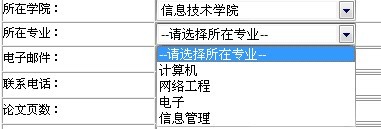
專案裡需要「選了學院,專業清單自動帶出」的連動效果。時間還算充裕,就沒去找現成 demo,自己寫了一版。純粹個人思路,寫得未必漂亮,記錄在此以備日後參考。
頁面上的兩個下拉選單
<tr>
  <td style="width: 130px">所在學院:</td>
  <td style="width: 100px">
    <select id="college" style="width: 200px" runat="server"
            onchange="changcollege(this.value)">
      <option value="0">--請選擇所在學院--</option>
    </select>
  </td>
</tr>
<tr>
  <td style="width: 130px">所在專業:</td>
  <td style="width: 100px">
    <select id="specialty" style="width: 200px" runat="server"
            onchange="SaveSpecical(this.value)">
      <option value="0">--請選擇所在專業--</option>
    </select>
  </td>
</tr>
JS 腳本
send_request 負責建立 XMLHttpRequest 並送出;changcollege 在學院變動時觸發;populateClass3 則是回呼,把字串拆開塞進下層選單。
<script type="text/javascript">
var http_request = false;

function send_request(method, url, content, responseType, callback) {
  http_request = false;

  if (window.XMLHttpRequest) {
    http_request = new XMLHttpRequest();
    if (http_request.overrideMimeType) {
      http_request.overrideMimeType("text/xml");
    }
  } else {
    try {
      http_request = new ActiveXObject("Msxml2.XMLHTTP");
    } catch (e) {
      try {
        http_request = new ActiveXObject("Microsoft.XMLHTTP");
      } catch (e) {}
    }
  }

  if (!http_request) {
    window.alert("創建XMLHttpRequest對象失敗");
    return false;
  }

  if (responseType.toLowerCase() == "text") {
    http_request.onreadystatechange = callback;
  } else {
    window.alert("ERR");
    return false;
  }

  if (method.toLowerCase() == "get") {
    http_request.open(method, url, true);
  } else if (method.toLowerCase() == "post") {
    http_request.open(method, url, true);
    http_request.setRequestHeader("Content-Type", "application/x-www-form-urlencoded");
  } else {
    window.alert("Err");
    return false;
  }

  http_request.send(content);
}

// 學院下拉選單變動時觸發
function changcollege(va) {
  if (va != '0') {
    var speciality = document.getElementById("specialty");
    speciality.disabled = false;
    var url = "Handler.ashx?type=college&id=" + va;
    send_request("GET", url, null, "text", populateClass3);
  }
}

// Ajax 成功後的回呼
function populateClass3() {
  var f = document.getElementById("specialty");
  if (http_request.readyState == 4) {
    if (http_request.status == 200) {
      var list = http_request.responseText;
      var classList = list.split("|");
      f.options.length = 1;   // 保留提示項,其餘清掉
      for (var i = 0; i < classList.length; i++) {
        var tmp = classList[i].split(",");
        f.add(new Option(tmp[1], tmp[0]));
      }
    } else {
      alert("您所請求的頁面有異常。");
    }
  }
}
</script>
伺服器端:用 ashx 處理並回傳字串
這裡刻意用最樸素的協定:以「|」分隔每一筆、以「,」分隔 ID 與名稱,前端收到後拆開即可。好處是不需要任何序列化函式庫,缺點是資料一旦含分隔符號就會出問題。
public class Handler : IHttpHandler {
    public void ProcessRequest(HttpContext context) {
        string type = context.Request.QueryString["type"];
        if (type.Equals("college")) {
            string id = context.Request.QueryString["id"];
            context.Response.ContentType = "text/plain";
            context.Response.Write(getSpecialty(id));
        }
    }

    public string getSpecialty(string college) {
        DataSet ds = GetInformation.GetSpecialtyInfo(college);
        string str = "";
        for (int i = 0; i < ds.Tables[0].Rows.Count; i++) {
            str += ds.Tables[0].Rows[i]["SpecialtyID"].ToString() + ","
                 + ds.Tables[0].Rows[i]["SpecialtyName"].ToString();
            if (i != ds.Tables[0].Rows.Count - 1) { str += "|"; }
        }
        return str.Trim();
    }

    public bool IsReusable { get { return false; } }
}
依學院編號查出對應專業,把名稱以「|」串接起來回傳,客戶端拆字串後逐一 add 進下拉選單。
延伸與改進空間
這裡示範的是二級連動,三級連動的原理完全相同——只是多串一層回呼。
若重寫一次,我會做三點調整:一是後端直接回傳 JSON 而非自訂分隔字串,避免資料內含分隔符號的風險;二是把 Ajax 呼叫改用 jQuery 的 $.getJSON,省掉自己實作 XHR 的跨瀏覽器分支;三是當上一層選回「請選擇」時,也把下層清空並 disabled,避免殘留舊資料造成誤會。
- 上一篇文章: jQuery Ajax 提交表單的兩種寫法(get 與 post)
- 下一篇文章: 帶即時提示的 Ajax 表單驗證範例