傳統購物車每加一項就換頁一次,使用者得重新找路。改用 Ajax 之後,點一下「加入購物車」,頁面不動,只有統計數字就地更新。以下示範完整實作。
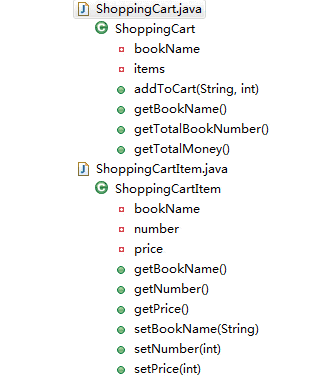
一、購物車類別的設計
ShoppingCartItem:封裝單本書,包含書名、數量、價格三個屬性,以及對應的 getter 與 setter。
ShoppingCart:購物車封裝類別,內部以 Map<String, ShoppingCartItem> 保存內容,對外提供三個方法——加入購物車、取得書本總數、取得總金額。
二、JSP:超連結帶參數,預留顯示位置
<body>
<!-- 加入 span 是為了後續定位更新 -->
<div id="cartstatus">
您已經將 <span id="bookName"></span> 加入到購物車中,
購物車中有 <span id="totalBookNumber"></span> 本書,
總價格是 <span id="totalMoney"></span>
</div>
<br><br>
java    <a href="${pageContext.request.contextPath}/addToCart?id=java&price=100">加入購物車</a><br>
ajax    <a href="${pageContext.request.contextPath}/addToCart?id=ajax&price=200">加入購物車</a><br>
jquery  <a href="${pageContext.request.contextPath}/addToCart?id=jquery&price=300">加入購物車</a><br>
</body>
<!-- ${pageContext.request.contextPath} 取得該專案的絕對路徑 -->
三、Servlet:addToCart 的處理步驟
1. 從請求中取得 id(書名)與 price。
2. 從 session 取出購物車物件;若不存在,就新建一個並放回去。
3. 執行 sc.addToCart(bookName, price)。
4. 組出要回傳的 JSON:{"bookName":"...","totalBookNumber":"...","totalMoney":"..."}。注意:伺服器端輸出 JSON 時,屬性名稱一定要用雙引號包住。
5. 輸出回應。
public class AddToCartServlet extends HttpServlet {

    public void doGet(HttpServletRequest request, HttpServletResponse response)
            throws ServletException, IOException {
        this.doPost(request, response);
    }

    public void doPost(HttpServletRequest request, HttpServletResponse response)
            throws ServletException, IOException {
        // 1. 取得請求參數
        String bookName = request.getParameter("id");
        int price = Integer.parseInt(request.getParameter("price"));

        // 2. 取得購物車物件
        ShoppingCart sc = (ShoppingCart) request.getSession().getAttribute("sc");
        if (sc == null) {
            sc = new ShoppingCart();
            request.getSession().setAttribute("sc", sc);
        }

        // 3. 加入購物車
        sc.addToCart(bookName, price);

        // 4. 組出 JSON(屬性名必須用雙引號)
        StringBuilder sBuilder = new StringBuilder();
        sBuilder.append("{")
                .append("\"bookName\":\"").append(bookName).append("\"")
                .append(",")
                .append("\"totalBookNumber\":\"").append(sc.getTotalBookNumber()).append("\"")
                .append(",")
                .append("\"totalMoney\":\"").append(sc.getTotalMoney()).append("\"")
                .append("}");

        // 5. 回應
        response.setContentType("text/javascript");
        response.getWriter().print(sBuilder.toString());
    }
}
用 StringBuilder 手拼 JSON 雖然直觀,但容易出錯。若有引入第三方函式庫(例如 Jackson),可以簡化為:
String jsonStr = null;
ObjectMapper objectMapper = new ObjectMapper();
jsonStr = objectMapper.writeValueAsString(sc);
四、前端:接收並更新畫面
步驟如下:
1. 為「加入購物車」超連結掛上 click 事件,並 return false 取消預設跳轉。
2. 用 $.getJSON(url, [data], [callback]) 以 GET 方式載入 JSON 資料,在回呼中把內容寫進頁面。
3. 用 jQuery 的 hide() 與 show() 判斷是否為第一次使用購物車——第一次時不顯示統計區。
<head>
<script type="text/javascript"
        src="${pageContext.request.contextPath}/scripts/jquery-1.7.2.js"></script>
<script type="text/javascript">
$(function () {
    var isHasCart = "${sessionScope.sc == null}";
    if (isHasCart == "true") {
        $("#cartstatus").hide();
    } else {
        $("#cartstatus").show();
        $("#bookName").text("${sessionScope.sc.bookName}");
        $("#totalBookNumber").text("${sessionScope.sc.totalBookNumber}");
        $("#totalMoney").text("${sessionScope.sc.totalMoney}");
    }

    $("a").click(function () {
        $("#cartstatus").show();
        var url = this.href;
        var agrs = { "time": new Date() };   // 時間戳避免快取
        $.getJSON(url, agrs, function (data) {
            $("#bookName").text(data.bookName);
            $("#totalBookNumber").text(data.totalBookNumber);
            $("#totalMoney").text(data.totalMoney);
        });
        return false;
    });
});
</script>
</head>
幾點補充
回呼裡附上的 time: new Date() 是為了避免 GET 請求被瀏覽器快取,否則連續加同一本書時,畫面數字可能不動。
用 .text() 而非 .html() 來填入書名,可以避免書名中的特殊字元被當成 HTML 解析。這是個習慣養成,能擋掉不少 XSS 風險。
另外,範例把價格直接放在超連結的 query string 裡,正式環境絕對不能這樣做——使用者改一下網址就能把價格改成 1 元。價格必須由伺服器依書名查詢,前端傳的只有識別用的 id。
- 上一篇文章: 用 Ajax 搭配 JSON 資料格式:規則說明與完整案例
- 下一篇文章: Ajax 中 GET 與 POST 的差異、寫法要點與選擇時機
相關文章
-
用 jQuery getJSON() 取得後端回傳的 JSON 資料 用jQuery與JSON實作無刷新表單取值 jQuery getJSON 與 .NET 整合:用 Handler 回傳 JSON 的實作方式 用 jQuery 的 $.getJSON 動手做一次跨域 Ajax 請求 jQuery Ajax 完整整理:load、get、post 到 $.ajax jQuery + Ajax 瀑布流實作:滾動到底自動載入更多 依 ID 非同步帶入多個文字框內容的實作 jQuery 三級聯動下拉選單實作:省/市/區一次搞定 jQuery 的兩個 each:$().each 與 $.each 差在哪 jQuery getJSON 完整解析:從單一物件到物件陣列的取用方式