Web 頁面的分頁做法很多,但多數都是整頁刷新——每次翻頁就把完整的頁面骨架、樣式與腳本重送一遍,實際上變動的只有那幾列資料。若改用 Ajax 分頁,只回傳當前頁的資料,頻寬消耗會大幅下降。

整體思路
非同步執行 Ajax,把新頁面的資料以精簡格式回傳,前端再動態組出表格輸出。你可以輸出 <table>,也可以輸出 <ul><li>(元素更少,輸出效率更高)。分頁資訊(總筆數、每頁筆數、目前頁碼、總頁數)則一併回傳,讓前端能正確渲染分頁控制項。
HTML:分頁控制區
設定 class="pages" 是為了之後能統一掛上 click 事件:
<div id="showPage" style="width: 650px; margin: 0 auto; display: none" class="pages">
  <div style="float: left">
    <a id="first" class="pages">首頁</a>
    <a id="prev"  class="pages">上頁</a>
    <a id="next"  class="pages">下頁</a>
    <a id="last"  class="pages">尾頁</a>
    跳轉到第
    <input type="text" id="txtGoPage"
           style="width: 45px; height: 15px; border: 1px solid" />
    頁
  </div>
  <div style="margin: 0; float: left">
    <input type="button" class="pages btn btn-info" id="go" value="跳轉" />
    共<span id="SumCount"></span> 條數據,
    每頁<span id="ItemCount"></span> 條,
    當前<span id="Index"></span>/<span id="PageCount"></span>頁
  </div>
</div>

<!-- 用這個 div 輸出返回的結果 -->
<div id="divBadProductInfo"></div>
CSS:分頁樣式
/* 分頁 */
.pages {
    cursor: pointer;
    text-align: center;
    margin: 0 auto;
    padding: 2px 0;
    font-family: verdana, helvetica, arial, sans-serif;
}
.pages a {
    border: 1px solid;
    padding: 0 6px;
    line-height: 20px;
    margin-right: 2px;
    overflow: hidden;
}
.pages a {
    border-color: #e6e7e1;
    color: #09c;
    background-color: #fff;
}
.pages a:hover {
    text-decoration: none;
    border-color: #09c;
}
.pages a.next {
    border-color: #09c;
}
JavaScript:首次載入與分頁動作
先引入 jQuery(版本可依專案調整):
<script src="assets/js/jquery-1.8.2.min.js"></script>
$(document).ready(function () {
    // 檢索條件
    var search = $("#txtFactroy").val() + "_" + $("#txtTimeSelect").val()
               + "_" + $("#txtPinfan").val() + "_"
               + $('input[type="checkbox"][name="option1"]:checked').val();

    $.ajax({
        type: "post",
        url: "ResponseHandler.ashx",
        // encodeURIComponent 格式化中文以防亂碼
        data: "BadProductWhere=" + encodeURIComponent(search) + "&currPage=1",
        datatype: "json",
        async: false,   // 這裡原意應是避免快取,但 async 實際控制的是同步與否
        success: function (returnData, textstatus, xmlhttprequest) {
            $("#showPage").css('display', 'block');
            $("#divBadProductInfo").html(returnData.split('_')[0]);
            var page = returnData.split('_')[1].split(',');
            $("#SumCount").text(page[0]);    // 共多少筆
            $("#ItemCount").text(page[1]);   // 每頁多少筆
            $("#Index").text(page[2]);       // 目前頁
            $("#PageCount").text(page[3]);   // 共多少頁
        }
    });

    $("#txtGoPage").val("");

    // 分頁操作
    $(".pages").click(function () {
        if (parseFloat($("#PageCount").html()) > 1) {
            var type = $(this).attr("id");
            var thisindex = $("#Index").text();
            var search = $("#txtFactroy").val() + "_" + $("#txtTimeSelect").val()
                       + "_" + $("#txtPinfan").val() + "_"
                       + $('input[type="checkbox"][name="option1"]:checked').val();

            switch (type) {
                case 'first':
                    $("#txtGoPage").val("");
                    BadPageIndex(1, search);
                    return;
                case 'prev':
                    $("#txtGoPage").val("");
                    var p = parseInt(thisindex) - 1;
                    if (p < 1) return;
                    BadPageIndex(p, search);
                    return;
                case 'next':
                    $("#txtGoPage").val("");
                    var n = parseInt(thisindex) + 1;
                    if (n > parseInt($("#PageCount").html())) return;
                    BadPageIndex(n, search);
                    return;
                case 'last':
                    $("#txtGoPage").val("");
                    BadPageIndex(parseInt($("#PageCount").html()), search);
                    return;
                case 'go':
                    BadPageIndex($("#txtGoPage").val(), search);
                    return;
            }
        }
    });
});

function BadPageIndex(index, searchwhere) {
    $.ajax({
        type: "post",
        url: "ResponseHandler.ashx",
        data: "BadProductWhere=" + encodeURIComponent(searchwhere)
            + "&currPage=" + index,
        datatype: "json",
        success: function (returnData, textstatus, xmlhttprequest) {
            $("#divBadProductInfo").html(returnData.split('_')[0]);
            var page = returnData.split('_')[1].split(',');
            $("#SumCount").text(page[0]);
            $("#ItemCount").text(page[1]);
            $("#Index").text(page[2]);
            $("#PageCount").text(page[3]);
        },
        error: function () {
            alert("服務錯誤");
        }
    });
}
後端:一般處理程序(ResponseHandler.ashx)
/// <summary>
/// 每頁顯示筆數
/// </summary>
private int pageSize = 20;
StringBuilder sbBadProductInfo = new StringBuilder();

if (!string.IsNullOrEmpty(context.Request["BadProductWhere"]) &&
    !string.IsNullOrEmpty(context.Request["currPage"])) {

    // 用 LINQ 篩出已出庫的資料
    List<bstate_view> lstGetBadProductData = (from p in lstGetBadProductData
        where !string.IsNullOrEmpty(p.出庫確認人) && p.出庫日期 != null
        select p).ToList<bstate_view>();

    // 組出分頁資訊字串
    int total = lstGetBadProductData.Count();
    string pageInfo = total + "," + pageSize + ","
        + context.Request["currPage"] + ","
        + (total % pageSize == 0 ? total / pageSize : total / pageSize + 1);

    // 用 Skip / Take 取出當前頁
    List<bstate_view> pageData = (total > pageSize
        ? lstGetBadProductData
            .Skip(int.Parse(context.Request["currPage"]) == 1
                  ? 0
                  : pageSize * (int.Parse(context.Request["currPage"]) - 1))
            .Take(pageSize)
        : lstGetBadProductData).ToList<bstate_view>();

    // 組出表格 HTML(此處節錄表頭與資料列部分)
    foreach (var item in pageData) {
        sbBadProductInfo.Append("<tr>");
        sbBadProductInfo.Append("<td>" + item.箱單編號   + "</td>");
        sbBadProductInfo.Append("<td>" + item.裝箱生成日期 + "</td>");
        sbBadProductInfo.Append("<td>" + item.工廠名稱   + "</td>");
        sbBadProductInfo.Append("<td>" + item.出庫確認人 + "</td>");
        sbBadProductInfo.Append("<td>" + item.出庫日期   + "</td>");
        sbBadProductInfo.Append("</tr>");
    }

    context.Response.Write(sbBadProductInfo.ToString() + "_" + pageInfo);
    context.Response.End();
}
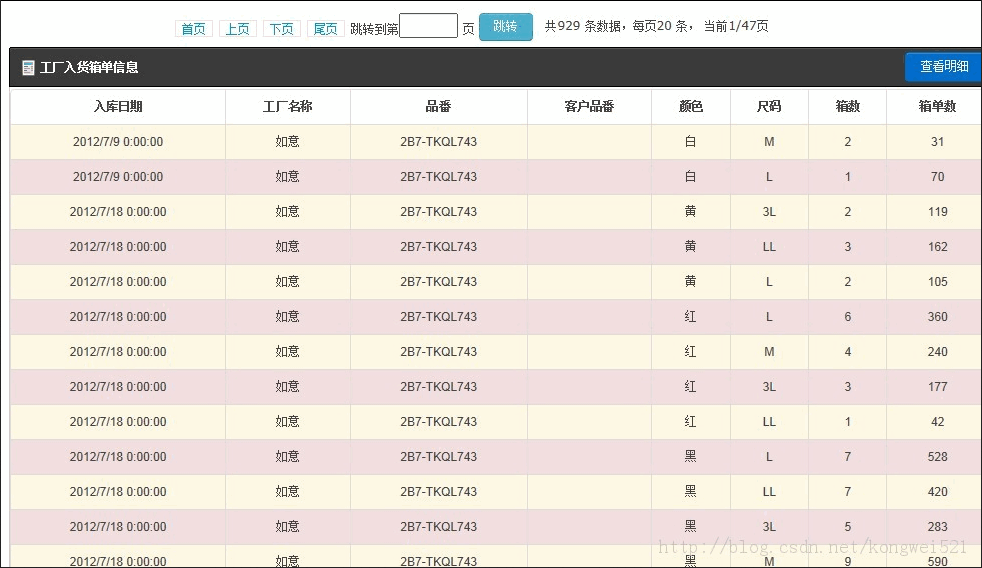
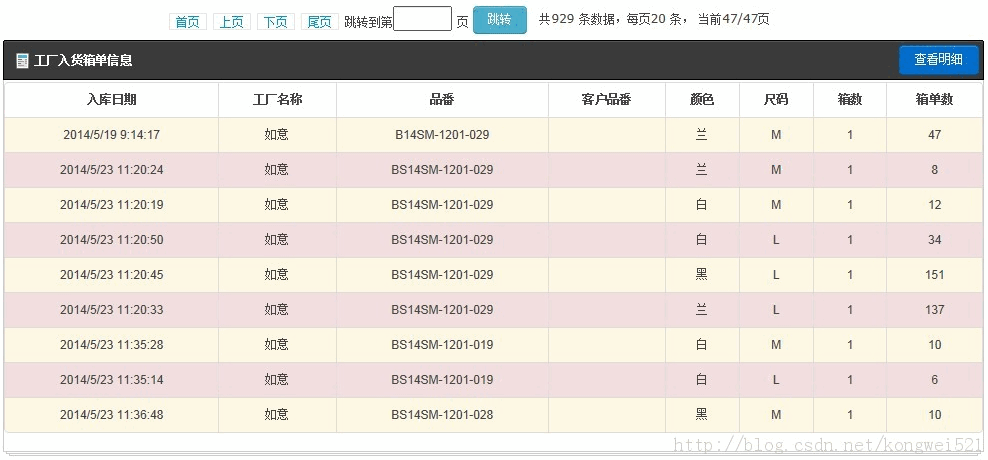
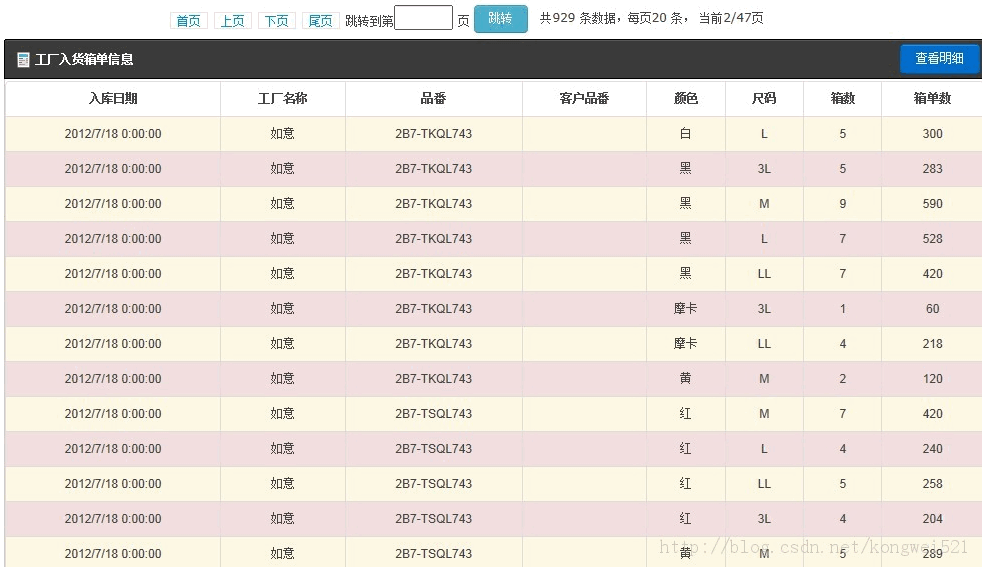
幾點值得檢討的實作細節
async: false 用錯了。原範例註解寫「禁止使用瀏覽器快取」,但 async 控制的是同步/非同步,與快取無關。要避免快取應該用 cache: false。而且分頁這種情境本來就該非同步,設成 false 反而會讓翻頁時整個頁面卡住。
用底線分隔回傳內容很脆弱。returnData.split('_') 這種協定一旦資料本身含底線就會出錯。既然已經宣告 datatype: "json",後端就該回傳真正的 JSON,前端用 data.html 與 data.pageInfo 取值,乾脆得多。
後端組 HTML 字串有 XSS 風險。把資料庫內容直接拼進 HTML,若其中含使用者輸入過的內容,就可能被注入腳本。輸出時應做 HTML 編碼(HttpUtility.HtmlEncode)。更理想的做法是只回傳 JSON 資料,由前端負責渲染。
Skip / Take 是記憶體分頁。範例先把全部資料 ToList() 再切頁,資料量大時會有明顯效能問題。若改用 Skip(...).Take(...) 搭配延遲查詢並在 SQL 層做分頁,才是真正的「降低伺服器負擔」。
整體而言,Ajax 分頁的方向是對的——只傳變動的部分,確實能省下大量頻寬。但實作上仍有幾處可以更嚴謹,特別是資料格式的約定與輸出的編碼處理。
- 上一篇文章: ajax 的 responseText 出現亂碼,問題其實在伺服器端
- 下一篇文章: 讓 Ajax 每五秒自動呼叫一次:定時輪詢的實作