jQuery + Ajax 異步表單驗證示例代碼
編輯:AJAX基礎知識
本例演示用 jQuery + Ajax 做異步表單驗證:用戶在輸入框輸入後離開焦點,即時到後台查詢並給出提示。

HTML 代碼
<script src='jquery.js'></script>
<script>
function checkname(){
    $.ajax({
        type: "get",
        url: 'index.php',
        data: "name=" + $("input[name='name']").val(),
        success: function(msg){
            $("#show").append(msg);
        }
    });
}
</script>

<form name='form'>
  <input name='name' type='text' onblur='checkname();'>
  <span id='show'></span><br />
  <input type='submit' name='submit' value='提交' />
</form>
PHP 代碼
<?php
$link = mysql_connect('localhost', 'root', 'sanyue');
if(!$link){ die('連接失敗:' . mysql_error()); }
mysql_select_db('excour', $link);

$name = $_GET['name'];
$sql  = "select name from user_info where name='$name'";
$result = mysql_query($sql);

if(mysql_num_rows($result) != 0){
    echo "<font color='red'>名字太受歡迎,換一個吧</font>";
}else{
    echo "<font color='blue'>成功</font>";
}

mysql_free_result($result);
mysql_close($link);
?>
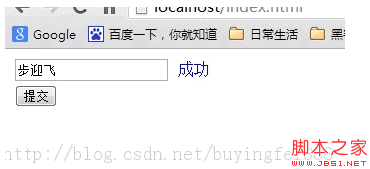
輸入框 onblur 觸發 Ajax 校驗,後端查庫判斷用戶名是否已被占用並返回提示,前端把結果追加到 #show。建議:實際項目應改用 MySQLi/PDO 並配合參數化查詢,避免這裡直接拼接 SQL 帶來的注入風險。
- 上一篇文章: AJAX 如何接收並解析 JSON 數據示例介紹
- 下一篇文章: jQuery Ajax 傳參巧用 JSON——附 JSON 插件用法