ajax跨頁面提交表單
編輯:AJAX基礎知識
前面提到過重復提交表單問題,處理token口令校驗、重定向之外,還有一種經常使用到的方法就是新頁面處理表單提交,完成後關閉當前頁面,並刷新之前發送請求的頁面。
這裡使用了artDialog.js
1、文件結構
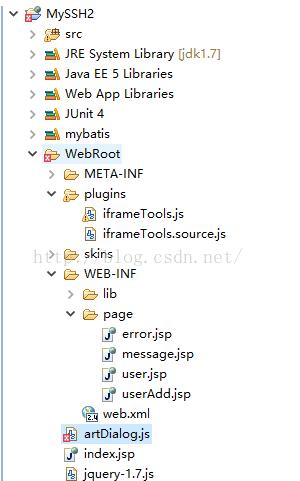
2、user.jsp
<%@ page language="java" import="java.util.*" pageEncoding="UTF-8"%>
<%@ taglib uri="/struts-tags" prefix="s"%>
<%@ taglib uri="http://java.sun.com/jsp/jstl/core" prefix="c"%>
<!DOCTYPE HTML PUBLIC "-//W3C//DTD HTML 4.01 Transitional//EN">
<html>
 <head>
 <title>user列表</title>

 <meta http-equiv="pragma" content="no-cache">
 <meta http-equiv="cache-control" content="no-cache">
 <meta http-equiv="expires" content="0">
 <script type="text/javascript" src="/MySSH2/jquery-1.7.js"></script>
 <script type="text/javascript" src="/MySSH2/artDialog.js?skin=default"></script>
 <script type="text/javascript">
 function openA(){
 window.open("/MySSH2/user/manage_addUI");
 }
 </script>
 </head>
 <body>
 <br/>
 <a href="<s:url action="manage_addUI" namespace="/user"/>">添加用戶</a>
 <a href="javascript:void(0)" onclick="openA()">添加用戶</a>
  <br/>
  用戶列表:<br/>
 <s:iterator value="#request.users">
 id:<s:property value="id"/><br/>
 name:<s:property value="name"/><br/>
 </s:iterator>


 </body>
</html>
3、userAdd.jsp
<%@ page language="java" import="java.util.*" pageEncoding="UTF-8"%>
<%@ taglib uri="/struts-tags" prefix="s"%>
<%@ taglib uri="http://java.sun.com/jsp/jstl/core" prefix="c"%>
<!DOCTYPE HTML PUBLIC "-//W3C//DTD HTML 4.01 Transitional//EN">
<html>
 <head>
 <title>用戶添加</title>

 <meta http-equiv="pragma" content="no-cache">
 <meta http-equiv="cache-control" content="no-cache">
 <meta http-equiv="expires" content="0">
 <script type="text/javascript" src="/MySSH2/jquery-1.7.js"></script>
 <script type="text/javascript">
 function AddUser(){
 var submitData = $('#userForm').serialize();
 console.log(submitData);
 $.ajax({
    type : "post",
    url : "/MySSH2/user/manage_add",
    cache : false,
    data: submitData,
    dataType : 'json',
    success : function(result) {
    <span style="white-space:pre">  </span>if(result.success){
       window.opener.art.dialog({time:2,content:'保存成功'});
       setTimeout(function(){window.opener.location.reload();},3);
      }
      else{
      <span style="white-space:pre"> </span> window.opener.art.dialog({time:2,content:'保存失敗'});
        setTimeout(function(){window.opener.location.reload();},3);
       }
       window.close();
      },
    error : function(XMLHttpRequest, textStatus,
      errorThrown) {
        alert("error");
      }
    });
 }
 </script>
 </head>

 <body>
 <s:form id="userForm" action="manage_add" namespace="/user" method="post">
  用戶名:<s:textfield name="user.name"/><br/><s:token></s:token>
  <input type="button" value="保存" onclick="AddUser()"/>
 </s:form>
 </body>
</html>
4、UserManageAction.java
package com.myssh2.action;

import java.io.IOException;
import java.io.PrintWriter;

import javax.annotation.Resource;
import javax.servlet.ServletException;

import org.apache.struts2.ServletActionContext;
import org.springframework.context.annotation.Scope;
import org.springframework.stereotype.Controller;

import com.myssh2.bean.User;
import com.myssh2.service.UserService;
import com.opensymphony.xwork2.ActionContext;
import com.opensymphony.xwork2.ActionSupport;


@Controller @Scope("prototype")
public class UserManageAction extends ActionSupport{
 @Resource UserService userService;
 private User user;

 public User getUser() {
  return user;
 }

 public void setUser(User user) {
  this.user = user;
 }

 public String addUI(){
  return "add";
 }

 public void add() throws ServletException, IOException{

  ServletActionContext.getResponse().setContentType("text/html;charset=utf-8");
  PrintWriter out = ServletActionContext.getResponse().getWriter();
  try {
   userService.addUser(user);
   ActionContext.getContext().put("message", "保存成功");
   out.write("{\"success\":true}");
  } catch (Exception e) {
    e.printStackTrace();
    out.write("{\"success\":false,\"msg\":\"error\"}");
  }
 }
}
頁面效果
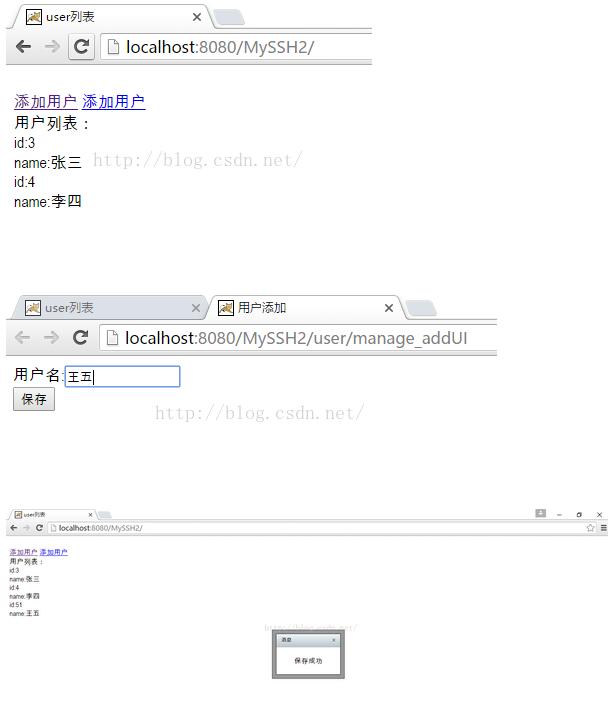
提交表單時使用$('#userForm').serialize();序列化表單數據
window.opener.art.dialog({time:2,content:'保存成功'});則是返回使用window.open的頁面(或者理解為父頁面),並調用artDialog插件的定時關閉dialog
setTimeout(function(){window.opener.location.reload();},3);使用定時器刷新使用window.open的頁面(或者理解為父頁面),dialog和reload的時間設置問題需重新調整。
以上就是本文的全部內容,希望對大家的學習有所幫助,也希望大家多多支持。
小編推薦
熱門推薦