Ajax實現異步用戶名驗證功能
編輯:AJAX基礎知識
先看看布局比較簡單,效果圖如下
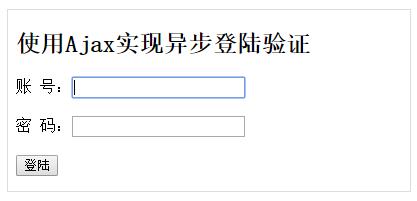
ajax功能:
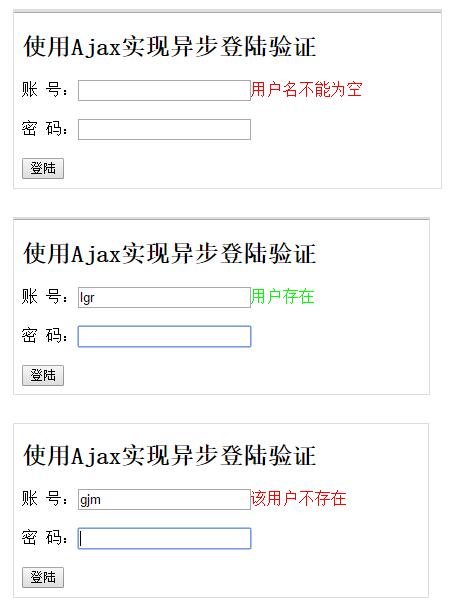
當用戶填寫好賬號切換到密碼框的時候,使用ajax驗證賬號的可用性。檢驗的方法如下:首先創建XMLHTTPRequest對象,然後將需要驗證的信息(用戶名)發送到服務器端進行驗證,最後根據服務器返回狀態判斷用戶名是否可用。
function checkAccount(){
var xmlhttp;
var name = document.getElementById("account").value;
if (window.XMLHttpRequest)
 xmlhttp=new XMLHttpRequest();
else
 xmlhttp=new ActiveXObject("Microsoft.XMLHTTP");

xmlhttp.open("GET","login.php?account="+name,true);
xmlhttp.send();

xmlhttp.onreadystatechange=function(){
 if (xmlhttp.readyState==4 && xmlhttp.status==200)
  document.getElementById("accountStatus").innerHTML=xmlhttp.responseText;
}
運行結果
代碼實現
index.html
<!DOCTYPE html>
<html>
<head>
<meta charset="UTF-8">
<title>Ajax登陸驗證</title>
<script type="text/javascript">
function checkAccount(){
var xmlhttp;
var name = document.getElementById("account").value;
if (window.XMLHttpRequest)
 xmlhttp=new XMLHttpRequest();
else
 xmlhttp=new ActiveXObject("Microsoft.XMLHTTP");

xmlhttp.open("GET","login.php?account="+name,true);
xmlhttp.send();

xmlhttp.onreadystatechange=function(){
 if (xmlhttp.readyState==4 && xmlhttp.status==200)
  document.getElementById("accountStatus").innerHTML=xmlhttp.responseText;
}
}
</script>
</head>
<body>
<div id="content">
<h2>使用Ajax實現異步登陸驗證</h2>
<form>
賬 號:<input type="text" id="account" autofocus required onblur="checkAccount()"></input><span id="accountStatus"></span><br><br>
密 碼:<input type="password" id="password" required></input><span id="passwordStatus"></span><br><br>
<input type="submit" value="登陸"></input>
</form>
</div>
</body>
</html>
login.php
<?php
  $con = mysqli_connect("localhost","root","GDHL007","sysu");

  if(!empty($_GET['account'])){
    $sql1 = 'select * from login where account = "'.$_GET['account'].'"';
    //數據庫操作
    $result1 = mysqli_query($con,$sql1);
    if(mysqli_num_rows($result1)>0)
      echo '<font style="color:#00FF00;">該用戶存在</font>';
    else
      echo '<font style="color:#FF0000;">該用戶不存在</font>';
    mysqli_close($con);
  }else
    echo '<font style="color:#FF0000;">用戶名不能為空</font>';

?>
以上就是本文的全部內容,希望對大家的學習有所幫助。
小編推薦
熱門推薦