AJAX實現無刷新檢測用戶名功能
編輯:AJAX基礎知識
先來看看原理圖
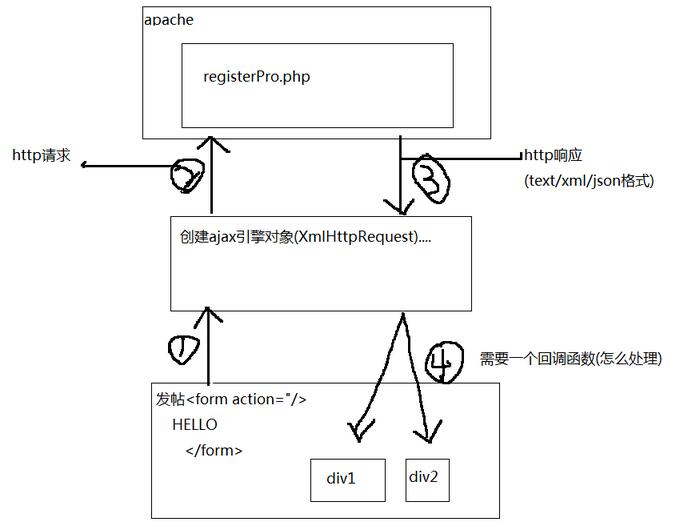
register.php
<!DOCTYPE html>
<html>
 <head>
  <meta charset="utf-8" />
  <title>ajax無刷新檢測</title>
  <style type="text/css">
   body{margin:0;padding:0;}.content{width:800px;margin:0 auto;}ul,li{list-style: none;margin:0;padding:0;}
   tr{width:200px;}td{width:80px;padding:5px 0;}td input,textarea{border: 1px solid #79ABFE;}
  </style>
 </head>
 <body>
  <div class="content">
   <script>
    myXmlHttpRequest.ContentType=("text/xml;charset=UTF-8");
    //創建ajax引擎(1號線)
    function getXmlHttpObject(){
     var xmlHttpRequest;
     //不同浏覽器獲取對象xmlHttpRequest方法不一樣
     if(window.ActiveXObject){
      xmlHttpRequest=new ActiveXObject("Microsoft.XMLHTTP");
     }else{
      xmlHttpRequest=new XMLHttpRequest();
     }
     return xmlHttpRequest;
    }
    //驗證用戶名是否存在
    var myXmlHttpRequest="";//因為chuli也用到了,所以要定義為全局變量
    //創建方法(2號線 http請求)
    function checkName(){
     //創建對象
     myXmlHttpRequest=getXmlHttpObject();
     //判斷是否創建ok
     if(myXmlHttpRequest){
      //通過myXmlHttpRequest對象發送請求到服務器的某個頁面
      var url="./registerPro1.php";
      //要發送的數據
      var data="username="+$('username').value;
      //打開請求
      myXmlHttpRequest.open("post",url,true);//ture表示使用異步機制
      //POST方法
      myXmlHttpRequest.setRequestHeader("Content-Type","application/x-www-form-urlencoded");
      //指定回調函數,chuli是函數名(registerPro裡的數據返回給chuli函數)
      myXmlHttpRequest.onreadystatechange=chuli;
      //開始發送數據,如果是get請求則填入null即可,如果是post請求則填入實際的數據
      myXmlHttpRequest.send(data);
     }
    }
    //回調函數(4號線)
    function chuli(){
     //取出從registerPro.php頁面返回的數據(4表示完成,200表示成功)
     if(myXmlHttpRequest.readyState==4){
      if(myXmlHttpRequest.status==200){
      //①、取出值,根據返回信息的格式定 text(html)
      //$('result').value=myXmlHttpRequest.responseText;
      //②、取出xml格式數據(解析)
      //獲取mes節點、這裡的mes返回的是節點列表(不知道有幾個mes)
      //var mes=myXmlHttpRequest.responseXML.getElementsByTagName("mes");
      //取出mes節點值
      //mes[0]->表示取出第一個mes節點
      //mes[0].childNodes[0]->表示取出mes節點的第一個子節點
      //var mes_val=mes[0].childNodes[0].nodeValue;
      //$("result").value=mes_val;
      //③、json格式
      //var mes=myXmlHttpRequest.responseText;
      //使用eval函數,將mes字串轉為對象
      //var mes_obj=eval("("+mes+")");
      //$('result').value=mes_obj.res;
      //③+、json格式擴展
      var mes=myXmlHttpRequest.responseText;
      var mes_obj=eval("("+mes+")");
      $('result').value=mes_obj[0].res;
      }
     }
    }
    //封裝一個函數,通過id號獲取對象
    function $(id){
     return document.getElementById(id);
    }
   </script>
   <br/>
   <strong style="color:red">發表留言</strong>
   <form action="#" method="POST" name="frm">
   <table cellpadding="0" cellspacing="0" >
    <tr>
     <td >留言標題:</td>
     <td><input type="text" name="title" autocomplete="off"/></td>
    </tr>
    <tr>
     <td>網名:</td>
     <td>
      <input id="username" onkeyup="checkName();" type="text" name="username" autocomplete="off"/>
      <td><input id="result" type="text" style="width:110px;font-size: 12px;border-width:0;" ></td>
     </td>
    </tr>
    <tr>
     <td>留言內容:</td>
     <td><textarea name="content" cols="26" rows="5" autocomplete="off"/ onclick="showNotice(this)"></textarea></td>
    </tr>
    <tr>
     <td></td>
     <td><input class="btn" type="submit" name="submit" value="提交"/></td>
    </tr>
   </table>
   </form>
  </div>
 </body>
</html>
registerPro1.php
<?php
 //將數據(text格式,xml格式,json格式)返回到ajax引擎(3號線 http響應 )

 //header("Content-Type: text/xml; charset=utf-8"); //告訴浏覽器,返回的是xml格式
 header("Content-Type: text/html; charset=utf-8"); //告訴浏覽器,返回的是text/json格式
 $username = $_POST["username"];
 //①
// if($username=="abc"){
//  echo '網名不可用';
// }else{
//  echo '網名可用';
// }
 //②
// $info="";
// if($username=="abc"){
//  $info.="<res><mes>網名不可用</mes></res>";
// }else{
//  $info.="<res><mes>網名可用</mes></res>";
// }
// echo $info;
 //③
// $info="";
// if($username=="abc"){
//  //這裡的$info返回的是一個字串
//  $info.='{"res":"不可用","id":"123","age":"5"}';
// }else{
//  $info.='{"res":"可用","id":"3","age":"1"}';
// }
// echo $info;
 //③+
 $info="";
 if($username=="abc"){
  //這裡的$info返回的是一個字串
  $info.='[{"res":"不可用","id":"123","age":"5"},{"res":"abc不可用","id":"3","age":"0"}]';
 }else{
  $info.='[{"res":"可用","id":"1","age":"15"},{"res":"可用","id":"83","age":"9"}]';
 }
 echo $info;
?>
效果圖:
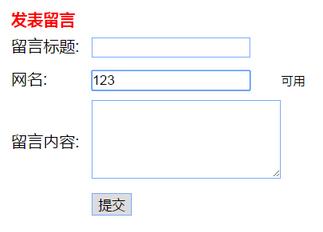
以上就是本文的全部內容,希望對大家的學習有所幫助,也希望大家多多支持。
小編推薦
熱門推薦