用 Bootstrap 美化 Ajax 頁面:載入、刪除與詳情彈窗
編輯:AJAX基礎知識
同一份功能,加上 Bootstrap 之後賣相完全不同。本篇在既有的 Ajax 載入/刪除功能上,補上 Bootstrap 的條紋表格、按鈕樣式,以及用 Modal 顯示「查看詳情」。
Bootstrap 是什麼
Bootstrap 是 Twitter 推出的開源前端開發工具包,由設計師 Mark Otto 與 Jacob Thornton 合作開發,本質上是一套 CSS/HTML 框架,以動態 CSS 語言 Less 撰寫。它提供了一整套優雅的 HTML 與 CSS 規範,只要掛上預先定義好的 class 名稱,就能得到相當像樣的畫面,而且原生支援響應式。專案在 GitHub 上長期熱門,NASA 與 MSNBC 的新聞網站都採用過。
引入檔案
<link href="dist/css/bootstrap.min.css" rel="stylesheet" type="text/css" />
<script src="jquery-1.11.2.min.js"></script>
<script src="dist/js/bootstrap.min.js"></script>
如果引用的是包含 jQuery 的複合 JS 檔,jQuery 一定要放在第一個,否則會出現 Bootstrap 依賴不到 jQuery 的錯誤。
美化表格
加上 table 與 table-striped 兩個 class 就有條紋效果:
<table class="table table-striped">
<thead>
<tr>
<td>代號</td>
<td>名稱</td>
<td>操作</td>
</tr>
</thead>
<tbody id="td">
</tbody>
</table>
加上詳情按鈕並套用樣式
$.ajax({
    url: "jiazai.php",
    dataType: "TEXT",
    success: function (data) {
        var str = "";
        var hang = data.split("|");
        for (var i = 0; i < hang.length; i++) {
            var lie = hang[i].split("-");
            str = str + "<tr><td>" + lie[0] + "</td><td>" + lie[1] + "</td><td>"
                + "<button type='button' class='btn btn-info sc' ids='" + lie[0] + "'>點擊刪除</button>"
                + "<button type='button' class='btn btn-primary xq' ids='" + lie[0] + "'>查看詳情</button>"
                + "</td></tr>";
        }
        $("#td").html(str);
        addshanchu();
        addxiangqing();
    }
});
查看詳情的點擊事件
點下去先彈出 Modal,再用 Ajax 撈該筆資料填入:
// 為「查看詳情」綁事件
function addxiangqing() {
    $(".xq").click(function () {
        $('#myModal').modal('show');       // 打開模態框
        var ids = $(this).attr("ids");
        $.ajax({
            url: "xiangqing.php",
            data: { ids: ids },
            dataType: "TEXT",
            type: "POST",
            success: function (data) {
                var lie = data.split("^");
                var str = "<div>代號:" + lie[0] + "</div><div>名稱:" + lie[1] + "</div>";
                $("#nr").html(str);
            }
        });
    });
}
詳情處理頁
<?php
$ids = $_POST["ids"];
include("db.class.php");
$db = new db();
$sql = "select * from min where ids = '{$ids}'";
echo $db->strQuery($sql);
拼接字串與輸出都封裝進類別的 strQuery(),這裡只要呼叫即可。
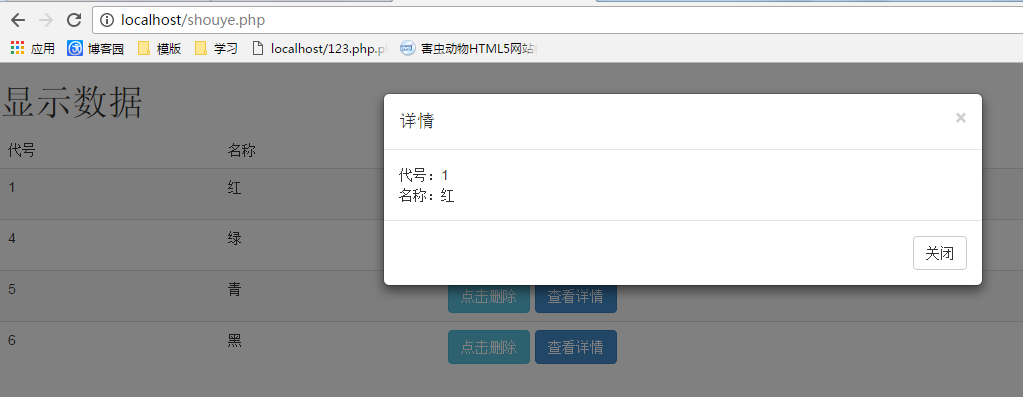
表格頁完整程式碼
<!DOCTYPE html PUBLIC "-//W3C//DTD XHTML 1.0 Transitional//EN" "https://www.w3.org/TR/xhtml1/DTD/xhtml1-transitional.dtd">
<html xmlns="https://www.w3.org/1999/xhtml">
<head>
<meta http-equiv="Content-Type" content="text/html; charset=utf-8" />
<title>顯示資料</title>
<link href="dist/css/bootstrap.min.css" rel="stylesheet" type="text/css" />
<script src="jquery-1.11.2.min.js"></script>
<script src="dist/js/bootstrap.min.js"></script>
<style type="text/css">
.xq { margin-left: 5px; }
</style>
</head>
<body>
<h1>顯示資料</h1>
<table class="table table-striped">
<thead>
<tr>
<td>代號</td>
<td>名稱</td>
<td>操作</td>
</tr>
</thead>
<tbody id="td">
</tbody>
</table>
<!-- 模態框(Modal) -->
<div class="modal fade" id="myModal" tabindex="-1" role="dialog" aria-labelledby="myModalLabel" aria-hidden="true">
<div class="modal-dialog">
<div class="modal-content">
<div class="modal-header">
<button type="button" class="close" data-dismiss="modal" aria-hidden="true">×</button>
<h4 class="modal-title" id="myModalLabel">詳情</h4>
</div>
<div class="modal-body" id="nr">
</div>
<div class="modal-footer">
<button type="button" class="btn btn-default" data-dismiss="modal">關閉</button>
</div>
</div>
<!-- /.modal-content -->
</div>
<!-- /.modal -->
</body>
</html>
<script>
load();
function load() {
$.ajax({
url: "jiazai.php",
dataType: "TEXT",
success: function (data) {
var str = "";
var hang = data.split("|");
for (var i = 0; i < hang.length; i++) {
var lie = hang[i].split("-");
str = str + "<tr><td>" + lie[0] + "</td><td>" + lie[1] + "</td><td>"
+ "<button type='button' class='btn btn-info sc' ids='" + lie[0] + "'>點擊刪除</button>"
+ "<button type='button' class='btn btn-primary xq' ids='" + lie[0] + "'>查看詳情</button>"
+ "</td></tr>";
}
$("#td").html(str);
addshanchu();
addxiangqing();
}
});
}
// 查看詳情
function addxiangqing() {
$(".xq").click(function () {
$('#myModal').modal('show');
var ids = $(this).attr("ids");
$.ajax({
url: "xiangqing.php",
data: { ids: ids },
dataType: "TEXT",
type: "POST",
success: function (data) {
var lie = data.split("^");
var str = "<div>代號:" + lie[0] + "</div><div>名稱:" + lie[1] + "</div>";
$("#nr").html(str);
}
});
});
}
// 刪除
function addshanchu() {
$(".sc").click(function () {
var ids = $(this).attr("ids");
$.ajax({
url: "shanchu.php",
data: { ids: ids },
dataType: "TEXT",
type: "POST",
success: function (d) {
if (d.trim() == "ok") {
alert("刪除成功");
load();
} else {
alert("刪除失敗");
}
}
});
});
}
</script>
後端三個處理頁
載入
<?php
include("db.class.php");
$db = new db();
$sql = "select * from min";
$arr = $db->Query($sql);
$str = "";
foreach ($arr as $v) {
    $str = $str . implode("-", $v) . "|";
}
$str = substr($str, 0, strlen($str) - 1);   // 去掉最後多出的分隔符
echo $str;
刪除
<?php
include("db.class.php");
$db = new db();
$ids = $_POST["ids"];
$sql = "delete from min WHERE ids='{$ids}'";
if ($db->Query($sql, 0)) {
    echo "ok";
} else {
    echo "no";
}
詳情
<?php
$ids = $_POST["ids"];
include("db.class.php");
$db = new db();
$sql = "select * from min where ids = '{$ids}'";
echo $db->strQuery($sql);
套上 Bootstrap 之後,畫面比手寫樣式清爽不少,模態框也省下了自己寫遮罩與定位的功夫。以上就是 Ajax 搭配 Bootstrap 的完整實作,希望對大家有幫助。
- 上一篇文章: Ajax 實作資料列表的動態載入與刪除
- 下一篇文章: Ajax 入門觀念與登入表單實作教學