jQuery + Ajax 即時驗證圖形驗證碼並顯示對錯圖示
編輯:AJAX基礎知識
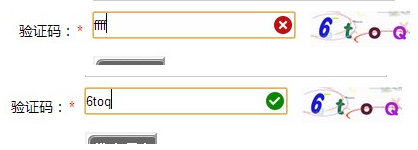
驗證碼輸入欄位若能即時回饋對錯,使用者不必等到送出表單才發現打錯。做法是在輸入框的 keyup 事件中判斷長度,一旦填滿就發送 Ajax 到後端比對,再依結果切換提示圖示。
核心腳本
 <script src="js/j.js"></script>
<script>
$(document).ready(function(e) {
  $('#yes').hide();
  $('#no').hide();
  $('input[name=gcode]').keyup(function(){
    if($(this).val().length==4){
      $.post('gbook.php',{cc:$('input[name=gcode]').val()},function(msg){
        if(msg=='yes'){
          $('#no').hide();
          $('#yes').show();
        }else{
          $('#yes').hide();
          $("#no").show();
        }
      });
    }
  });
});
</script>
頁面初始化時先把兩個圖示藏起來,避免閃現;每次按鍵都檢查長度是否已滿四位,滿了才發請求,如此可以省下大量無效查詢。
對錯圖示的樣式
 .sl-error-verifycode {
  background-image: url("images/icons.png");
  background-position: -26px 0;
  background-repeat: no-repeat;
  display: block;
  font-size: 18px;
  height: 23px;
  line-height: 20px;
  margin-left: 180px;
  margin-top: -25px;
  position: relative;
  text-align: center;
  width: 20px;
  z-index: 2;
}
.sl-correct-verifycode {
  background-image: url("images/icons.png");
  background-position: -50px 0;
  background-repeat: no-repeat;
  display: block;
  font-size: 18px;
  height: 23px;
  line-height: 20px;
  margin-left: 180px;
  margin-top: -25px;
  position: relative;
  text-align: center;
  width: 20px;
  z-index: 2;
}
兩個 class 共用同一張雪碧圖,只靠 background-position 的水平偏移切出不同圖示,這是減少 HTTP 請求的常見手法。
表單結構
 <tr>
<td height="40" align="right">驗證碼:</td>
<td height="40"><span class="addred">*</span></td>
<td height="40">
<input type="text" name="gcode" id="textfield7" class="txtlist">
<span id="yes" class="sl-correct-verifycode"></span><span id="no" class="sl-error-verifycode"></span>
<img style="float:right; margin-top:-25px; margin-right:300px;" align="middle" src="inc/cc.php" onClick="this.src='inc/cc.php?'+new Date" title="點擊換一張圖片" width="100px"></td>
</tr>
換圖的技巧值得記下:this.src='inc/cc.php?'+new Date。由於同一個 URL 會被瀏覽器快取,加上時間戳參數就能強制重新請求,得到一張新驗證碼。
後端比對:gbook.php
 <?php
session_start();
if(isset($_POST['cc'])){
  $cc = strtolower($_POST['cc']);
  $ss = strtolower($_SESSION['code']);
  if($cc==$ss){
    echo "yes";
  }else{
    echo "no";
  }
}
兩邊都轉成小寫再比對,是為了讓驗證碼不區分大小寫,符合多數使用習慣。記得圖片檔(icons.png)的路徑要正確,否則只會看到空白。
補充一個安全提醒:真正送出表單時,後端仍必須重新比對一次 session 中的驗證碼,前端的即時提示只是使用者體驗,不能作為驗證依據。
- 上一篇文章: 用 Ajax 的 beforeSend 與 complete 做資料載入提示
- 下一篇文章: Ajax 與跨域問題深入解析