仿京東購物車結算頁:Ajax + JSON 資料互動實作
編輯:AJAX基礎知識
這是一個仿京東風格的購物車結算頁練習,重點在於「用 Ajax 讀取 JSON 產生商品列」以及「數量增減後即時重算小計與總價」。
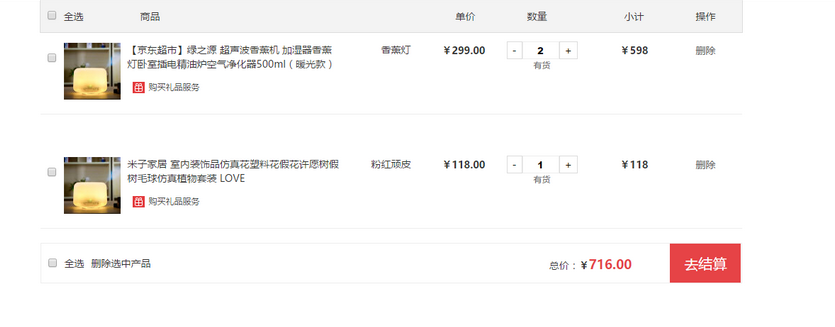
頁面結構
<div class="goodsList_menu">
<div class="goodsList">
<div class="goodsListfl">
<input class="fl" style="margin:15px 10px 0 10px;" type="checkbox" name="" />
<ul>
<li>全選</li>
<li>商品</li>
</ul>
</div>
<div class="goodsListfr fr">
<ul>
<li>單價</li>
<li class="w100">數量</li>
<li class="w100">小計</li>
<li>操作</li>
</ul>
</div>
</div>

<!-- 內容 -->
<div class='goodsListbox'></div>

<div class="checkout">
<div class="checkoutleft">
<input class="fl" style="margin:21px 10px 0 10px;" type="checkbox" name="" />
<ul>
<li>全選</li>
<li>刪除選中產品</li>
</ul>
</div>
<div class="checkoutright fr">
<span>總價:<b>¥</b></span><span class="checkoutSum">0</span>
<input type="button" value="去結算" />
</div>
</div>
</div>
樣式
body, html, ul, li, a {
    margin: 0; padding: 0;
    font-family: "microsoft yahei";
    list-style: none;
    text-decoration: none;
}
.fl { float: left; }
.fr { float: right; }
.f12 { font-size: 12px; }
.disl { display: inline-block; }
.w100 { width: 100px; }
.fw { font-weight: bold; }

.goodsList_menu {
    width: 990px; height: 45px; background: #f3f3f3;
    margin: 0 auto; line-height: 45px;
    font-size: 14px; color: #333; border: 1px solid #ddd;
}
.goodsList_menu .goodsListfl ul li { float: left; margin-right: 80px; cursor: pointer; }
.goodsList_menu .goodsListfr ul li { float: left; margin-right: 37px; text-align: center; cursor: pointer; }

/* 內容 */
.goodsList_content {
    width: 100%; height: 80px;
    border-bottom: 1px solid #eee;
    padding: 20px 0; margin-top: 40px;
}
.goodsList_content .disl { line-height: 20px; width: 300px; cursor: pointer; margin-left: 10px; }
.goodsList_content .disl span:hover { color: #e4393c; }
.goodsList_content .disl p:hover { color: #e4393c; }

.goodsListnum .listNum {
    height: 21px; width: 50px;
    border: 1px solid #eee; text-align: center; outline: none;
}
.goodsListnum ul li { float: left; margin-right: 30px; text-align: center; cursor: pointer; }
.goodsListnum ul li a { border: 1px solid #ddd; padding: 2px 7px; color: #000; }
.goodsListnum ul li p { line-height: 0; color: #666; font-size: 12px; margin-top: -2px; }

.buy_goods p {
    background: url(../images/arrow.png) no-repeat;
    padding-left: 30px; background-position: -20px -20px;
}
.buy_goods { position: relative; }

/* 底部結賬 */
.checkout { height: 55px; border: 1px solid #eee; margin-top: 20px; line-height: 55px; }
.checkout .checkoutleft ul li { float: left; margin-right: 10px; cursor: pointer; }
.checkout .checkoutSum { font-weight: bold; font-size: 18px; color: #e64346; }
.checkout .checkoutright input {
    border: none; color: #fff; outline: none;
    width: 100px; height: 55px; line-height: 55px;
    font-size: 20px; background: #e64346;
    margin-left: 50px; cursor: pointer;
}
Ajax 取資料與數量計算
<script>
$.ajax({
    type: "get",
    url: "jd.json",
    dataType: "json",
    success: function (data) {
        var list = data.list;      // 拿到 list 陣列
        for (var i = 0; i < list.length; i++) {
            var numArray = list[i];
            numArray.price = (numArray.price).toFixed(2);

            var text = "<div class='goodsList_content'>"
                + "<div class='fl buy_goods'>"
                + "<input class='fl' style='margin:15px 10px 0 10px;' type='checkbox' name='' />"
                + "<img align='top' src='images/1.jpg' /><div class='disl'>"
                + "<span>" + numArray.description + "</span>"
                + "<p class='f12'>購買禮品服務</p></div>"
                + "<div class='disl' style='width:auto;position:absolute;right:-100px;top:0;'>"
                + "<span>" + numArray.color + "</span></div></div>"
                + "<div class='fr goodsListnum' style='margin-top:-12px;'><ul>"
                + "<li><b>¥</b><span class='fw'>" + numArray.price + "</span></li>"
                + "<li class='w100'>"
                + "<a class='minus' onClick='minus(this);' href='javascript:void(0);'>-</a>"
                + "<input value='1' class='listNum' />"
                + "<a class='add' onClick='add(this)' href='javascript:void(0);'>+</a>"
                + "<p>有貨</p></li>"
                + "<li class='w100'><b>¥</b><span id='sub' class='fw'>"
                + (numArray.price * numArray.quentity).toFixed(2) + "</span></li>"
                + "<li><a style='border:none;color:#666;' href='javascript:void(0);'>刪除</a></li>"
                + "</ul></div></div>";

            $(text).appendTo(".goodsListbox");
        }
    },
    error: function () {
        console.log("調用數據失敗!");
    }
});

var listNum, price, sums, sub1, sub2;

function add(obj) {
    listNum = parseInt($(obj).prev().val());
    var num = listNum + 1;
    $(obj).prev().val(num);

    price = $(obj).parent().prev().children('span').text();   // 找到單價
    price = parseFloat(price);

    $(obj).parent().next().children('span').text((price * num).toFixed(2));
    sumTotal();
}

function minus(obj) {
    listNum = parseInt($(obj).next().val());
    if (listNum <= 1) {
        listNum = 1;
    } else {
        --listNum;
    }
    $(obj).next().val(listNum);

    price = $(obj).parent().prev().children('span').text();
    price = parseFloat(price);

    $(obj).parent().next().children('span').text((price * listNum).toFixed(2));
    sumTotal();
}

// 重新累加所有小計
function sumTotal() {
    var total = 0;
    $(".goodsList_content").each(function () {
        total += parseFloat($(this).find("#sub").text()) || 0;
    });
    $(".checkoutright .checkoutSum").text(total.toFixed(2));
}
</script>
由於時間因素,這份程式碼沒有做完整的物件化重構,但效果已經先呈現出來。實際上原範例在加總時寫死了 $(".goodsList_content:eq(0)") 與 :eq(1) 兩列,商品數量一變就會算錯;上面改成用 each() 遍歷全部列,才是比較可靠的做法。另外,金額計算應以「分」為單位用整數運算,避免浮點數誤差。
希望這個範例可以幫到更多技術愛好者與朋友!
- 上一篇文章: 用 Promise 拆解多個 Ajax 請求造成的程式碼巢狀
- 下一篇文章: 基於 Blob 的 Ajax 檔案下載與進度條實作