原生 JavaScript 實作 Tab 選項卡切換功能
編輯:關於JavaScript
本文分享以純原生 JavaScript 打造 Tab 選項卡切換的完整實作,程式碼簡潔且相容性佳。
取得類名元素的方法
先來看取得類名元素的關鍵函式:
getByClassName:function(className,parent){
  var elem = [],
      node = parent != undefined && parent.nodeType==1 ? parent.getElementsByTagName('*') : document.getElementsByTagName('*'),
      p = new RegExp("(^|\\s)"+className+"(\\s|$)");
  for(var n=0,i=node.length;n<i;n++){
    if(p.test(node[n].className)){ elem.push(node[n]); }
  }
  return elem;
}
其中 parent 參數是可選的,使用前需先判斷它是否存在且為 DOM 元素:parent != undefined && parent.nodeType==1。nodeType == 1 可判斷節點是否為 DOM 元素,藉此排除空白節點(在 Firefox 中空白也會被視為節點)。
移除元素類名
var cur = new RegExp(this.sCur,'g'); // this.sCur 即類名,如 this.sCur = "cur";
this.oTab_btn[n].className = this.oTab_btn[n].className.replace(cur,'');
呼叫範例
<!doctype html>
<html lang="en">
<head>
  <meta charset="UTF-8">
  <title>Document</title>
  <style type="text/css">
  body,p,ul,li {padding: 0;margin: 0;}
  ul {list-style: none;}
  h3 {padding: 5px;background-color: #999;margin-bottom: 10px;}
  .box {width: 300px;height:100px;border: 1px solid #ccc;}
  .box ul{height: 30px;line-height: 30px;}
  .box ul li {float: left;display: inline;width: 150px;text-align: center;background-color: #eee;cursor: pointer;}
  .box .tab-cur {background-color: #000;color: #fff;}
  .box p {display: none;padding: 30px;}
  #tabB {width: 450px;}
  .box .tab-cur02 {background-color: #025023;}
  </style>
</head>
<body>
  <h3>tabA</h3>
  <div class="box" id="tabA">
    <ul>
      <li class="tab-i">btn-A</li>
      <li class="tab-i">btn-B</li>
    </ul>
    <p class="tab-c">con-A</p>
    <p class="tab-c">con-B</p>
  </div>
  <h3>tabB</h3>
  <div class="box" id="tabB">
    <ul>
      <li class="tab-i">btn-A</li>
      <li class="tab-i">btn-B</li>
      <li class="tab-i">btn-C</li>
    </ul>
    <p class="tab-k">con-A</p>
    <p class="tab-k">con-B</p>
    <p class="tab-k">con-C</p>
  </div>
  <script type="text/javascript" src="下方程式碼段.js"></script>
  <script type="text/javascript">
  new LGY_tab({'tabBtn':'#tabA .tab-i','tabCon':'#tabA .tab-c','cur':'tab-cur'});
  new LGY_tab({'tabBtn':'#tabB .tab-i','tabCon':'#tabB .tab-k','cur':'tab-cur02','type':'mouseover'});
  </script>
</body>
</html>
JavaScript 詳細程式碼
function LGY_tab(option){
  this.oTab_btn = this.getDom(option.tabBtn); // 切換點擊的元素
  this.oTab_clist = this.getDom(option.tabCon); // 切換的內容
  if(!this.oTab_btn || !this.oTab_clist) return;
  this.sCur = option.cur; // 啟用狀態的類名
  this.type = option.type || 'click';
  this.nLen = this.oTab_btn.length;
  this.int();
}
LGY_tab.prototype = {
  getId:function(id){ return document.getElementById(id); },
  getByClassName:function(className,parent){
    var elem = [],
        node = parent != undefined && parent.nodeType==1 ? parent.getElementsByTagName('*') : document.getElementsByTagName('*'),
        p = new RegExp("(^|\\s)"+className+"(\\s|$)");
    for(var n=0,i=node.length;n<i;n++){
      if(p.test(node[n].className)){ elem.push(node[n]); }
    }
    return elem;
  },
  getDom:function(s){
    var nodeName = s.split(' '),
        p = this.getId(nodeName[0].slice(1)),
        c = this.getByClassName(nodeName[1].slice(1),p);
    if(!p || c.length==0) return null;
    return c;
  },
  change:function(){
    var cur = new RegExp(this.sCur,'g');
    for(var n=0;n<this.nLen;n++){
      this.oTab_clist[n].style.display = 'none';
      this.oTab_btn[n].className = this.oTab_btn[n].className.replace(cur,'');
    }
  },
  int:function(){
    var that = this;
    this.oTab_btn[0].className += ' '+this.sCur;
    this.oTab_clist[0].style.display = 'block';
    for(var n=0;n<this.nLen;n++){
      this.oTab_btn[n].index = n;
      this.oTab_btn[n]['on'+this.type] = function(){
        that.change();
        that.oTab_btn[this.index].className += ' ' + that.sCur;
        that.oTab_clist[this.index].style.display = 'block';
      }
    }
  }
}
最終效果圖展示:
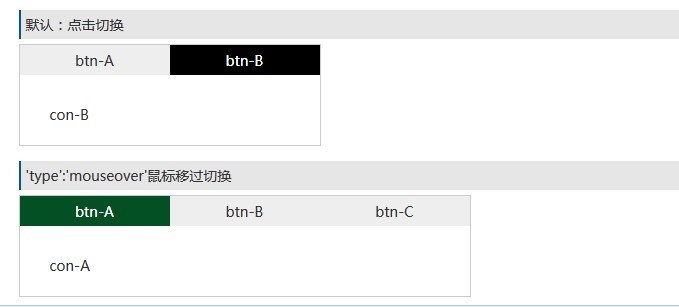
效果相當出色,相容性也不錯,程式碼更是簡潔,足以取代龐大的 jQuery 選項卡插件。
- 上一篇文章: DOM 節點替換與修改 replaceChild() 用法實解
- 下一篇文章: 推薦 4 個實用的原生 JavaScript 常用函式