用 JavaScript 正則表達式打造密碼強度即時檢測
編輯:關於JavaScript
註冊與登入頁面上,密碼強度提示幾乎是標配。本文帶你用 JavaScript 搭配正則表達式,做出一個能即時回饋密碼強弱的小範例,讓使用者在輸入的當下就能看見結果。
功能設計
整個判斷邏輯可以拆成兩大部分:
1、長度校驗:密碼必須介於 6 到 16 個字元之間。少於 6 個或超過 16 個都要給出提示,此時不顯示強度;如果完全沒有輸入,同樣要提醒使用者。
2、強度判定:當長度落在 6 到 16 字元之間時,若密碼全是數字或全是字母,判定為「弱」;數字與字母的組合判定為「強」;字母、數字再加上底線的組合,同樣屬於「強」。
效果預覽:


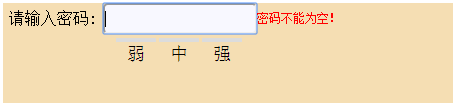

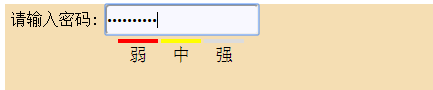
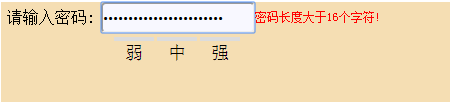
完整程式碼:
<!DOCTYPE html> <html> <head> <meta charset="utf-8"> <title></title> <style> .mm-body{ position: relative; height: 100px; width: 450px; background-color: wheat; } .mm-top{ height:35px; width: 450px; background-color: wheat; } .mm-sr{ height:30px; width: 100px; float: left; text-align: center; line-height: 30px; } #mm-pwd{ float: left; height:25px; background-color: ghostwhite; border-radius: 5px; width: 150px; } .mm-btm{ height: 40px; width: 140px; position: relative; margin-left: 110px; } #lv1,#lv2,#lv3{ height: 30px; width: 40px; border-top: 4px solid gainsboro; margin-left: 3px; float: left; font-size: 18px; text-align: center; line-height: 25px; } </style> </head> <body> <div class="mm-body"> <div class="mm-top"> <span class="mm-sr">請輸入密碼:</span> <form method="get" action="data.html" > <input type="password" id="mm-pwd" onkeyup="show()"/> </form> <span id="mm-pd"style="color: red; font-size: 12px; line-height: 30px;"></span> </div> <div class="mm-btm"> <div id="lv1">弱</div> <div id="lv2">中</div> <div id="lv3">強</div> <!--強度判斷也可用表格做 <table border="0px" cellpadding="0px" cellspacing="1px" > <tr height="20px" > <td width="40px" id="lv1" style="border-top: 3px solid darkgrey;">弱</td> <td width="40px" id="lv2" style="border-top: 3px solid darkgrey;">中</td> <td width="40px" id="lv3" style="border-top: 3px solid darkgrey;">強</td> </tr> </table>--> </div> </div> </body> </html> <script language="JavaScript"> function show(){ var a=document.getElementById("mm-pwd").value; if(a.length==0){ document.getElementById("mm-pd").innerHTML="密碼不能為空!"; } else if(a.length<6){ document.getElementById("mm-pd").innerHTML="密碼長度小於6個字符!"; } else if(a.length>=6&&a.length<=16){ document.getElementById("mm-pd").innerHTML=""; var reg=/^[0-9]{6,16}$|^[a-zA-Z]{6,16}$/; //全是數字或全是字母 6-16個字符 var reg1=/^[A-Za-z0-9]{6,16}$/; //數字、26個英文字母 6-16個字符 var reg2=/^\w{6,16}$/; // 由數字、26個英文字母或者下劃線組成的字符串 6-16個字符 if(a.match(reg)){ document.getElementById("lv1").style.borderTopColor="red"; } else if(a.match(reg1)){ document.getElementById("lv1").style.borderTopColor="red"; document.getElementById("lv2").style.borderTopColor="yellow"; } else if(a.match(reg2)){ document.getElementById("lv1").style.borderTopColor="red"; document.getElementById("lv2").style.borderTopColor="yellow"; document.getElementById("lv3").style.borderTopColor="green"; } } else if(a.length>16){ document.getElementById("mm-pd").innerHTML="密碼長度大於16個字符!"; document.getElementById("lv1").style.borderTopColor="gainsboro"; document.getElementById("lv2").style.borderTopColor="gainsboro"; document.getElementById("lv3").style.borderTopColor="gainsboro"; } } </script>
重點整理
這個範例的關鍵在於三條正則表達式的分工:第一條負責判斷是否為純數字或純字母,第二條涵蓋數字與英文字母的組合,第三條則用 \w 把底線也納入考量。透過 onkeyup 事件即時觸發 show() 函式,就能在每次敲鍵盤時同步更新提示文字與強度色條,操作起來相當順手。
- 上一篇文章: Vue 串接高德地圖:玩轉周邊搜尋功能
- 下一篇文章: Angular 搭配 Node 產生隨機數的實作教學