滑鼠移入時 select 下拉選單點不中的成因與解法
編輯:關於JavaScript
當 hover 顯示的浮層裡含有 select 時,會出現一個惱人的現象:滑鼠移上去、浮層卻在選項被點中之前就先收起了,導致怎麼點都選不到。這個問題的根源在於 mouseout 的觸發時機判斷。
關鍵修正
function(e) {
  var o = e.relatedTarget || e.toElement;   // 滑鼠實際移往的目標
  if (!o) return;                            // 移到 option 上時不隱藏
  // ... 隱藏浮層
}
relatedTarget(標準)與 toElement(舊 IE)代表「滑鼠正要移入的目標」。當使用者在 IE 中把滑鼠移到 option 上時,這個值會是 null;Firefox 等瀏覽器則是 undefined。兩者都是假值,因此 if (!o) return; 一句就能攔下這種情況,讓浮層維持顯示。
完整範例
<!DOCTYPE html PUBLIC "-//W3C//DTD XHTML 1.0 Transitional//EN"
  "https://www.w3.org/TR/xhtml1/DTD/xhtml1-transitional.dtd">
<html xmlns="https://www.w3.org/1999/xhtml">
<head>
<meta http-equiv="Content-Type" content="text/html; charset=utf-8" />
<title>無標題文檔</title>
<style type="text/css">
  * { margin: 0; padding: 0; list-style: none; border: 0; }
  .pop_blue { position: absolute; cursor: pointer; padding: 10px; }
  .pop_blue span {
    display: inline-block; width: 24px; height: 32px;
    background: url(../images/pop_blue.png) no-repeat;
  }
  .map_xf .rud1 {
    width: 210px; position: absolute; border: 1px solid #ddd;
    display: none; background-color: #fff; padding: 17px 25px;
  }
  .map_xf .rud1 li { margin: 0 0 8px; }
  .map_xf .rud1 input, .map_xf .rud1 select { height: 22px; }
</style>
<script type="text/javascript" src="jquery-1.9.1.min.js"></script>
<script type="text/javascript">
$(function(){
  $('.pop_blue').hover(
    function(){
      $(this).find('.rud1').show();
      $(this).css("z-index", "9999");
    },
    function(e){
      var o = e.relatedTarget || e.toElement;
      if (!o) return;                     // 移到 option 上,不隱藏
      $(this).find('.rud1').hide();
      $(this).css("z-index", "0");
    }
  );
});
</script>
</head>
<body>
<div style="position:relative;width:100px;height:100px">
  <div class="pop_blue" style="top:0px; left:0;">
    <span>鼠標移上</span><i></i>
    <div class="rud1 font12" style="top:10px;left:40px; display:none; padding:50px; background:blue;">
      <ul>
        <li>
          <select class="w100" id="dan">
            <option value="1">選擇單元</option>
            <option value="2">選擇單元1</option>
            <option value="3">選擇單元2</option>
            <option value="4">選擇單元3</option>
            <option value="5">選擇單元4</option>
          </select>
        </li>
      </ul>
    </div>
  </div>
</div>
</body>
</html>
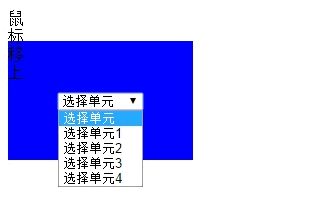
加上這個判斷之後,滑鼠移到 option 上時浮層不會消失,選單就能正常點選了。
更根本的解法
與其逐一判斷 relatedTarget,不如換一個語意更精確的事件。mouseenter 與 mouseleave 不會像 mouseover/mouseout 那樣因為在子元素之間移動而反覆觸發,因此天然就沒有這個問題:
$('.pop_blue').on('mouseenter', function(){
  $(this).find('.rud1').show();
});
$('.pop_blue').on('mouseleave', function(){
  $(this).find('.rud1').hide();
});
另外原範例有五個 option 的 value 全部寫成「選擇單元」,這是無效的設定——送出表單後伺服器無法分辨使用者選了哪一項,每個選項的 value 都應該不同。
最後,若這個浮層是主要互動路徑,建議不要只靠 hover。鍵盤使用者無法觸發 hover,觸控裝置上 hover 也不存在。加上 focus-within 的 CSS 或改用點擊切換,會讓功能更完整。
- 上一篇文章: 用遞迴反轉陣列並串接成字串的實例
- 下一篇文章: 用 JS 與 Flash 在網站中嵌入 FLV 影片播放器
相關文章
-
不用 Flash:用 HTML5 加上滑鼠移入音效 mouseover 與 mouseenter 到底差在哪?用計數實驗看清楚 jQuery 滑過圖片浮出遮罩層:六種進場方向一次滿足 click 與 mousedown、mouseup 的關係及實戰應用 mouseover 與 mouseenter 到底差在哪 mouseover 為什麼會反覆觸發,以及怎麼繞開它 jQuery 中 hover 效果與事件委派的正確寫法 為什麼 trigger('hover') 不會動?改用 mouseenter 就解決 用 jQuery 做五星評分:滑過幾顆就亮幾顆 JavaScript 與 jQuery 的滑鼠事件冒泡行為整理