JSON.stringify 轉換日期時間不準確的解決方法
編輯:關於JavaScript
呼叫 JSON.stringify 將物件轉為字串時,如果物件中包含時間物件,時間會被轉換為國際標準時間(ISO),而非當前國家區域的時間。測試程式碼如下:
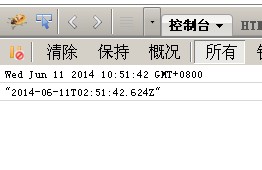
<script>
  // var o = new Date();
  // console.log(o.toString());       // 中國時區時間,格式如 "Wed Jun 11 2014 10:51:42 GMT+0800"
  // console.log(JSON.stringify(o));  // 輸出國際標準時間(ISO),少了 8 個小時,格式如 "2014-06-11T02:51:42.624Z"
</script>
若想讓 JSON.stringify 轉換日期物件 Date 時回傳當前所在國家的時區,而非國際標準時間,可以重寫 Date 物件的 prototype 上的 toJSON 方法,回傳自訂的時間格式——因為 JSON.stringify 呼叫的正是 Date 物件的 toJSON 方法。示例如下:
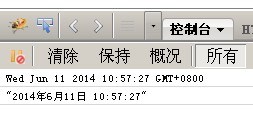
<script>
  Date.prototype.toJSON = function () { return this.toLocaleString(); }
  var o = new Date();
  console.log(o.toString());      // 預設格式:"Wed Jun 11 2014 10:51:42 GMT+0800"
  console.log(JSON.stringify(o)); // 輸出自訂的本地時間:"2014年6月11日 10:57:27"
</script>
透過覆寫 toJSON,就能讓序列化後的日期以本地時區格式呈現,避免少了八小時的困擾。
- 上一篇文章: JavaScript 父子頁面互動技巧總結
- 下一篇文章: JavaScript 事件監聽與事件捕獲機制詳解
相關文章
-
HTML5 localStorage 使用全攻略:從優勢局限到增刪改查 在JavaScript中使用json2.js序列化為JSON 動手擴充jQuery的JSON處理能力 淺談 JSON.parse()、JSON.stringify() 與 eval() 的分工與風險 JSON 物件入門:定義、訪問與遍歷 用 jQuery 自製 JSON.stringify:jQstringify 方法實作 字串與 JSON 互相轉換:JSON2.js 與原生方法的實測對照 手寫一個 JsonToString 對象序列化函數 前台 JS 物件如何轉換為後台 Java 物件 用JavaScript生成JSON資料的簡單做法