簡單美觀的可拖曳 JS 彈窗(相容多數瀏覽器)
編輯:關於JavaScript
做了一個外觀清爽、標題列可拖曳的彈窗元件,搭配遮罩層與確定/取消/關閉三種回呼,並以 jQuery 簡化事件綁定。
效果預覽
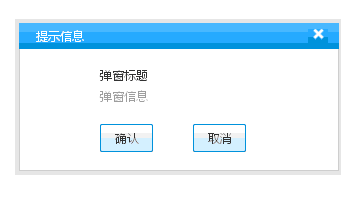
拖曳函數
// drag(obj [, scroll])
// obj    : 要拖曳的元素 id 或元素本身
// scroll : 可選,是否隨視窗捲動一起移動,預設否
function drag(o, s)
{
   if (typeof o == "string") o = document.getElementById(o);

   o.orig_x = parseInt(o.style.left) - document.body.scrollLeft;
   o.orig_y = parseInt(o.style.top) - document.body.scrollTop;
   o.orig_index = o.style.zIndex;

   o.onmousedown = function(a)
   {
     this.style.zIndex = 10000;      // 拖曳時拉到最上層
     var d = document;
     if(!a) a = window.event;

     // 記下偏移量,避免按下瞬間跳位
     var x = a.clientX + d.body.scrollLeft - o.offsetLeft;
     var y = a.clientY + d.body.scrollTop - o.offsetTop;

     // 拖曳期間禁止選取文字,否則會一路選到藍底
     d.ondragstart = "return false;";
     d.onselectstart = "return false;";
     d.onselect = "document.selection.empty();";

     // 舊 IE 與舊 Firefox 的滑鼠捕捉
     if(o.setCapture) o.setCapture();
     else if(window.captureEvents) window.captureEvents(Event.MOUSEMOVE|Event.MOUSEUP);

     d.onmousemove = function(a)
     {
       if(!a) a = window.event;
       o.style.left = a.clientX + document.body.scrollLeft - x;
       o.style.top  = a.clientY + document.body.scrollTop  - y;
       o.orig_x = parseInt(o.style.left) - document.body.scrollLeft;
       o.orig_y = parseInt(o.style.top)  - document.body.scrollTop;
     };

     d.onmouseup = function()
     {
       if(o.releaseCapture) o.releaseCapture();
       else if(window.captureEvents) window.captureEvents(Event.MOUSEMOVE|Event.MOUSEUP);

       d.onmousemove = null;
       d.onmouseup = null;
       d.ondragstart = null;
       d.onselectstart = null;
       d.onselect = null;

       o.style.cursor = "normal";
       o.style.zIndex = o.orig_index;    // 還原原本層級
     };
   };

   // 可選:讓彈窗隨頁面捲動保持在原位
   if (s)
   {
     var orig_scroll = window.onscroll ? window.onscroll : function (){};
     window.onscroll = function ()
     {
       orig_scroll();
       o.style.left = o.orig_x + document.body.scrollLeft;
       o.style.top  = o.orig_y + document.body.scrollTop;
     };
   }
}
彈窗邏輯
var title = '提示標題';
var message = '提示內容';

function dialogalert(title, message, TrueEvent, CancelEvent, CloseEvent) {
   $("#divBackground").removeClass("hidden");
   $("#divMaincontent").removeClass("hidden");

   $("#alertTitle").html(title);
   $("#alertContent").html(message);

   // 確定
   $("#btnSure").click(function () {
     $("#divBackground").addClass("hidden");
     $("#divMaincontent").addClass("hidden");
     $("#btnSure").unbind("click");
     if (TrueEvent) { window.location.href = TrueEvent; }
   });

   // 取消
   $("#btnCancel").click(function () {
     $("#divBackground").addClass("hidden");
     $("#divMaincontent").addClass("hidden");
     $("#btnCancel").unbind("click");
     if (CancelEvent) { window.location.href = TrueEvent ? CancelEvent : ''; }
   });

   // 右上角 X
   $("#btnClose").click(function () {
     $("#divBackground").addClass("hidden");
     $("#divMaincontent").addClass("hidden");
     $("#btnClose").unbind("click");
     if (CloseEvent) { window.location.href = CloseEvent; }
   });
}

$(function(){
   drag("divMaincontent");
   dialogalert("彈窗標題", "彈窗信息",
     'https://www.baidu.com/',
     'https://www.icode100.com/',
     'https://bbs.icode100.com/');
});
樣式
body, p {
   background: none repeat scroll 0 0 #FFFFFF;
   color: #333333; font-size: 12px; margin: 0; padding: 0;
}
.hidden { display:none }
.left { float:left }
.right { float:right }

#divMaincontent {
   font-family: "微軟雅黑","宋體",Microsoft Yahei,Tahoma,Arial,sans-serif;
   position:absolute;
   vertical-align: baseline;
}
#divMaincontent a { text-decoration:none; color:#333333;}

.blackf1 { clear: both; font-size: 0; height: 12px; line-height: 12px; }
.fontcolorf1 { color: #999999; }

.pm_main {
   border: 4px solid rgba(0, 0, 0, 0.1);
   left: 40%; position: fixed; top: 40%;
   width: 318px; z-index: 10001;
}
.pm_tit1 {
   background: url("images/dialog_blue.gif") repeat-x scroll 0 0 rgba(0, 0, 0, 0);
   color: #FFFFFF; height: 26px; line-height: 26px;
   padding: 0 1px; text-indent: 16px; width: 100%;
   cursor: move;
}
.pm_tit1 a {
   background: url("images/pm_bg.png") no-repeat scroll 0 -67px rgba(0, 0, 0, 0);
   cursor: pointer; height: 20px; margin-right: 10px; width: 20px;
}
.pm_tit1 a:hover { background-position: 0 -90px; }

.pm_con1 {
   background: none repeat scroll 0 0 #CCCCCC;
   max-height: 150px; overflow-y: auto; padding: 0 1px 1px; width: 100%;
}
.pm_con2 {
   background: none repeat scroll 0 0 #FFFFFF;
   overflow: hidden; padding: 16px 0; width: 100%;
}
.pm_con2 p { margin-left: 80px; padding: 2px 0; text-align: left; }

.pm_btn1 a, .pm_btn1 a:link, .pm_btn1 a:visited,
.pm_btn1 a:hover, .pm_btn1 a:active {
   background: url("images/pm_bg.png") no-repeat scroll 0 0 rgba(0, 0, 0, 0);
   display: inline-block; height: 28px; line-height: 28px;
   margin: 3px 40px 0 0; text-align: center; width: 53px;
}
.pm_btn1 a:hover { background-position: 0 -35px; color: #333333; text-decoration: none; }
結構
<div class="pm_main hidden" id="divMaincontent">
   <div class="pm_tit1">
     <span class="left">提示信息</span>
     <a class="right" id="btnClose" href="javascript:void(0)"></a>
   </div>
   <div class="pm_con1">
     <div class="pm_con2">
       <p id="alertTitle">提示</p>
       <p class="fontcolorf1" id="alertContent">今日秒殺已售罄</p>
       <div class="blackf1"></div>
       <p class="pm_btn1">
         <a id="btnSure" href="javascript:void(0)">確認</a>
         <a id="btnCancel" href="javascript:void(0)">取消</a>
       </p>
     </div>
   </div>
</div>
images 目錄需要的圖片:
dialog_blue.gif:

pm_bg.png:

幾個可以調整的地方
· 遮罩層獨立出來。目前 #divBackground 在 CSS 中沒有定義,實際運作需要自己補上(position:fixed; inset:0; background:rgba(0,0,0,.4); z-index:10000;)。把遮罩獨立成一個元素,而不是去改 body 背景,視覺與維護性都更好。
· 用 text() 取代 html()。$("#alertContent").html(message) 若 message 來自使用者輸入,會有 XSS 風險,改用 .text() 更安全。
· 避免重複綁定。每次呼叫 dialogalert 都用 .click() 再綁一次,然後靠 unbind 移除。較穩妥的是改用 .off('click').on('click', ...),或使用事件代理。
· 可拖曳範圍應限制在視窗內。目前可以拖到畫面外,導致再也拉不回來。在 mousemove 裡加上 Math.max(0, Math.min(x, 視窗寬 - 元素寬)) 這類夾擠即可。
· 無障礙。彈窗容器建議加上 role="dialog"、aria-modal="true"、aria-labelledby,開啟時把焦點移入、關閉時還給原本的觸發元素,並支援 Esc 關閉。
- 上一篇文章: 兩個 div 並排顯示,點標題切換內容的選項卡實作
- 下一篇文章: JavaScript 單例模式的兩種實作方式