做一個能翻月、翻年、點擊選日期的日曆,本質上就是一次 Date 對象的綜合練習:如何取當月天數、如何求某月第一天是星期幾、如何格式化輸出。
創建 Date 對象的語法
var myDate = new Date(); // 自動以當前日期時間為初始值帶參數的形式有五種:
new Date("month dd,yyyy hh:mm:ss");
new Date("month dd,yyyy");
new Date(yyyy, mth, dd, hh, mm, ss);
new Date(yyyy, mth, dd);
new Date(ms);
最後一種形式中,參數是目標時間與 GMT 時間 1970 年 1 月 1 日相差的毫秒數。需要注意的是月份參數 mth 從 0 開始,0 代表一月,這一點最容易出錯。
參數含義
- month:英文月份名,January 到 December。
- mth:整數月份,0(一月)到 11(十二月)。
- dd:月中的第幾天,1 到 31。
- yyyy:四位數年份。
- hh:小時,0(午夜)到 23。
- mm:分鐘,0 到 59。
- ss:秒,0 到 59。
- ms:毫秒,大於等於 0 的整數。
常用方法速查
取值類:getDate() 月中的日、getDay() 周中的日(0~6)、getMonth() 月份(0~11)、getFullYear() 四位年份、getHours()、getMinutes()、getSeconds()、getMilliseconds()、getTime() 返回 1970 年 1 月 1 日以來的毫秒數、getTimezoneOffset() 返回本地時間與 GMT 的分鐘差。
UTC 系列:把上面各方法換成 getUTCDate()、getUTCDay()、getUTCMonth()、getUTCFullYear()、getUTCHours()、getUTCMinutes()、getUTCSeconds()、getUTCMilliseconds(),即按世界時返回。
設置類:setDate()、setMonth()、setFullYear()、setHours()、setMinutes()、setSeconds()、setMilliseconds()、setTime(),以及對應的 setUTC* 系列。
轉換類:toString()、toTimeString()、toDateString()、toUTCString()(取代已廢棄的 toGMTString())、toLocaleString()、toLocaleTimeString()、toLocaleDateString()、toSource()、valueOf()。
另外兩個靜態方法:Date.parse() 返回 1970 年 1 月 1 日午夜到指定日期字符串的毫秒數;Date.UTC() 按世界時返回指定日期的毫秒數。註意 getYear() 與 setYear() 已不建議使用,請改用 getFullYear() 與 setFullYear()。
日曆效果
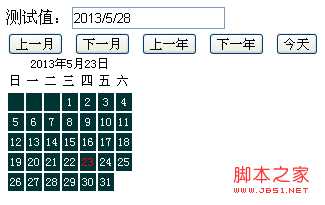
樣式與結構
<style>
#calendar { font-size: 12px; }
#calendar tbody td {
    background: #033; color: #fff;
    text-align: center; padding: 2px;
}
.detail { text-align: center; }
</style>

測試值:<input id="calendar_value" type="text" /><br />
<button id="cal_prev">上一月</button>
<button id="cal_next">下一月</button>
<button id="cal_preyear">上一年</button>
<button id="cal_nextyear">下一年</button>
<button id="cal_today">今天</button>
<div id="calendar" style="position:absolute;"></div>
日曆對象實現
var Calendar = function (year, monthNum, parent) {
this.year = year;
this.parent = parent;
this.monthNum = monthNum - 1;
function isLeapYear(y) {
return (y > 0) && !(y % 4) && ((y % 100) || !(y % 400));
}
// 依月份與是否閏年決定當月天數
this.numDays = [31, isLeapYear(this.year) ? 29 : 28, 31, 30, 31, 30,
31, 31, 30, 31, 30, 31][this.monthNum];
this.weekDays = ["日", "一", "二", "三", "四", "五", "六"];
this.nowDate = new Date;
this.init();
};
Calendar.prototype = {
setMonthNum: function (monthNum) { this.monthNum = monthNum - 1; },
getMonthNum: function () { return this.monthNum + 1; },
setYearNum: function (year) { this.year = year; },
getYearNum: function () { return this.year; },
init: function () { this.setup(this.parent); },
reflesh: function () { this.setup(this.parent); },
setup: function (id) {
var cal = document.getElementById(id);
cal.innerHTML = "";
var calDiv = document.createElement("div");
var tab = document.createElement("table");
cal.appendChild(calDiv);
calDiv.innerHTML = this.getSummary();
calDiv.className = "detail";
cal.appendChild(tab);
this.thead = document.createElement("thead");
this.tbody = document.createElement("tbody");
this.tr = document.createElement("tr");
this.td = document.createElement("td");
tab.appendChild(this.thead);
tab.appendChild(this.tbody);
this.setThead();
this.create();
},
// 渲染星期表頭
setThead: function () {
var day = this.weekDays;
var tr = this.tr.cloneNode(true);
this.thead.appendChild(tr);
for (var i = 0; i < 7; i++) {
var td = this.td.cloneNode(true);
tr.appendChild(td);
td.innerHTML = day[i];
}
},
// 渲染日期格子
create: function () {
var day = new Date(this.year, this.monthNum, 1);
var tr = this.tr.cloneNode(true);
var dayCount = this.numDays;
var that = this;
that.tbody.appendChild(tr);
// 前面補空格,讓 1 號對齊星期
for (var j = 0; j < day.getDay(); j++) {
var td0 = that.td.cloneNode(true);
tr.appendChild(td0);
td0.innerHTML = " ";
}
for (var i = 1; i <= dayCount; i++) {
if ((j + i) % 7 - 1 == 0) {
tr = that.tr.cloneNode(true);
that.tbody.appendChild(tr);
}
var td = that.td.cloneNode(true);
var s = i;
if (i == that.nowDate.getDate()) {
s = "<font color='red'>" + i + "</font>";
}
td.innerHTML = s;
td.style.cursor = "pointer";
td.onclick = function () {
document.getElementById("calendar_value").value =
that.getYearNum() + "/" + that.getMonthNum() + "/" + this.innerHTML;
};
td.onmouseover = function () {
this.style.background = "#fff";
this.style.color = "#033";
};
td.onmouseout = function () {
this.style.background = "";
this.style.color = "#fff";
};
tr.appendChild(td);
}
},
getSummary: function () {
return this.year + "年" + (this.monthNum + 1) + "月" + this.nowDate.getDate() + "日";
}
};
var cal = new Calendar(2013, 5, "calendar");
cal.init();
document.getElementById("cal_prev").onclick = function () {
cal.monthNum--;
if (cal.getMonthNum() < 1) { cal.setMonthNum(12); cal.year--; }
cal.reflesh();
};
document.getElementById("cal_next").onclick = function () {
cal.monthNum++;
if (cal.getMonthNum() > 12) { cal.setMonthNum(1); cal.year++; }
cal.reflesh();
};
document.getElementById("cal_today").onclick = function () {
cal.setYearNum((new Date).getFullYear());
cal.setMonthNum((new Date).getMonth() + 1);
cal.reflesh();
};
document.getElementById("cal_preyear").onclick = function () {
cal.setYearNum(cal.getYearNum() - 1);
cal.reflesh();
};
document.getElementById("cal_nextyear").onclick = function () {
cal.setYearNum(cal.getYearNum() + 1);
cal.reflesh();
};總結
這份代碼把日曆封裝成一個構造函數,狀態(年、月)與渲染邏輯分離,翻月翻年只需改狀態再調用 reflesh() 重繪。閏年判斷、當月天數、第一天星期幾是全部難點所在。實際項目中還可以補充:點擊空白格自動切換到相鄰月份、鍵盤上下鍵換月、選中日期高亮、以及把中文硬編碼改成配置項以便國際化。
- 上一篇文章: JavaScript 表格排序(升序/降序)完整實現
- 下一篇文章: 原生 JavaScript 計算器實現步驟拆解