原生 JavaScript 計算器實現步驟拆解
編輯:關於JavaScript
一個看起來簡單的計算器,寫清楚並不容易:連續運算怎麼算、小數點怎麼防重複、退格怎麼處理、除零怎麼辦。下面按步驟把實現拆開講。
涉及知識點
- 四則運算的實現與運算符分發。
- 事件對象與事件源的判斷,用事件委託統一處理所有按鈕。
- 用全局變量維護「當前輸入、上次結果、待執行運算符」這套狀態機。
效果預覽
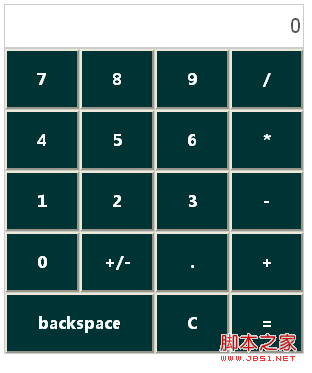
界面結構
<style>
#calculate {
    line-height: 60px; text-align: center;
    background: #ccc; font-size: 16px; font-weight: bold;
}
#calculate tbody input {
    width: 100%; height: 60px;
    background: #033; color: #fff;
    font: bold 16px/1em 'Microsoft yahei';
}
#calculate tbody td { width: 25%; background: #fff; }
#calculate_outPut {
    font-size: 20px; letter-spacing: 2px; background: #fff;
    height: 40px; border: none; text-align: right; width: 100%;
}
</style>

<table width="300" border="0" cellspacing="1" cellpadding="0" id="calculate">
<thead>
<tr>
    <td colspan="4" align="right">
        <input id="calculate_outPut" value="0" disabled="disabled">
    </td>
</tr>
</thead>
<tbody id="calculate_num">
<tr>
    <td><input type="button" value="7" _type='num' /></td>
    <td><input type="button" value="8" _type='num' /></td>
    <td><input type="button" value="9" _type='num' /></td>
    <td><input type="button" value="/" _type='op' /></td>
</tr>
<tr>
    <td><input type="button" value="4" _type='num' /></td>
    <td><input type="button" value="5" _type='num' /></td>
    <td><input type="button" value="6" _type='num' /></td>
    <td><input type="button" value="*" _type='op' /></td>
</tr>
<tr>
    <td><input type="button" value="1" _type='num' /></td>
    <td><input type="button" value="2" _type='num' /></td>
    <td><input type="button" value="3" _type='num' /></td>
    <td><input type="button" value="-" _type='op' /></td>
</tr>
<tr>
    <td><input type="button" value="0" _type='num' /></td>
    <td><input type="button" value="+/-" _type='+/-' /></td>
    <td><input type="button" value="." _type='.' /></td>
    <td><input type="button" value="+" _type='op' /></td>
</tr>
<tr>
    <td colspan="2"><input type="button" value="backspace" _type='bs' /></td>
    <td><input type="button" value="C" _type='cls' /></td>
    <td><input type="button" value="=" _type='eval' /></td>
</tr>
</tbody>
</table>
第一步:用名值對代替 switch
四則運算不需要寫四個 if 或一個 switch,把運算符作為 key、函數作為 value 存進對象,分發時直接查表調用,擴展新運算符只需加一條屬性。
var operateExp = {
    '+': function (num1, num2) { return num1 + num2; },
    '-': function (num1, num2) { return num1 - num2; },
    '*': function (num1, num2) { return num1 * num2; },
    '/': function (num1, num2) { return num2 === 0 ? 0 : num1 / num2; }
};
第二步:過濾操作數並完成計算
var operateNum = function (num1, num2, op) {
    if (!(num1 && num2)) return;
    num1 = Number(num1);   // 保證是數字
    num2 = Number(num2);
    if (!op) return num1;  // 沒有運算符,直接返回第一個數
    if (!operateExp[op]) return 0;
    return operateExp[op](num1, num2);
};
第三步:用全局變量控制狀態
var result = 0;      // 計算結果
var isReset = false; // 是否需要重新開始輸入
var operation;       // 當前待執行的運算符
第四步:把頁面操作與邏輯分離
var calculate_outPut = document.getElementById("calculate_outPut");

function setScreen(num) { calculate_outPut.value = num; }   // 寫顯示屏
function getScreen() { return calculate_outPut.value; }     // 讀顯示屏
第五步:事件委託統一處理按鍵
var calculate_num = document.getElementById("calculate_num");

calculate_num.onclick = function (e) {
    var ev = e || window.event;
    var target = ev.target || ev.srcElement;
    if (target.type != "button") return;

    var mark = target.getAttribute("_type");   // 按鈕類型
    var value = target.value;                  // 按鈕值
    var num = getScreen();

    if (mark === 'bs') {          // 退格
        if (num == 0) return;
        var snum = Math.abs(num).toString();
        if (snum.length < 2) setScreen(0);
        else setScreen(num.toString().slice(0, -1));
    }

    if (mark === 'num') {         // 數字
        if (num === '0' || isReset) {
            setScreen(value);
            isReset = false;
            return;
        }
        setScreen(num.toString().concat(value));
    }

    if (mark === ".") {           // 小數點,同一屏只允許一個
        var hasPoint = num.toString().indexOf(".") > -1;
        if (hasPoint) {
            if (isReset) { setScreen("0" + value); isReset = false; return; }
            return;
        }
        setScreen(num.toString().concat(value));
    }

    if (mark === "+/-") setScreen(-num);   // 正負號

    if (mark === "op") {          // 運算符
        if (isReset) return;
        isReset = true;
        if (!operation) {
            result = +num;
            operation = value;
            return;
        }
        result = operateNum(result, num, operation);
        setScreen(result);
        operation = value;
    }

    if (mark === "cls") {         // 清零
        result = 0;
        setScreen(result);
        isReset = false;
    }

    if (mark === "eval") {        // 等於
        if (!operation) return;
        result = operateNum(result, num, operation);
        setScreen(result);
        operation = null;
        isReset = false;
    }
};
設計小結
整份代碼的關鍵在於三層分離:運算規則放在 operateExp 這張查表裡,狀態用 result / isReset / operation 三個變量維護, DOM 讀寫全部收攏到 setScreen 與 getScreen。這樣一來,事件處理函數只負責「判斷按了什麼、該改哪個狀態」,可讀性和可擴展性都遠好於把邏輯堆在 onclick 裡。若要繼續完善,可以加入運算優先級(先乘除後加減)、百分比、以及鍵盤輸入支持。
- 上一篇文章: 原生 JavaScript 日曆實現與 Date 對象用法梳理
- 下一篇文章: 用 JS 實現遮罩層彈窗的完整思路