JavaScript 實現網頁時間自動刷新原理與步驟
編輯:關於JavaScript
在很多網頁應用中,需要實時顯示並自動刷新當前時間,比如時鐘、倒計時等場景。本文以一個簡單的 Clock 為例,講解如何用 JavaScript 實現時間的自動刷新。
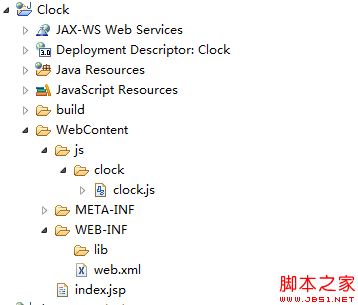
項目結構如下:
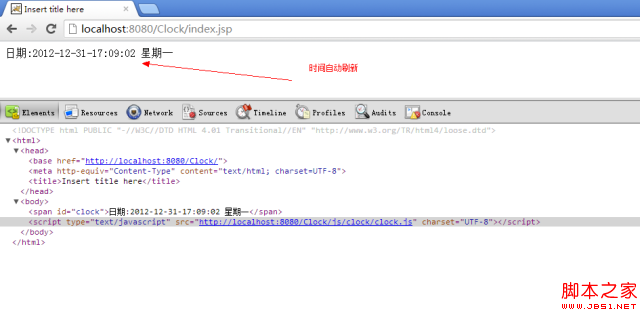
運行效果:
首先是頁面的 index.jsp:
<%@ page language="java" contentType="text/html; charset=UTF-8" pageEncoding="UTF-8"%>
<%
String path = request.getContextPath();
String basePath = request.getScheme() + "://"
  + request.getServerName() + ":" + request.getServerPort()
  + path + "/";
%>
<!DOCTYPE html PUBLIC "-//W3C//DTD HTML 4.01 Transitional//EN" "https://www.w3.org/TR/html4/loose.dtd">
<html>
<head>
<base href="<%=basePath%>" />
<meta http-equiv="Content-Type" content="text/html; charset=UTF-8">
<title>Insert title here</title>
</head>
<body>
<span id="clock"> </span>
</body>
<script type="text/javascript" src="<%=basePath%>js/clock/clock.js" charset="UTF-8"></script>
</html>
核心邏輯在 clock.js 中:
/**
 * 時間顯示
 * @date 2012-12-31
 * @author hongten (hongtenzone@foxmail.com)
 */
function Clock() {
  var date = new Date();
  this.year = date.getFullYear();
  this.month = date.getMonth() + 1;
  this.date = date.getDate();
  this.day = new Array("星期日", "星期一", "星期二", "星期三", "星期四", "星期五", "星期六")[date.getDay()];
  this.hour = date.getHours() < 10 ? "0" + date.getHours() : date.getHours();
  this.minute = date.getMinutes() < 10 ? "0" + date.getMinutes() : date.getMinutes();
  this.second = date.getSeconds() < 10 ? "0" + date.getSeconds() : date.getSeconds();

  // 日期:2012-12-31-17:03:18 星期一
  this.toString = function () {
    return "日期:" + this.year + "-" + this.month + "-" + this.date + "-"
      + this.hour + ":" + this.minute + ":" + this.second + " " + this.day;
  };

  // 2012-12-31
  this.toSimpleDate = function () {
    return this.year + "-" + this.month + "-" + this.date;
  };

  // 2012-12-31 17:04:03
  this.toDetailDate = function () {
    return this.year + "-" + this.month + "-" + this.date + " "
      + this.hour + ":" + this.minute + ":" + this.second;
  };

  this.display = function (ele) {
    var clock = new Clock();
    ele.innerHTML = clock.toString();
    window.setTimeout(function () {
      clock.display(ele);
    }, 1000);
  };
}

// <span id="clock"> </span>
var clock = new Clock();
clock.display(document.getElementById("clock"));
實現的關鍵在於 display 方法:每次調用時重新創建 Clock 對象獲取最新時間並更新頁面,然後用 setTimeout 在 1000 毫秒(1 秒)後再次調用自身,從而形成閉環,達到每秒自動刷新的效果。這種遞歸式定時器的方式在 Web 開發中非常實用。
- 上一篇文章: onclick 與事件監聽器執行先後順序深度剖析
- 下一篇文章: JavaScript 讓文本框獲得焦點並將光標定位到末尾