Node.js 入門:從輸出頁面到靜態資源服務
編輯:關於JavaScript
Node.js 不只是命令列工具,也能直接建立 HTTP 服務。從最簡單的輸出,到讀取 HTML、提供 JS 與 CSS,都是理解 Node.js 的好起點。
從 console 開始
Node.js 沿用 console 物件,可用來輸出訊息:
console.log("hello node.js");在瀏覽器中常見的 alert 不適合直接用在 Node.js,因為它屬於瀏覽器全域方法。
建立 HTTP 服務
var http = require("http");
http.createServer(function (request, response) {
  response.writeHead(200, { "Content-Type": "text/plain" });
  response.write("Hello node.js");
  response.end();
}).listen(8888);
接著可把服務邏輯拆成模組,讓入口檔案更清楚。
讀取 HTML 與靜態資源
var http = require("http");
var fs = require("fs");
var url = require("url");

exports.start = function () {
  http.createServer(function (request, response) {
    var pathname = url.parse(request.url).pathname;
    var ext = pathname.indexOf(".") >= 0 ? pathname.slice(pathname.lastIndexOf(".")) : "";

    if (ext == ".css") {
      fs.readFile("." + request.url, "utf-8", function (err, data) {
        if (err) throw err;
        response.writeHead(200, { "Content-Type": "text/css" });
        response.write(data);
        response.end();
      });
    } else if (ext == ".js") {
      fs.readFile("." + request.url, "utf-8", function (err, data) {
        if (err) throw err;
        response.writeHead(200, { "Content-Type": "application/javascript" });
        response.write(data);
        response.end();
      });
    } else {
      fs.readFile("./index.html", "utf-8", function (err, data) {
        if (err) throw err;
        response.writeHead(200, { "Content-Type": "text/html" });
        response.write(data);
        response.end();
      });
    }
  }).listen(8888);
};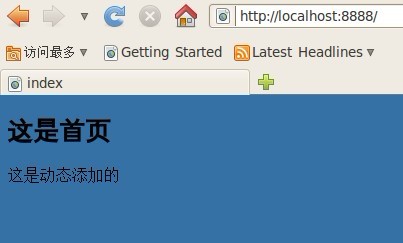
透過這個流程,Node.js 就能回傳完整頁面,也能處理 JavaScript 與 CSS 請求。接下來可再擴充多頁、路由、Cookie、Session 與快取等功能。
- 上一篇文章: Node.js 實戰:建立簡單的 Web 伺服器
- 下一篇文章: Node.js 模組寫法入門:exports 與 require