做一個可排序、可就地編輯的二維表格
編輯:關於JavaScript
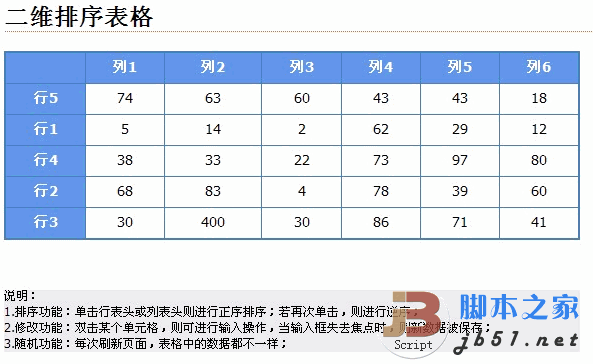
純前端的互動表格是很好的練習題,因為它一次涵蓋了事件綁定、DOM 操作、資料與視圖分離幾個基本功。這個範例做到三件事:
- 排序:點一下行表頭或列表頭進行正序排序,再點一次則變為逆序。
- 修改:雙擊任一儲存格進入輸入狀態,輸入框失去焦點時把新值存回資料。
- 隨機:每次重新整理,表格內容都不一樣,方便測試排序是否真的生效。
效果如下:
完整原始碼
<html>
<head>
<title>二維排序表格</title>
<style type="text/css">
* { font-family: Tahoma, Arial, Serif; font-size: 14; }
body { text-align: center; min-width: 760px; }
#main { width: 720px; margin: 0 auto; text-align: left; }
p { border-bottom: dotted 1px #e63; font-size: 24px; font-family: Arial; font-weight: bold; }

/* 表格樣式 */
table { text-align: center; border: solid 1px #4682b4; width: 80%; background-color: #4682b4; }
th { background-color: #6495ed; cursor: pointer; color: White; height: 30px; }
/* 配上儲存格樣式之後,表格會呈現細線邊框 */
td { background-color: #fff; padding: 4px; }
/* 滑鼠經過時的深藍色 */
.activecol { background-color: #005eae; }
</style>
</head>

<body onload="initTwoArr()">
<p>二維排序表格</p>

<table>
<thead>
<tr>
  <th> </th>
  <th onclick="sortColumn(1)" onmousemove="setActiveCol(this)" onmouseout="setLoseFocusCol(this)">列1</th>
  <th onclick="sortColumn(2)" onmousemove="setActiveCol(this)" onmouseout="setLoseFocusCol(this)">列2</th>
  <th onclick="sortColumn(3)" onmousemove="setActiveCol(this)" onmouseout="setLoseFocusCol(this)">列3</th>
  <th onclick="sortColumn(4)" onmousemove="setActiveCol(this)" onmouseout="setLoseFocusCol(this)">列4</th>
  <th onclick="sortColumn(5)" onmousemove="setActiveCol(this)" onmouseout="setLoseFocusCol(this)">列5</th>
  <th onclick="sortColumn(6)" onmousemove="setActiveCol(this)" onmouseout="setLoseFocusCol(this)">列6</th>
</tr>
</thead>
<tbody>
<tr>
  <th onclick="sortRow(this)" onmousemove="setActiveCol(this)" onmouseout="setLoseFocusCol(this)">行1</th>
  <!-- 資料儲存格由 initTwoArr() 動態產生 -->
</tr>
<tr>
  <th onclick="sortRow(this)" onmousemove="setActiveCol(this)" onmouseout="setLoseFocusCol(this)">行2</th>
</tr>
<tr>
  <th onclick="sortRow(this)" onmousemove="setActiveCol(this)" onmouseout="setLoseFocusCol(this)">行3</th>
</tr>
<tr>
  <th onclick="sortRow(this)" onmousemove="setActiveCol(this)" onmouseout="setLoseFocusCol(this)">行4</th>
</tr>
<tr>
  <th onclick="sortRow(this)" onmousemove="setActiveCol(this)" onmouseout="setLoseFocusCol(this)">行5</th>
</tr>
</tbody>
</table>

<p style="font-size:14px;font-weight:normal;text-align:left">
說明:<br>
1. 排序功能:單擊行表頭或列表頭則進行正序排序;若再次單擊,則進行逆序;<br>
2. 修改功能:雙擊某個儲存格,則可進行輸入操作,當輸入框失去焦點時,新資料即被保存;<br>
3. 隨機功能:每次刷新頁面,表格中的資料都不一樣。
</p>
</body>
</html>
設計上的幾個關鍵
- 資料與視圖分離:全域的
initTwoArr()負責產生二維陣列並渲染成儲存格,排序時只對陣列動手,再重新渲染一次。這比直接搬 DOM 節點簡單得多,也不容易出錯。 - 行列都要能排序:所以
sortColumn(n)與sortRow(this)分成兩個入口,前者依欄位索引排序,後者從被點擊的th反推它在哪一列。 - 方向切換:內部維護一個升降序旗標,同一個表頭連點兩次就翻轉,這是使用者最熟悉的操作慣性。
- 視覺回饋:
setActiveCol/setLoseFocusCol搭配.activecol樣式,讓滑鼠停留的整列或整欄變色,使用者才知道點下去會作用在哪裡。 - 就地編輯:雙擊時把
td內容換成<input>,並掛上onblur把值寫回陣列。用 blur 而非 Enter 作為提交時機,是為了讓「點別的地方」也能自然完成編輯。
原始文章以線上範例頁的形式提供(含「運行代碼 / 複製代碼 / 保存代碼」三個按鈕),這裡已把結構與樣式還原成可直接使用的完整頁面;若你要接自己的資料來源,只要替換 initTwoArr() 的內容即可,其餘邏輯不必更動。