用 getBoundingClientRect() 取得頁面元素座標
編輯:關於JavaScript
取得元素在視窗中的位置,過去多半得靠 offsetLeft/offsetTop 一層層往上累加,程式碼又長又容易出錯。getBoundingClientRect() 把這件事簡化成一次呼叫。
以下為 MSDN 的說明:
語法
oRect = object.getBoundingClientRect()回傳值
回傳一個 TextRectangle 物件。每個矩形有四個整數屬性(top、left、right、bottom),代表該矩形各邊的座標,單位為像素。
備註
此方法取得的物件,提供所有矩形聯集相對於用戶端左上角(client area)的 left、top、right、bottom 座標。在 Internet Explorer 5 中,視窗左上角相對於真正的用戶端是 (2, 2) 像素。
白話來說,它回傳頁面中某元素的左、上、右、下四條邊界相對於瀏覽器視窗的位置。用圖看更直覺:
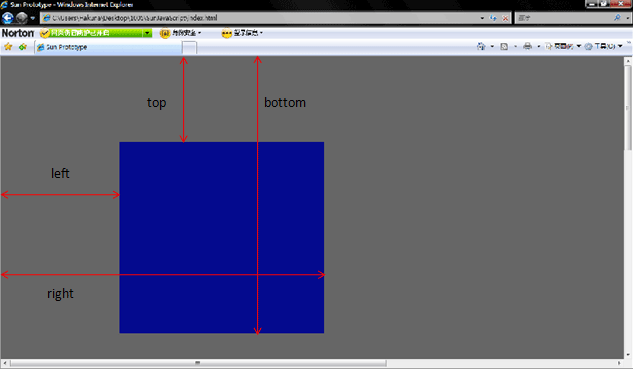
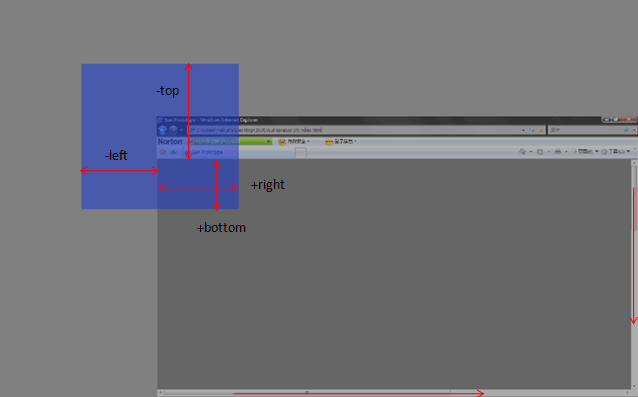
這方法早已不是 IE 專屬,Firefox 3.0+ 與 Opera 9.5+ 都支援了,取位置的效率因此大幅提升;在舊版 Opera 與 Firefox 上,只能靠迴圈逐層往上算出元素的絕對位置。
下面的範例把元素放在絕對定位的位置,滾動捲軸後點擊紅色區塊,就能看到各值的變化:
<!DOCTYPE html PUBLIC "-//W3C//DTD XHTML 1.0 Transitional//EN" "https://www.w3.org/TR/xhtml1/DTD/xhtml1-transitional.dtd">
<html xmlns="https://www.w3.org/1999/xhtml">
<head>
<meta http-equiv="Content-Type" content="text/html; charset=utf-8" />
<title>Demo</title>
</head>
<body style="width:2000px; height:1000px;">
<div id="demo" style="position:absolute; left:518px; width:500px; height:500px; background:#CC0000; top:114px;">Demo,為了方便直接用絕對定位的元素</div>
</body>
</html>
<script>
document.getElementById('demo').onclick = function (){
    if (document.documentElement.getBoundingClientRect) {
        alert("left:"  + this.getBoundingClientRect().left);
        alert("top:"   + this.getBoundingClientRect().top);
        alert("right:"  + this.getBoundingClientRect().right);
        alert("bottom:" + this.getBoundingClientRect().bottom);
        var X = this.getBoundingClientRect().left + document.documentElement.scrollLeft;
        var Y = this.getBoundingClientRect().top  + document.documentElement.scrollTop;
        alert("Demo 的位置是 X:" + X + "; Y:" + Y);
    }
}
</script>
關鍵在於:該方法給的是「視窗相對座標」,加上文件的捲動量 scrollLeft/scrollTop 後,才會得到「頁面絕對座標」。
var X = this.getBoundingClientRect().left + document.documentElement.scrollLeft;
var Y = this.getBoundingClientRect().top  + document.documentElement.scrollTop;
有了這兩個變數,元素定位與浮動提示框的擺放都變得單純許多。
- 上一篇文章: JavaScript 的類繼承:Crockford 經典模式解析
- 下一篇文章: 用騰訊 IP 介面取得訪客的地理位置