jsTree 無限級樹:後端 JSON 遞迴轉換實作
編輯:關於JavaScript
jsTree 官方網站:https://www.jstree.com/
它支援直接從後端抓資料渲染成樹:
$("#mytree").tree({
data : {
type : "json",
url : "${ctx}/user/power!list.do"
}
});
但 url 回傳的內容必須符合它定義的 JSON 結構,也就是每個節點帶 attributes、state、data,子節點放在 children 陣列裡:
$("#demo2").tree({
data : {
type : "json",
json : [
{ attributes: { id : "pjson_1" }, state: "open", data: "Root node 1", children : [
{ attributes: { id : "pjson_2" }, data: { title : "Custom icon", icon : "../media/images/ok.png" } },
{ attributes: { id : "pjson_3" }, data: "Child node 2" },
{ attributes: { id : "pjson_4" }, data: "Some other child node" }
]},
{ attributes: { id : "pjson_5" }, data: "Root node 2" }
]
}
});
所以後端需要一段把實體集合轉成這個格式的邏輯。由於樹的深度不固定,這裡用遞迴處理:
/**
* 無限遞迴獲得 jsTree 的 json 字串
* @param parentId 父節點 id
*/
private String getJson(long parentId)
{
List<Action> actions = actionManager.queryByParentId(parentId);
for (int i = 0; i < actions.size(); i++)
{
Action a = actions.get(i);
if (a.getIshaschild() == 1)   // 有子節點
{
str += "{attributes:{id:\"" + a.getAnid()
+ "\"},state:\"open\",data:\"" + a.getAnname() + "\" ,";
str += "children:[";
List<Action> list = actionManager.queryByParentId(a.getAnid());
for (int j = 0; j < list.size(); j++)
{
Action ac = list.get(j);
if (ac.getIshaschild() == 1)
{
this.getJson(ac.getParentid());   // 遞迴
}
else
{
str += "{attributes:{id:\"" + ac.getAnid()
+ "\"},state:\"open\",data:\"" + ac.getAnname() + "\" }";
if (j < list.size() - 1) { str += ","; }
}
}
str += "]";
str += " }";
if (i < actions.size() - 1) { str += ","; }
}
}
return str;
}
呼叫端在 Action 裡組出完整陣列並輸出:
@Action(results = { @Result(name = "success", location = "/main/user/action-list.jsp") })
public String list()
{
String str = "[";
str += this.getJson(0);   // 從根節點開始
str += "]";
this.renderJson(str);
return null;
}
其中 Action 是權限或功能表之類的實體類別。
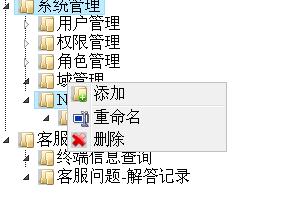
要留意的是,字串手工拼接 JSON 雖然直覺,但節點名稱若含引號或特殊字元就會產生非法 JSON。較穩妥的做法是先組出物件結構,再交給 JSON 序列化機制輸出。
- 上一篇文章: JavaScript 手寫二級聯動下拉選單完整實作
- 下一篇文章: 用騰訊 IP 地址庫做訪客地區定位