輕量級 JavaScript ToolTip 提示框實作
編輯:關於JavaScript
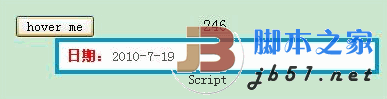
滑鼠移過就浮現提示,比原生 title 屬性漂亮,而且內容可以用 HTML 自訂。
JavaScript
// 取得某元素的絕對定位座標
function GetPos(obj){
var pos = new Object();
pos.x = obj.offsetLeft;
pos.y = obj.offsetTop;
while (obj = obj.offsetParent){
pos.x += obj.offsetLeft;
pos.y += obj.offsetTop;
}
return pos;
};

var ToolTip = {
_tipPanel: null,
Init: function(){
if (null == this._tipPanel){
var tempDiv = document.createElement("div");
document.body.insertBefore(tempDiv, document.body.childNodes[0]);
tempDiv.id = "tipPanel";
tempDiv.style.display = "none";
tempDiv.style.position = "absolute";
tempDiv.style.zIndex = "999";
}
},
AttachTip: function(){},   // 動態綁定提示(保留給後續擴充)
DetachTip: function(){},   // 移除提示綁定
ShowTip: function(oTarget){
if ($("tipPanel") == null) return;

var tempStr = "";        // 組出 HTML 片段
if (arguments.length > 1){
for (var i = 1; i < arguments.length; i++){
tempStr += "<p>" + arguments[i] + "</p>";
}
}
$("tipPanel").innerHTML = tempStr;

var pos = GetPos(oTarget);   // 定位在目標元素下方
$("tipPanel").style.left = (oTarget.offsetWidth / 2 + pos.x) + "px";
$("tipPanel").style.top  = (oTarget.offsetHeight + pos.y) + "px";

$("tipPanel").style.display = "";
},
HideTip: function(){
if ($("tipPanel") == null) return;
$("tipPanel").style.display = "none";
}
};
這裡用可變參數(arguments)設計 ShowTip,第一個參數是目標元素,之後每個參數各自成為提示框中的一個段落,呼叫端因此不必自己組 HTML。文中 $("id") 等同 document.getElementById("id")。
CSS
#tipPanel{
background: white; padding: 6px 8px; width: 300px;
border: solid 4px #09c; font-size: 14px; color: #555;
}
#tipPanel p{ margin: 0px; }
#tipPanel b{ color: red; font-size: 14px; }
HTML 呼叫
<body>
<input type="button" value="hover me"
onmouseover='ToolTip.ShowTip(this,"<b>日期:</b>2010-7-19");'
onmouseout='ToolTip.HideTip();'
style="margin:200px 100px;" />
</body>
<script type="text/javascript">
ToolTip.Init();
</script>
程式裡 AttachTip 與 DetachTip 留成空函式,是因為當時的專案用不到動態綁定。若要補上,做法是在初始化時掃描帶有特定 class 的元素,用事件 delegation 統一掛上移入移出監聽,就不必在每個標籤上寫 inline 事件。
- 上一篇文章: JavaScript 把時間戳還原成實際時間
- 下一篇文章: 依生日自動推算星座的 JavaScript 函式