原生js驗證簡潔注冊登錄頁面
編輯:關於JavaScript
序
一個以js驗證表單的簡潔的注冊登錄頁面,不多說直接上圖
效果
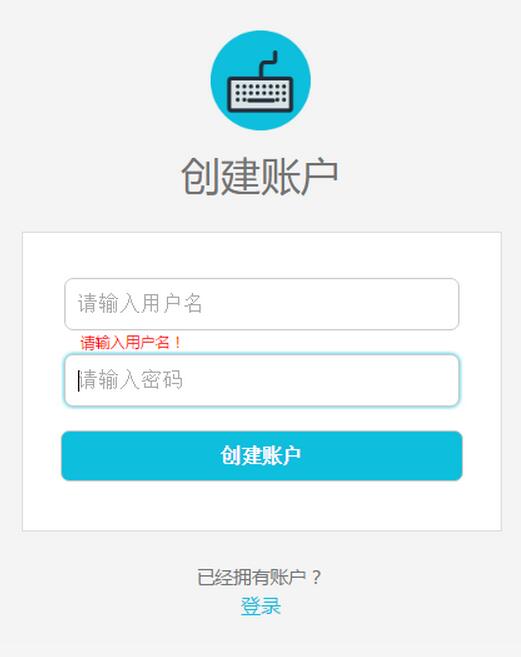
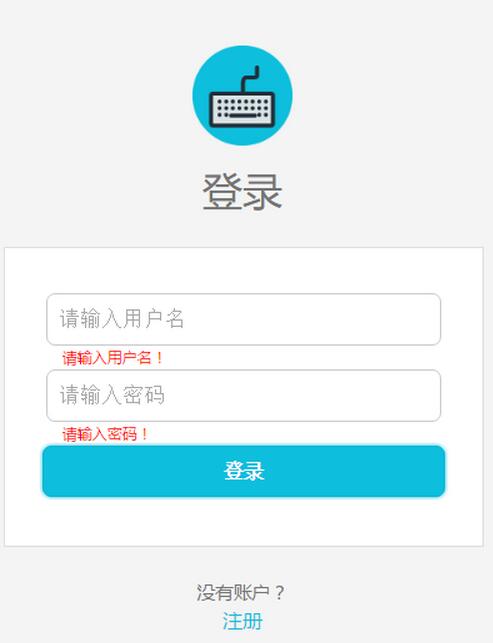
主要文件
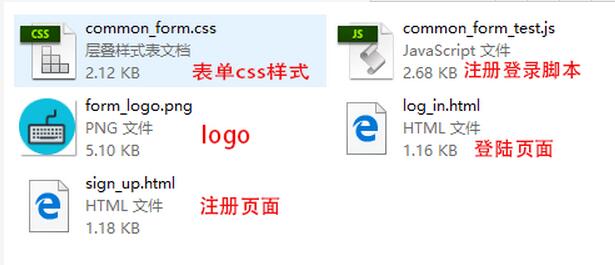
完整代碼
1 sign_up.html 注冊表單
<!DOCTYPE html>
<html lang="en">
<head>
 <meta charset="UTF-8">
 <title>sign-up</title>
 <link rel="stylesheet" href="css/common_form.css">
</head>
<body>
 <header>
 <div class="header-line"></div>
 </header>
 <div class="content">
 <img class="content-logo" src="img/form_logo.png" alt="logo">
 <h1 class="content-title">創建賬戶</h1>
 <div class="content-form">
  <form method="post" action="" onsubmit="return submitTest()">
  <div id="change_margin_1">
   <input class="user" type="text" name="user" placeholder="請輸入用戶名" onblur="oBlur_1()" onfocus="oFocus_1()">
  </div>
  <!-- input的value為空時彈出提醒 -->
  <p id="remind_1"></p>
  <div id="change_margin_2">
   <input class="password" type="password" name="password" placeholder="請輸入密碼" onblur="oBlur_2()" onfocus="oFocus_2()">
  </div>
  <!-- input的value為空時彈出提醒 -->
  <p id="remind_2"></p>
  <div id="change_margin_3">
   <input class="content-form-signup" type="submit" value="創建賬戶">
  </div>
  </form>
 </div>
 <div class="content-login-description">已經擁有賬戶?</div>
 <div><a class="content-login-link" href="log_in.html">登錄</a></div>
 </div>
<script src="js/common_form_test.js"></script>
</body>
</html>
2 log_in.html 登錄表單
<!DOCTYPE html>
<html lang="en">
<head>
 <meta charset="UTF-8">
 <title>log-in</title>
 <link rel="stylesheet" href="css/common_form.css">
</head>
<body>
 <header>
 <div class="header-line"></div>
 </header>
 <div class="content">
 <img class="content-logo" src="img/form_logo.png" alt="logo">
 <h1 class="content-title">登錄</h1>
 <div class="content-form">
  <form method="post" action="" onsubmit="return submitTest()">
  <div id="change_margin_1">
   <input class="user" type="text" name="user" placeholder="請輸入用戶名" onblur="oBlur_1()" onfocus="oFocus_1()">
  </div>
  <!-- input的value為空時彈出提醒 -->
  <p id="remind_1"></p>
  <div id="change_margin_2">
   <input class="password" type="password" name="password" placeholder="請輸入密碼" onblur="oBlur_2()" onfocus="oFocus_2()">
  </div>
  <!-- input的value為空時彈出提醒 -->
  <p id="remind_2"></p>
  <div id="change_margin_3">
   <input class="content-form-signup" type="submit" value="登錄">
  </div>
  </form>
 </div>
 <div class="content-login-description">沒有賬戶?</div>
 <div><a class="content-login-link" href="sign_up.html">注冊</a></div>
 </div>
<script src="js/common_form_test.js"></script>
</body>
</html>
3 common_form.css 表單css樣式
/*重置樣式*/
html, body, div, span, applet, object, iframe, h1, h2, h3, h4, h5, h6, p, blockquote, pre, a, abbr,
acronym, address, big, cite, code, del, dfn, em, img, ins, kbd, q, s, samp, small, strike, strong, sub
, sup, tt, var, b, u, i, dl, dt, dd, ol, ul, li, fieldset, form, label, legend, table, caption, tbody,
tfoot, thead, tr, th, td, article, aside, canvas, details, embed, figure, figcaption, footer, header,
hgroup, menu, nav, output, section, summary, time, mark, audio, video {
 margin: 0;
 padding: 0;
 border: 0
}
body {
 font-family: "微軟雅黑";
 background: #f4f4f4;
}

/*header*/
.header-line {
 width: 100%;
 height: 4px;
 background: #0dbfdd;
}

/*content*/
.content {
 width: 28%;
 margin: 70px auto 0;
 text-align: center;
}
.content-logo {
 width: 80px;
 height: 80px;
}
.content-title {
 margin: 10px 0 25px 0;
 font-size: 2em;
 color: #747474;
 font-weight: normal;
}
.content-form {
 width: 100%;
 padding: 36px 0 20px;
 border: 1px solid #dedede;
 text-align: center;
 background: #fff;
}
.content-form form div {
 margin-bottom: 19px;
}
.content-form form .user,
.content-form form .password {
 width: 77%;
 height: 20px;
 padding: 10px;
 font-size: 1em;
 border: 1px solid #cccbcb;
 border-radius: 7px;
 letter-spacing: 1px;
}
.content-form form input:focus {
 outline: none;
 -webkit-box-shadow: 0 0 5px #0dbfdd;
  box-shadow: 0 0 5px #0dbfdd;
}
.content-form-signup {
 width: 84%;
 margin: 0 auto;
 padding: 10px;
 border: 1px solid #cccbcb;
 border-radius: 7px;
 font-size: 1em;
 font-weight: bold;
 color: #fff;
 background: #0dbfdd;
 cursor: pointer;
}
.content-form-signup:hover {
 background: #0cb3d0;
}
.content-form-signup:focus {
 outline: none;
 border: 1px solid #0cb3d0;
}
.content-login-description {
 margin-top: 25px;
 line-height: 1.63636364;
 color: #747474;
 font-size: .91666667rem;
}
.content-login-link {
 font-size: 16px;
 color: #0dbfdd;
 text-decoration: none;
}

/*輸入框無內容便提示*/
#remind_1,
#remind_2 {
 width: 76%;
 margin: 0 auto 2px;
 text-align: left;
 font-size: .2em;
 color: #f00;
}
4 common_form_test.js 注冊登錄腳本
// 全局變量a和b,分別獲取用戶框和密碼框的value值
var a = document.getElementsByTagName("input")[0].value;
var b = document.getElementsByTagName("input")[1].value;

//用戶框失去焦點後驗證value值
function oBlur_1() {
 if (!a) { //用戶框value值為空
 document.getElementById("remind_1").innerHTML = "請輸入用戶名!";
 document.getElementById("change_margin_1").style.marginBottom = 1 + "px";
 } else { //用戶框value值不為空
 document.getElementById("remind_1").innerHTML = "";
 document.getElementById("change_margin_1").style.marginBottom = 19 + "px";
 }
}

//密碼框失去焦點後驗證value值
function oBlur_2() {
 if (!b) { //密碼框value值為空
 document.getElementById("remind_2").innerHTML = "請輸入密碼!";
 document.getElementById("change_margin_2").style.marginBottom = 1 + "px";
 document.getElementById("change_margin_3").style.marginTop = 2 + "px";
 } else { //密碼框value值不為空
 document.getElementById("remind_2").innerHTML = "";
 document.getElementById("change_margin_2").style.marginBottom = 19 + "px";
 document.getElementById("change_margin_3").style.marginTop = 19 + "px";
 }
}

//用戶框獲得焦點的隱藏提醒
function oFocus_1() {
 document.getElementById("remind_1").innerHTML = "";
 document.getElementById("change_margin_1").style.marginBottom = 19 + "px";
}

//密碼框獲得焦點的隱藏提醒
function oFocus_2() {
 document.getElementById("remind_2").innerHTML = "";
 document.getElementById("change_margin_2").style.marginBottom = 19 + "px";
 document.getElementById("change_margin_3").style.marginTop = 19 + "px";
}

//若輸入框為空,阻止表單的提交
function submitTest() {
 if (!a && !b) { //用戶框value值和密碼框value值都為空
 document.getElementById("remind_1").innerHTML = "請輸入用戶名!";
 document.getElementById("change_margin_1").style.marginBottom = 1 + "px";
 document.getElementById("remind_2").innerHTML = "請輸入密碼!";
 document.getElementById("change_margin_2").style.marginBottom = 1 + "px";
 document.getElementById("change_margin_3").style.marginTop = 2 + "px";
 return false; //只有返回true表單才會提交
 } else if (!a) { //用戶框value值為空
 document.getElementById("remind_1").innerHTML = "請輸入用戶名!";
 document.getElementById("change_margin_1").style.marginBottom = 1 + "px";
 return false;
 } else if (!b) { //密碼框value值為空
 document.getElementById("remind_2").innerHTML = "請輸入密碼!";
 document.getElementById("change_margin_2").style.marginBottom = 1 + "px";
 document.getElementById("change_margin_3").style.marginTop = 2 + "px";
 return false;
 }
}
5 form_logo.png Logo照片

到這裡,一個簡單的注冊登錄頁面就完成了,後面會持續更新,使之更強大。
以上就是本文的全部內容,希望對大家的學習有所幫助,也希望大家多多支持。
小編推薦
熱門推薦