1 縮略語列表問題出發點:一段包含大量縮略語的文本,例如:
<p>
 The <abbr title="World Wide Web Consortium">W3C</abbr> defines
 the <abbr title="Document Object Model">DOM</abbr> as:
 </p>
 <blockquote cite="http://www.w3.org/DOM/">
 <p>
 A platform- and language-neutral interface that will allow programs
 and scripts to dynamically access and update the
 content, structure and style of documents.
 </p>
 </blockquote>
 <p>
 It is an <abbr title="Application Programming Interface">API</abbr>
 that can be used to navigate <abbr title="HyperText Markup Language">HTML</abbr>
 and <abbr title="eXtensible Markup Language">XML</abbr> documents.
 </p>
縮略語標簽的title屬性在浏覽器裡是隱藏的,不同浏覽器對縮略語的默認呈現樣式是不同的,那麼這多少都會影響用戶的體驗。一個比較好的解決方法是,將這些縮列語通過列表的方式展示出來。如:
<dl>
 <dt>縮略語標題/abbr.lastChild.nodeValue</dt>
 <dd>縮略語定義描述/abbr.getAttribute</dd>
 ......
</dl>
用DOM來創建這個列表(即用js來動態創建html標記,常見的方法見 詳解js的事件處理函數和動態創建html標記方法),大致過程如下:
(1)遍歷abbr
(2)保存abbr的title屬性和文本
(3)創建定義列表元素dl
(4)創建定義標題元素dt
(5)將abbr的文本插入到這個dt元素
(6)創建定義描述元素dd
(7)將abbr的title屬性插入到這個dd元素
(9)追加以上創建的各元素
代碼如下:
function displayAbbreviations() {
 //注釋1:注意這裡沒有對DOM方法做兼容性檢查
 var abbreviations = document.getElementsByTagName("abbr");
 var defs = new Array();//注釋2:用數組的鍵值對來保存abbr的title屬性和文本
 //loop through the abbr list
 for (var i=0; i<abbreviations.length; i++) {
 var current_abbr = abbrevaitons[i];
 //注釋3:if (current_abbr.childNodes.length < 1) continue;
 var defination = current_abbr.getAttributes("title");
 var key = current_abbr.lastChild.nodeValue;
 defs[key] = defination;
 }
 var dlist = document.createElement("dl");
 //loop through the defs
 for (key in defs) {
 var defination = defs[key];
 var dtitle = document.createElement("dt");
 var dtitle_text = document.createTextNode(key);
 dtitle.appendChild(dtitle_text);
 var ddesc = document.createElement("dd");
 var ddesc_text = document.createTextNode(defination);
 ddesc.appendChild(ddesc_text);
 dlist.appendChild(dtitle);
 dlist.appendChild(ddesc);
 }
 //注釋4:if (dlist.childNodes.length < 1) return false;
 var header = document.createElement("h2");
 var header_text = document.createElement("Abbreviations");
 header.appendChild(header_text);
 //注釋5:下面兩行用到了HTML-DOM屬性:document.body,也可以用DOM core的 document.getElementsByTagName("body")[0]方法;
 document.body.appendChild(header);
 document.body.appendChild(dlist);
}
displayAbbreviations有很多改進的余地,比如注釋1提到的DOM方法兼容性檢查問題。還有就是IE6不支持<abbr>的問題,這個問題可以通過增加注釋3和注釋5中的語句來解決。注釋3解決了IE6及之前的版本的IE在統計abbr元素節點時總是返回0的問題,注釋5則解決了浏覽器不支持abbr元素而出現js報錯的問題。
2 動態創建文獻來源鏈接的實現方法和縮列語列表的方法大致相同
<blockquote> 標簽定義塊引用,它有一個可選的cite屬性,這個屬性規定了引用的來源。該屬性的值是一個包含在引號中並指向某個網頁的 URL地址。這個屬性很有用,它可以將文獻資料和相關網頁鏈接起來。但主流浏覽器均不支持 cite 屬性,一般都會將它忽略,用戶也看不到。
將1中的html代碼中 <blockquote> 的cite屬性以鏈接的形式顯示出來,代碼如下:
function displayCitations() {
    //兼容性檢查
 if (!document.getElementsByTagName || !document.createElement
 || !document.createTextNode) return false;
 //獲取所有的blockquote元素
 var quotes = document.getElementsByTagName("blockquote");
 //1 遍歷blockquote元素
 for (var i=0; i<quotes.length; i++) {
 // 檢查是否存在cite屬性
 if (!quotes[i].getAttribute("cite")) continue;
 // 2 提取cite屬性的值
 var url = quotes[i].getAttribute("cite");
 // 獲取blockquote包含的所有元素節點,注意是元素節點,這樣就把文本節點排除掉了
 var quoteChildren = quotes[i].getElementsByTagName("*");
 // 判斷元素是否為空
 if (quoteChildren.length < 1) continue;
 var elem = quoteChildren[quoteChildren.length - 1];//獲取最後一個元素節點
 var link = document.createElement("a");//3 創建鏈接節點
 var link_text = document.createTextNode("source");
 link.appendChild(link_text);
 link.setAttribute("href", url);//4 給鏈接節點的href屬性賦值
 var superscript = document.createElement("sup");
 superscript.appendChild(link);
 elem.appendChild(superscript);//5 追加節點到<blockquote>包含節點的末尾
 }
}
3 accesskey 屬性可以將<a>鏈接與鍵盤的特定按鍵關聯在一起,如:<a href="index.html" accesskey="1">Home</a>,不過好像不是所有的浏覽器都支持這個屬性,比如Opera。
將下面html代碼中的accesskey屬性像上面縮列語以列表的形式展示出來。
<ul id="navigation">
 <li><a href="index.html" accesskey="1">Home</a></li>
 <li><a href="search.html" accesskey="4">Search</a></li>
 <li><a href="contact.html" accesskey="0">Contact</a></li>
 </ul>
代碼如下:
function displayAccesskeys() {
 if (!document.getElementsByTagName || !document.createElement || !document.createTextNode) return false;
// get all the links in the document
 var links = document.getElementsByTagName("a");
// create an array to store the accesskeys
 var akeys = new Array();
// loop through the links
 for (var i=0; i<links.length; i++) {
 var current_link = links[i];
// if there is no accesskey attribute, continue the loop
 if (current_link.getAttribute("accesskey") == null) continue;
// get the value of the accesskey
 var key = current_link.getAttribute("accesskey");
// get the value of the link text
 var text = current_link.lastChild.nodeValue;
// add them to the array
 akeys[key] = text;
 }
// create the list
 var list = document.createElement("ul");
// loop through the accesskeys
 for (key in akeys) {
 var text = akeys[key];
// create the string to put in the list item
 var str = key + " : "+text;
// create the list item
 var item = document.createElement("li");
 var item_text = document.createTextNode(str);
 item.appendChild(item_text);
// add the list item to the list
 list.appendChild(item);
 }
// create a headline
 var header = document.createElement("h3");
 var header_text = document.createTextNode("Accesskeys");
 header.appendChild(header_text);
// add the headline to the body
 document.body.appendChild(header);
// add the list to the body
 document.body.appendChild(list);
}
addLoadEvent(displayAccesskeys);
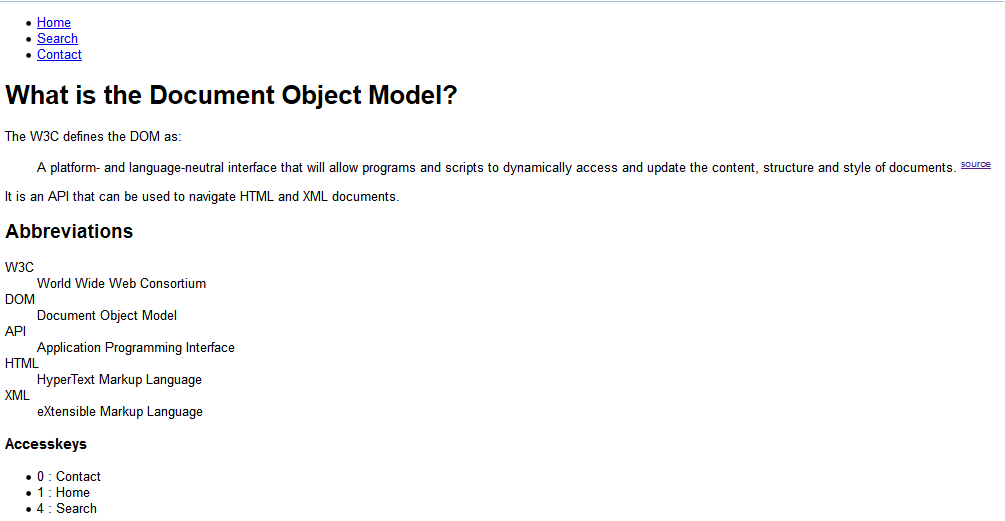
最後實現的網頁效果如下:
以上就是本文的全部內容,希望本文的內容對大家的學習或者工作能帶來一定的幫助,同時也希望多多支持!