Bootstrap Modal對話框如何在關閉時觸發事件
編輯:關於JavaScript
下表列出了模態框中要用到事件。這些事件可在函數中當鉤子使用。
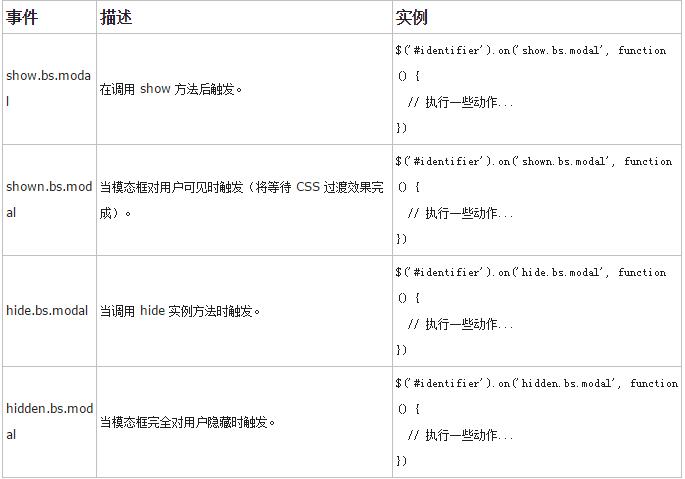
實例
下面的實例演示了事件的用法:
<!DOCTYPE html>
<html>
<head>
 <title>Bootstrap 實例 - 模態框(Modal)插件事件</title>
 <link href="/bootstrap/css/bootstrap.min.css" rel="stylesheet">
 <script src="/scripts/jquery.min.js"></script>
 <script src="/bootstrap/js/bootstrap.min.js"></script>
</head>
<body>

<h2>模態框(Modal)插件事件</h2>

<!-- 按鈕觸發模態框 -->
<button class="btn btn-primary btn-lg" data-toggle="modal" data-target="#myModal">
 開始演示模態框
</button>

<!-- 模態框(Modal) -->
<div class="modal fade" id="myModal" tabindex="-1" role="dialog"
 aria-labelledby="myModalLabel" aria-hidden="true">
 <div class="modal-dialog">
 <div class="modal-content">
  <div class="modal-header">
  <button type="button" class="close" data-dismiss="modal"
  aria-hidden="true">×
  </button>
  <h4 class="modal-title" id="myModalLabel">
  模態框(Modal)標題
  </h4>
  </div>
  <div class="modal-body">
  點擊關閉按鈕檢查事件功能。
  </div>
  <div class="modal-footer">
  <button type="button" class="btn btn-default"
  data-dismiss="modal">
  關閉
  </button>
  <button type="button" class="btn btn-primary">
  提交更改
  </button>
  </div>
 </div><!-- /.modal-content -->
 </div><!-- /.modal-dialog -->
</div><!-- /.modal -->
<script>
 $(function () { $('#myModal').modal('hide')})});
</script>
<script>
 $(function () { $('#myModal').on('hide.bs.modal', function () {
 alert('嘿,我聽說您喜歡模態框...');})
 });
</script>

</body>
</html>
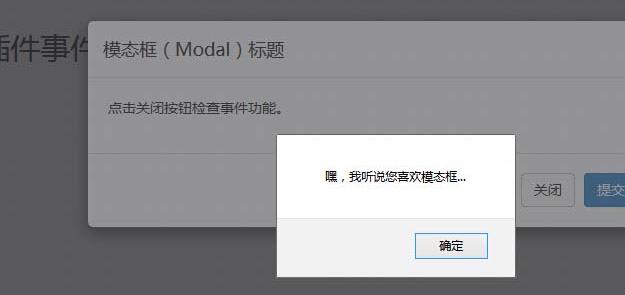
如果大家還想深入學習,可以點擊這裡進行學習,再為大家附3個精彩的專題:
Bootstrap學習教程
Bootstrap實戰教程
Bootstrap插件使用教程
以上就是本文的全部內容,希望對大家的學習有所幫助,也希望大家多多支持。
小編推薦
熱門推薦