JavaScript表單驗證開發
編輯:關於JavaScript
本文實例為大家分享了js表單驗證的具體代碼,供大家參考,具體內容如下
在線demo:http://www.hui12.com/nbin/csdn/jsInput/demo.html
效果圖:
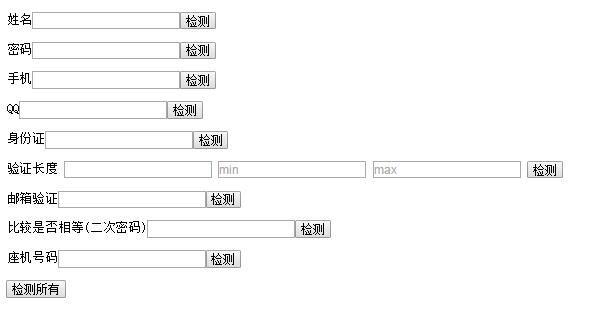
/* 驗證類型
testName: "驗證用戶",
testPassword: "密碼",
testPhone: "手機號碼",
testQQ: "驗證QQ",
testLength: "驗證是否在指定長度內", //3個參數,最小和最大
testEmail: "驗證郵箱",
testSame: "兩個元素比較是否相同", //接受兩個參數
testWX: "驗證微信昵稱",
testPlane: "驗證座機",
testManCard: "驗證身份證"
*/
/* 使用方法
 * 創建實例對象 var a = new testInput();
 * 傳入dom-JQ對象和對應的檢測的方法
 * a.add( [$(".testName"),"testName"] ),以數組形式
 * 可以接受2次數組多傳 a.add([[$(".testName"),"testName"], [$(".testName"),"testName"]])
 * 檢測方法
 * a.get( $(".testName") ) 獲取單個結果,返回結果為JSON {result:'結果', text:'提示'}
 * a.get( [$(".testName"), $(".testName")] ) 獲取指定結果 返回結果為數組 [{obj:'',result:'',txt:''}, {obj:'',result:'',txt:''}]
 * a.get() 如果不傳入參數,則獲取所有結果,不包含特殊驗證 testLength, testSame
 * 特殊檢測
 * 檢測是字節長度是否在指定范圍內 a.get( [$(".testLength"), min, max] ) 最小值最大值,數字類型
 * 檢測兩個輸入內容是否一致(2次密碼確認) a.get([$(".testSama"), $(".testSama"), "same"]) 前兩個為比較對象,第三個為固定必填參數
 */

(function(window, $){
 var proto = {
 testName: function($obj){
  var str = $obj.val();
  if( !this.checkNormal(str) ){
  return {
   result: false,
   txt: "由字母,數字、下劃線組成"
  }
  };
  if( !this.checkLength(str,6,20) ){
  return {
   result: false,
   txt: "長度在6-20個字符以內"
  }
  };
  if( !this.checkFirstA(str) ){
  return {
   result: false,
   txt: "第一個字符不能為數字"
  }
  };
  return {
  result: true,
  txt: ""
  }
 },
 testPassword: function($obj){
  return this.testName($obj);
 },
 testPhone: function($obj){
  var str = $obj.val();
  var re = /^1\d{10}$/;
  if( re.test(str) ){
  return {
   result: true,
   txt: ""
  }
  }else{
  return {
   result: false,
   txt: "手機號碼由11位數字組成"
  }
  }
 },
 testQQ: function($obj){
  var str = $obj.val();
  var re = /^\d{5,10}$/;
  if( re.test(str) ){
  return {
   result: true,
   txt: ''
  }
  }else{
  return {
   result: false,
   txt: "5~10位數字"
  }
  }
 },
 testLength: function($obj, a, b){
  if( this.checkLength($obj.val(),a,b) ){
  return {
   result: true
  }
  }else{
  return {
   result: false
  }
  }
 },
 testEmail: function($obj){
  var re = /^(\w-*\.*)+@(\w-?)+(\.\w{2,})+$/;
  var str = $obj.val();
  if( re.test(str) ){
  return {
   result: true,
   txt: ""
  };
  }else{
  return {
   result: false,
   txt: "郵箱格式不正確"
  }
  };
 },
 testSame: function($obj1, $obj2){
  if( $obj1.val() == $obj2.val() ){
  return {
   result: true,
   txt: ""
  }
  }else{
  return {
   result: false,
   txt: "不一致"
  }
  }
 },
 testWX: function($obj){
  var str = $obj.val();
  var reg = /^[a-z_\d]+$/;
  if( reg.test(str) ){
  return {
   result: true,
   txt: ""
  };
  }else{
  return {
   result: false,
   txt: ""
  }
  }
 },
 testPlane: function($obj){
  var str = $obj.val();
  var reg = /^\d{3,4}-\d{5,8}$/;
  if( reg.test(str) ){
  return {
   result: true,
   txt: ""
  }
  }else{
  return {
   result: false,
   txt: "格式為:010-1234567"
  }
  }
 },
 testManCard: function($obj){
  var str = $obj.val();
  var reg = /(^\d{15}$)|(^\d{18}$)|(^\d{17}(\d|X|x)$)/;
  if( reg.test(str) ){
  return {
   result: true,
  }
  }else{
  return {
   result: false,
   text: "請輸入正確的身份證號碼"
  }
  }
 },

 /*
  * 檢測方法
  */
 checkEmpty: function(str){
  if( str.trim() == '' ){
  return false;
  }else{
  return true;
  }
 },
 //檢測第一個字母是否為數字
 checkFirstA: function(str){
  var first = str.charAt(0);
  if( /\d/.test(first) ){
  return false;
  }else{
  return true;
  }
 },
 //檢測數字+字母
 checkNormal: function(str){
  var reg = /^(([a-z]+[0-9]+)|([0-9]+[a-z]+))[a-z0-9]*$/i;
  if( reg.test(str) ){
  return true;
  }else{
  return false;
  }
 },
 //檢測是否在規范長度內
 checkLength: function(str,a,b){
  var min = a || 6;
  var max = b || 20;
  var length = str.length;
  if( length>=a && length <= b ){
  return true;
  }else{
  return false;
  }
 },
 //
 add: function(arr){
  !this.cache && (this.cache = []);
  var isTwo = $.isArray(arr[0]);
  if( isTwo ){
  this.cache = this.cache.concat(arr);
  }else{
  this.cache.push(arr);
  };
  return this;
 },
 get: function(){
  var This = this;
  var args = arguments;
  if( args.length === 0 ){
  //檢測所有, 返回數組結果
  var tmp = [];
  $.each(This.cache, function(i, val) {
   var newArr = [].concat(val);
   newArr.splice(1,1);
   tmp.push( newArr );
  });
  return merges(tmp,10);
  }else{
  if( $.isArray(args[0]) ){ //[obj,obj,obj]
   var tmp = [];
   // 1.一個檢測,帶參數2,3 [obj,2,3]
   // 2、一個檢測,和另外一個是否相等 [obj,obj,'same']
   // 3、多個檢測,返回多個結果. [obj,obj],又可能出現上面2種情況
   if( !isNaN(args[0][1]) || !isNaN(args[0][2]) ){
   tmp.push(args[0]);
   return merges(tmp, 1);
   };
   if( args[0][2] == 'same' ){
   args[0].splice(2,1);
   tmp.push(args[0]);
   return merges(tmp, 1);
   };
   $.each(args[0], function(i, val) {
   if( $.isArray(val) ){
    tmp.push(val);
   }else{
    tmp.push([val]);
   };
   });
   return merges(tmp);
  }else{
   //常規
   return merges([[args[0]]], 1);
  }
  };
  function merges(arr, one){ //arr = [ [obj,a,b], [obj] ]
  var result = [];
  $.each(arr, function(i, val){
   var oldName = val[0][0];
   var tName;
   $.each(This.cache, function(i2,val2) {
   if( oldName == val2[0][0] ){
    tName = val2[1];
    return false;
   };
   });
   var r;
   if( one == 10){
   if( tName == "testLength" || tName == "testSame" ){
    r = {
    tName: "請單獨獲取"
    };
   }else{
    r = This[tName].apply(This, val);
   };
   }else{
   r = This[tName].apply(This, val);
   };
   if( one==1 ){
   result.push(r);
   return false;
   };
   r.obj = val[0];
   result.push( r );
  });
  return one==1 ? result[0] : result;
  };
 }
 };
 function Test(){
 return this;
 };
 Test.prototype = proto;
 Test.prototype.constructor = Test;
 window.Test = Test;
})(window, jQuery)
主要說說add和get方法實現的思路
表單和規則對應,采用數組形式 【表單,規則】
add: function(arr){
 !this.cache && (this.cache = []);
 var isTwo = $.isArray(arr[0]);
 if( isTwo ){
 this.cache = this.cache.concat(arr);
 }else{
 this.cache.push(arr);
 };
 return this;
}
cache用來保存值
isTwo用來判斷是否是2次數組,2次數組傳多個值
get方法
var This = this;
var args = arguments;
if( args.length === 0 ){
 //檢測所有, 返回數組結果
 var tmp = [];
 $.each(This.cache, function(i, val) {
 var newArr = [].concat(val);
 newArr.splice(1,1);
 tmp.push( newArr );
 });
 return merges(tmp,10);
}
如果沒有值,則獲取所有結果,所有執行都是在merges函數裡面執行,merges第一個參數為檢測元素,結構為2次數組,[ [obj,a,b], [obj] ],因為有特殊檢測帶有參數,所有裡面一次數組實際上為檢測元素和要用的參數值,第二個參數為特殊參數,後文用來做判斷是否是全部檢測,用splice截取第二個參數,第二個參數為檢測方法,後面用不到,截取後的數組為 【dom,參數】
}else{
 if( $.isArray(args[0]) ){ //[obj,obj,obj]
 var tmp = [];
 // 1.一個檢測,帶參數2,3 [obj,2,3]
 // 2、一個檢測,和另外一個是否相等 [obj,obj,'same']
 // 3、多個檢測,返回多個結果. [obj,obj],又可能出現上面2種情況
 if( !isNaN(args[0][1]) || !isNaN(args[0][2]) ){
  tmp.push(args[0]);
  return merges(tmp, 1);
 };
 if( args[0][2] == 'same' ){
  args[0].splice(2,1);
  tmp.push(args[0]);
  return merges(tmp, 1);
 };
 $.each(args[0], function(i, val) {
  if( $.isArray(val) ){
  tmp.push(val);
  }else{
  tmp.push([val]);
  };
 });
 return merges(tmp);
 }else{
 //常規
 return merges([[args[0]]], 1);
 }
};
$.isArray(args[0]) 用來判斷是否是數組,不是數組則為dom對象,執行merges([[args[0]]], 1),第一個參數設置為2次數組,原因上文有提到,後面的1為後面結果做判斷,1直接返回json結果
為真的時候,裡面又有三種情況,和備注的相對應
function merges(arr, one){ //arr = [ [obj,a,b], [obj] ]
 var result = [];<span style="white-space:pre"> </span>//返回結果
 $.each(arr, function(i, val){
 var oldName = val[0][0];<span style="white-space:pre"> </span>//val為1次數組,得到源生dom對象
 var tName;<span style="white-space:pre"> </span>//執行方法名字
 $.each(This.cache, function(i2,val2) {
  if( oldName == val2[0][0] ){<span style="white-space:pre"> </span>//如果傳入dom和cache已保存的dom一樣,則獲取dom執行方法
  tName = val2[1];
  return false;
  };
 });
 var r;
 if( one == 10){<span style="white-space:pre"> </span>//全部獲取,對特殊檢測做特殊處理
  if( tName == "testLength" || tName == "testSame" ){
  r = {
   tName: "請單獨獲取"
  };
  }else{
  r = This[tName].apply(This, val);
  };
 }else{<span style="white-space:pre"> </span>//獲取單個檢測結果
  r = This[tName].apply(This, val);
 };
 if( one==1 ){<span style="white-space:pre"> </span>//如果為1,則只單個檢測,結果為[{}],然後跳出
  result.push(r);
  return false;
 };
 r.obj = val[0];<span style="white-space:pre"> </span>//沒有執行1的判斷,說明是多個元素檢測,手動增加一個obj屬性,方便返回值查詢,結果為[{},{}...]
 result.push( r );
 });
 return one==1 ? result[0] : result;<span style="white-space:pre"> </span>//針對傳入參數返回不同結果
};
如果大家還想深入學習,可以點擊兩個精彩的專題:jquery表單驗證大全 JavaScript表單驗證大全
以上就是本文的全部內容,希望對大家的學習有所幫助,也希望大家多多支持。
小編推薦
熱門推薦