js html5 css俄羅斯方塊游戲再現
編輯:關於JavaScript
這個游戲主要分為三部份,HTML5+CSS+JAVASCRIPT來完成的。在這裡詳細講一下js的代碼。因為這個游戲的主要部分其實就是js。
大多數都是靠js來完成的。
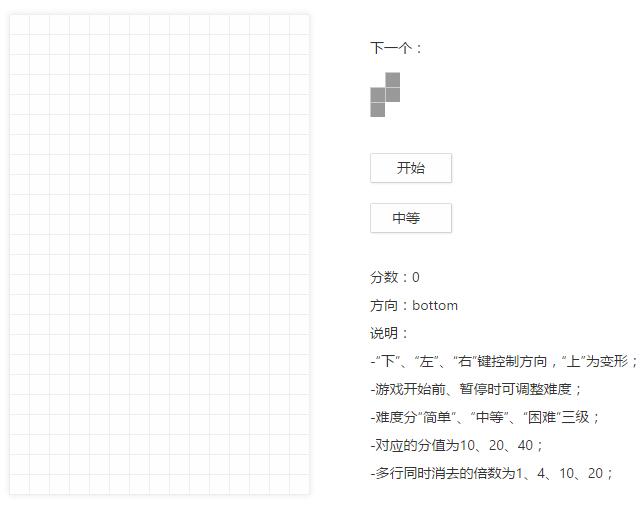
完成後的效果如下:
HTML代碼:
<body>
 <div class="wrap">
 <div class="play_wrap">
 <div id="play_area"></div>
 <div class="play_menu">
 <p>下一個:</p>
 <div id="play_nextType"></div>
 <a id="play_btn_start" class="play_btn" href="javascript:void(0);"
 unselectable="on">開始</a><a id="play_btn_level" class="play_btn" href="javascript:void(0)" unselectable="on"><span class="level_text">中等</span class="level_icon"></span></a>
 <div class="level_menu" id="play_menu_level">
 <ul>
 <li><a href="javascript:void(0)" level=0>簡單</a></li>
 <li><a href="javascript:void(0)" level=1>中等</a></li>
 <li><a href="javascript:void(0)" level=2>困難</a></li>
 </ul>
 </div>
 <p>
 分數:<span id="play_score">0</span>
 </p>
 <p>
 方向:<span id="play_direction">bottom</span>
 </p>
 <p>
 說明:<br> -“下”、“左”、“右”鍵控制方向,“上”為變形;<br> -游戲開始前、暫停時可調整難度;<br>
 -難度分“簡單”、“中等”、“困難”三級;<br> -對應的分值為10、20、40;<br>
 -多行同時消去的倍數為1、4、10、20;
 </p>
 </div>
 </div>
 </div>
 </body>
CSS代碼:
<style>
body,div,dl,dt,dd,ul,ol,li,h1,h2,h3,h4,h5,h6,pre,form,fieldset,input,button,textarea,p,blockquote,th,td
{
 padding: 0;
 margin: 0;
}

body {
 font-family: "Helvetica Neue", "Hiragino Sans GB", "Segoe UI",
 "Microsoft Yahei", "微軟雅黑", Tahoma, Arial, STHeiti, sans-serif;
 font-size: 12px;
 background: #fff;
 color: #333;
}

a{
 outline:none;
 -moz-outline:none;
 text-decoration: none;
}

.wrap{
 width:1000px;
 margin:80px auto;
}

.play_wrap{
 padding-left:260px;
}

#play_area{
 float:left;
 width:300px;
 height:480px;
 margin:auto;
 background-color:#fefefe;
 border-radius:2px;
 color:black;
 box-shadow:0px 0px 8px #e5e5e5;
 padding:1px 0 0 1px;
}

#play_area .play_cell{
 float:left;
 width:19px;
 height:19px;
 border:1px solid #eee;
 margin:-1px 0 0 -1px;
}

#play_area .play_cell.active{
 background:#999;
 border:1px solid #ccc;
}

#play_area .play_cell.goal{
 background:#0c0;
}

.play_menu{
 float:left;
 margin-left:60px;
 font-size:14px;
 padding-top:20px;
}

.play_menu #play_nextType{
 width:60px;
 height:60px;
 padding:1px 0 0 1px;
 margin:10px 0 20px 0;
}

.play_menu .play_mini_cell{
 float:left;
 width:14px;
 height:14px;
 border:1px solid #fff;
 margin:-1px 0 0 -1px;
}

.play_menu .play_mini_cell.active{
 background:#999;
 border:1px solid #ccc;
}

.play_menu p {
 line-height:200%;
 clear:both;
}

.play_menu a.play_btn{
 display:block;
 margin-bottom:20px;
 width:80px;
 height:28px;
 line-height:28px;
 text-align:center;
 text-decoration: none;
 color:#333;
 background:#fefefe;
 border:1px solid #eee;
 border-radius: 2px;
 box-shadow: 1px 1px 2px #eee;
 border-color:#ddd #d2d2d2 #d2d2d2 #ddd;
 outline: none;
 -moz-outline:none;
}

.play_menu a.play_btn:hover{
 background-color:#fcfcfc;
 border-color:#ccc;
 box-shadow: inset 0 -2px 6px #eee;
}

.play_menu a#play_btn_level{
 position:relative;
 margin-bottom:30px;
}

.level_text{
 margin-left:-10px;
}

.level_icon{
 display: block;
 position:absolute;
 top:12px;
 right:16px;
 width:0;
 height:0;
 overflow: hidden;
 border:5px solid #FFF;
 border-color: #999 transparent transparent transparent;
}

.level_menu{
 position:absolute;
 margin:-30px 0 0 1px;
 display:none;
}
.level_menu ul{
 list-style:none;
}
.level_menu li{
 float:left;
}
.level_menu li a{
 display:block;
 padding:3px 10px;
 border:1px solid #e8e8e8;
 margin-left:-1px;
 color:#09c;
}
.level_menu li a:hover{
 background:#09c;
 color:#fefefe;
}
</style>
HTML的代碼其實就是一個游戲結構的框架,這裡框架其實就是幾個div的東西,所以不會太長,理解起來也是挺容易的。而CSS則是控制網頁的布局與美觀,所以要想吸引玩家,那CSS方面必須下功夫,而這裡的CSS只是其實就將游戲區域與菜單區域分為左右兩邊了。而游戲域內的一個個框其實就是多個div,整齊排列在一起而已。
下面到了js了:
因為在代碼已經將一些重要的部分做了注釋,所以就不打算逐步分去分析了。說一下整體的寫法吧。其實它首先是直接定義了一些圖形的坐標,然後根據這些坐標畫出一個下一個的圖形出來,之後就是利用一個setInterval函數在游戲區域標出每個點,如果不能下落了就直接清除掉時間函數,之後在調用一個創建時間函數的函數出來,在畫一個圖形出來。具體的細節就看代碼吧。
<script type="text/javascript" src="jquery-1.6.2.min.js"></script>
 <script type="text/javascript">
 var Tetris = function(options){
 //方塊區域
 this.e_playArea = $("#play_area");
 //開始按鈕
 this.e_startBtn = $("#play_btn_start");
 //分數
 this.e_playScore = $("#play_score");
 //方向
 this.e_playDirection = $("#play_direction");
 //等級按鈕
 this.e_levelBtn = $("#play_btn_level");
 //等級菜單
 this.e_levelMenu = $("#play_menu_level");
 //下一個方塊的類型
 this.e_nextType = $("#play_nextType");
 //總的列數
 this.cellCol = 15;
 //總的行數
 this.cellRow = 24;
 //每個小方塊的屬性數組
 this.cellArr = [];
 //保存右上方下一個那裡的小圖形數組
 this.miniCellArr = [];
 //分數
 this.score = 0;
 //方向
 this.direction = "bottom";
 //定時器的ID
 this.timer = null;
 //定時器的時間數組
 this.interval = [600,300,100];
 //等級的分數數組
 this.levelScore = [10,20,40];
 //消除的行數多少而給的倍數
 this.doubleScore = [1,4,10,20];
 //默認等級1
 this.level = 1;
 //游戲是否進行
 this.playing = false;
 //游戲暫停標記
 this.turning = false;
 //游戲結束標記
 this.death = false;
 //一開始方塊列出現的位置
 this.offsetCol = Math.floor(this.cellCol/2);
 //一開始方塊行出現的位置
 this.offsetRow = -3;

 this.tetrisArr = [];
 /*
 0,1,15,16
 0,1,15,16
 */
 this.tetrisArr[0] = [
 [0,1,this.cellCol,this.cellCol+1],
 [0,1,this.cellCol,this.cellCol+1]
 ];
 /*
 1,14,15,16
 0,15,30,31
 14,15,16,29
 -1,0,15,30
 */
 this.tetrisArr[1] = [
 [1,this.cellCol-1,this.cellCol,this.cellCol+1],
 [0,this.cellCol,this.cellCol*2,this.cellCol*2+1],
 [this.cellCol-1,this.cellCol,this.cellCol+1,this.cellCol*2-1],
 [-1,0,this.cellCol,this.cellCol*2]
 ];
 /*
 -1,14,15,16
 0,1,15,30
 14,15,16,31
 0,15,29,30
 */
 this.tetrisArr[2] = [
 [-1,this.cellCol-1,this.cellCol,this.cellCol+1],
 [0,1,this.cellCol,this.cellCol*2],
 [this.cellCol-1,this.cellCol,this.cellCol+1,this.cellCol*2+1],
 [0,this.cellCol,this.cellCol*2-1,this.cellCol*2]
 ];
 /*
 0,15,16,31
 15,16,29,30
 */
 this.tetrisArr[3] = [
 [0,this.cellCol,this.cellCol+1,this.cellCol*2+1],
 [this.cellCol,this.cellCol+1,this.cellCol*2-1,this.cellCol*2]
 ];
 /*
 0,14,15,29
 14,15,30,31
 */
 this.tetrisArr[4] = [
 [0,this.cellCol-1,this.cellCol,this.cellCol*2-1],
 [this.cellCol-1,this.cellCol,this.cellCol*2,this.cellCol*2+1]
 ];
 /*
 0,14,15,16
 0,15,16,30
 14,15,16,30
 0,14,15,30
 */
 this.tetrisArr[5] = [
 [0,this.cellCol-1,this.cellCol,this.cellCol+1],
 [0,this.cellCol,this.cellCol+1,this.cellCol*2],
 [this.cellCol-1,this.cellCol,this.cellCol+1,this.cellCol*2],
 [0,this.cellCol-1,this.cellCol,this.cellCol*2]
 ];
 /*
 0,15,30,45
 14,15,16,17
 */
 this.tetrisArr[6] = [
 [0,this.cellCol,this.cellCol*2,this.cellCol*3],
 [this.cellCol-1,this.cellCol,this.cellCol+1,this.cellCol+2]
 ];
 this.tetrisType = [1,1];
 this.tetrisType = [1,0];
 this.tetrisTypeArr = [];

 this.preTetris = [];
 this.thisTetris = [];
 this.fullArr = [];

 this.start();
 }
 Tetris.prototype = {
 //開始入口函數
 start : function(){
 this.init();
 this.menu();
 this.control();
 },
 //選擇設置
 setOptions : function(options){
 this.score = options.score === 0 ? options.score
 : (options.score || this.score);
 this.level = options.level === 0 ? options.level
 : (options.level || this.level);
 },
 resetArea : function(){
 $(".play_cell.active").removeClass("active");
 this.setOptions({
 "score" : 0
 });
 this.e.playScore.html(this.score);
 },
 //菜單
 menu : function(){
 var self = this;
 this.e_startBtn.click(function(){
 self.e_levelMenu.hide();
 if(self.playing){
 self.pause();
 } else if(self.death){
 self.resetArea();
 self.play();
 } else {
 self.play();
 }
 });
 this.e_levelBtn.click(function(){
 if(self.playing)return;
 self.e_levelMenu.toggle();
 });
 this.e_levelMenu.find("a").click(function(){
 self.e_levelMenu.hide();
 self.e_levelBtn.find(".level_text").html($(this).html());
 self.setOptions({
 "level" : $(this).attr("level")
 });
 });
 },
 play : function(){
 var self = this;
 this.e_startBtn.html("暫停");
 this.playing = true;
 this.death = false;
 if(this.turning){
 this.timer = setInterval(function(){
 self.offsetRow++;
 self.showTetris();
 },this.interval[this.level]);
 } else {
 this.nextTetris();
 }
 },
 pause : function(){
 this.e_startBtn.html("開始");
 this.playing = false;
 clearTimeout(this.timer);
 },
 //初始化游戲
 init : function(){
 var self =this,_ele,_miniEle,_arr = [];
 //創建小方塊放進cellArr裡
 for(var i=0;i<this.cellCol;++i){
 for(var j=0;j<this.cellRow;++j){
 _ele = document.createElement("div");
 _ele.className = "play_cell";
 _ele.id = "play_cell_"+ i + "_" + j;
 this.cellArr.push($(_ele));
 this.e_playArea.append(_ele);
 }
 }
 //創建下一個圖形的小方塊
 for(var m=0;m<16;++m){
 _miniEle = document.createElement("div");
 _miniEle.className = "play_mini_cell";
 this.miniCellArr.push($(_miniEle));
 this.e_nextType.append(_miniEle);
 }
 //保存三維數組tetrisArr的前兩維數據編號,k為其第一維編號,j為其二維
 for(var k=0,klen=this.tetrisArr.length;k<klen;++k){
 for(var j=0,jlen=this.tetrisArr[k].length;j<jlen;++j){
 this.tetrisTypeArr.push([k,j]);
 }
 }
 //下一個圖形的【x】【y】
 this.nextType = this.tetrisTypeArr[Math.floor(this.tetrisTypeArr.length*Math.random())];
 this.showNextType();
 },
 //按鍵控制函數
 control : function(){
 var self = this;
 $("html").keydown(function(e){
 if(!self.playing)
 return !self.playing;
 switch(e.keyCode){
 case 37:
 self.direction = "left";
 break;
 case 38:
 self.direction = "top";
 break;
 case 39:
 self.direction = "right";
 break;
 case 40:
 self.direction = "bottom";
 break;
 default:
 return;
 break;
 }
 //顯示當前的按鍵操作
 self.e_playDirection.html(self.direction);
 //實行按鍵的操作函數
 self.drive();
 return false;
 });
 },
 //改變圖形的狀態
 changTetris : function(){
 var _len = this.tetrisArr[this.tetrisType[0]].length;
 if(this.tetrisType[1] < _len-1){
 this.tetrisType[1]++;
 } else {
 this.tetrisType[1] = 0;
 }
 },
 //按鍵的操作函數
 drive : function(){
 switch(this.direction){
 case "left":
 if(this.offsetCol>0){
 this.offsetCol--;
 }
 break;
 case "top":
 this.changTetris();
 break;
 case "right":
 this.offsetCol++;
 break;
 case "bottom":
 if(this.offsetRow<this.cellRow-2){
 this.offsetRow++;
 }
 break;
 default:
 break;
 }
 //顯示圖形的函數
 this.showTetris(this.direction);
 },
 //顯示圖形的函數
 showTetris : function(dir){
 var _tt = this.tetrisArr[this.tetrisType[0]][this.tetrisType[1]],_ele,self=this;
 this.turning = true;
 this.thisTetris = [];
 for(var i=_tt.length-1;i>=0;--i){
 _ele = this.cellArr[_tt[i]+this.offsetCol+this.offsetRow*this.cellCol];
 //規定左右移動不能超出邊框
 if(this.offsetCol<7&&(_tt[i]+this.offsetCol+1)%this.cellCol==0){
 this.offsetCol++;
 return;
 }else if(this.offsetCol>7&&(_tt[i]+this.offsetCol)%this.cellCol==0){
 this.offsetCol--;
 return;
 }
 //判斷是否下落是與方塊碰撞了,排除向左移動時碰到左邊的方塊而停止下落
 if(_ele&&_ele.hasClass("active")&&dir=="left"&&($.inArray(_ele,this.preTetris)<0)){
 if(($.inArray(_ele,this.cellArr)-$.inArray(this.preTetris[i],this.cellArr))%this.cellCol!=0){
 this.offsetCol++;
 return;
 }
 }
 if(_ele&&_ele.hasClass("active")&&dir=="right"&&($.inArray(_ele,this.preTetris)<0)){
 if(($.inArray(_ele,this.cellArr)-$.inArray(this.preTetris[i],this.cellArr))%this.cellCol!=0){
 this.offsetCol--;
 return;
 }
 }
 //找到某個div進行下落的過程
 //否則找不到直接結束下落的過程
 if(_ele){
 //找到一個div有class=active,而且不是上一次自身的位置,那麼就停止
 //向下走了,因為遇到障礙物了
 //否則這個div符合,存起來
 if(_ele.hasClass("active")&&($.inArray(_ele,this.preTetris)<0)){
 this.tetrisDown();
 return;
 } else {
 this.thisTetris.push(_ele);
 }
 } else if(this.offsetRow>0){
 this.tetrisDown();
 return;
 }
 }
 //將上一次的位置的標記全部去除
 for(var j=0,jlen=this.preTetris.length;j<jlen;++j){
 this.preTetris[j].removeClass("active");
 }
 //標記這一次的位置
 for(var k=0,klen=this.thisTetris.length;k<klen;k++){
 this.thisTetris[k].addClass("active");
 }
 //儲存起現在的位置,會成為下一次的前一次位置
 this.preTetris = this.thisTetris.slice(0);
 },
 //無法下落時進行的函數
 tetrisDown : function(){
 clearInterval(this.timer);
 var _index;
 this.turning = false;
 //是否填充滿一行的檢測
 forOuter:for(var j=0,jlen=this.preTetris.length;j<jlen;++j){
 _index = $.inArray(this.preTetris[j],this.cellArr);
 for(var k=_index-_index%this.cellCol,klen=_index-_index%this.cellCol+this.cellCol;k<klen;++k){
 if(!this.cellArr[k].hasClass("active")){
 continue forOuter;
 }
 }
 if($.inArray(_index-_index%this.cellCol,this.fullArr)<0)
 this.fullArr.push(_index-_index%this.cellCol);
 }
 if(this.fullArr.length){
 this.getScore();
 return;
 }
 //如果圖形在6-9的div內被標記,那麼游戲結束
 for(var i=6;i<9;++i){
 if(this.cellArr[i].hasClass("active")){
 this.gameOver();
 alert("you lost!");
 return;
 }
 }
 this.nextTetris();
 },
 //下一個圖形
 nextTetris : function(){
 var self = this;
 clearInterval(this.timer);
 this.preTetris = [];
 this.offsetRow = -2;
 this.offsetCol = 7;
 this.tetrisType = this.nextType;
 this.nextType = this.tetrisTypeArr[Math.floor(this.tetrisTypeArr.length*Math.random())];
 this.showNextType();
 this.timer = setInterval(function(){
 self.offsetRow++;
 self.showTetris();
 },this.interval[this.level]);
 },
 showNextType : function(){
 //_nt為找到在this.nextType[0]行,this.nextType[1]列的一行數據
 var _nt = this.tetrisArr[this.nextType[0]][this.nextType[1]],_ele,_index;
 //找到class=active的元素,之後全部刪除class元素
 this.e_nextType.find(".active").removeClass("active");
 for(var i=0,ilen=_nt.length;i<ilen;++i){
 //因為offsetCol的最小值只能為2,所以在tetrisArr數組中賦的值都減了2
 //這裡要加回2來處理,才能在小的視圖裡安放圖形
 if(_nt[i]>this.cellCol-2){
 _index = (_nt[i]+2)%this.cellCol-1+4*parseInt((_nt[i]+2)/this.cellCol);
 }else{
 _index = _nt[i] + 1;
 }
 _ele = this.miniCellArr[_index];
 _ele.addClass("active");
 }
 },
 //獲取分數
 getScore : function(){
 var self = this;
 //對完整的行消除,對元素進行向下移動
 for(var i=this.fullArr.length-1;i>=0;--i){
 for(var j=0;j<this.cellCol;++j){
 this.cellArr[j+this.fullArr[i]].removeClass("active");
 if(j==this.cellCol-1){
 for(var k=this.fullArr[i];k>=0;--k){
 if(this.cellArr[k].hasClass("active")){
  this.cellArr[k].removeClass("active");
  this.cellArr[k+this.cellCol].addClass("active");
 }
 }
 }
 }
 }
 this.score += this.levelScore[this.level]*this.doubleScore[this.fullArr.length-1];
 this.e_playScore.html(this.score);
 this.fullArr = [];
 this.nextTetris();
 },
 //游戲結束
 gameOver : function(){
 this.death = true;
 this.pause();
 return;
 }
 };
 $(document).ready(function(e){
 var t = new Tetris();
 });
 </script>
源碼下載:http://xiazai.jb51.net/201610/yuanma/js-html5els(jb51.net).rar
以上就是本文的全部內容,希望對大家的學習有所幫助,也希望大家多多支持。
小編推薦
熱門推薦