在web中js實現類似excel的表格控件
編輯:關於JavaScript
Execl功能非常強大,內置的很多函數或公式可以大大提高對數據的加工處理能力。那麼在web中有沒有類似的控件呢?經過一番搜尋,發現handsontable具備了基本的excel功能支持公式,同時能對數據進行實時編輯。另外支持拖動復制、Ctrl+C 、Ctrl+V 等等。在浏覽器支持方面,它支持以下的浏覽器: IE7+, FF, Chrome, Safari, Opera。
首先引入相關庫文件,公式支持不包含在handsontable.full.js中,需要單獨引入:
<script src="http://handsontable.github.io/handsontable-ruleJS/lib/jquery/jquery-1.10.2.js"></script>
<script src="http://handsontable.github.io/handsontable-ruleJS/lib/handsontable/handsontable.full.js"></script>
<link rel="stylesheet" media="screen" href="http://handsontable.github.io/handsontable-ruleJS/lib/handsontable/handsontable.full.css">
<script src="http://handsontable.github.io/handsontable-ruleJS/lib/RuleJS/lib/lodash/lodash.js"></script>
<script src="http://handsontable.github.io/handsontable-ruleJS/lib/RuleJS/lib/underscore.string/underscore.string.js"></script>
<script src="http://handsontable.github.io/handsontable-ruleJS/lib/RuleJS/lib/moment/moment.js"></script>
<script src="http://handsontable.github.io/handsontable-ruleJS/lib/RuleJS/lib/numeral/numeral.js"></script>
<script src="http://handsontable.github.io/handsontable-ruleJS/lib/RuleJS/lib/numericjs/numeric.js"></script>
<script src="http://handsontable.github.io/handsontable-ruleJS/lib/RuleJS/lib/js-md5/md5.js"></script>
<script src="http://handsontable.github.io/handsontable-ruleJS/lib/RuleJS/lib/jstat/jstat.js"></script>
<script src="http://handsontable.github.io/handsontable-ruleJS/lib/RuleJS/lib/formulajs/formula.js"></script>
<script src="http://handsontable.github.io/handsontable-ruleJS/lib/RuleJS/js/parser.js"></script>
<script src="http://handsontable.github.io/handsontable-ruleJS/lib/RuleJS/js/ruleJS.js"></script>
<script src="http://handsontable.github.io/handsontable-ruleJS/lib/handsontable/handsontable.formula.js"></script>
在HTML中放置一個Div容器來存放handsontable控件:
 <body>
  <div id="handsontable-code"></div>
 </body>
在javascript代碼中,首先獲取div容器,然後創建表格控件:
<script type="text/javascript">
   $(document).ready(function () {

 var data1 = [
  ['=$B$2', "Maserati", "Mazda", "return 1+2;", 'return DataAccess.getScalar("select top 1 name from Cloud_Users where cellPhone=15895211486");', "=A$1"],
  [2009, 0, 2941, 4303, 354, 5814],
  [2010, 5, 2905, 2867, '=SUM(A4,2,3)', '=$B1'],
  [2011, 4, 2517, 4822, 552, 6127],
  [2012, '=SUM(A2:A5)', '=SUM(B5,E3)', '=A2/B2', 12, 4151]
 ];


      function negativeValueRenderer(instance, td, row, col, prop, value, cellProperties) {
        Handsontable.renderers.TextRenderer.apply(this, arguments);

        var escaped = Handsontable.helper.stringify(value),
        newvalue;

        if (escaped.indexOf('return') === 0) {
          //計算列為只讀
          //cellProperties.readOnly = true;
          td.style.background = '#EEE';
          newvalue = document.createElement('span');
          $.ajax({
            //提交數據的類型 POST GET
            type: "POST",
            //提交的網址
            url: "/services/CSEngine.ashx",
            //提交的數據
            data: { code: value, code2: escaped },
            //返回數據的格式
            datatype: "html",//"xml", "html", "script", "json", "jsonp", "text".
            //在請求之前調用的函數
            //beforeSend: function () { $("#msg").html("logining"); },
            //成功返回之後調用的函數
            success: function (data) {
              // $("#msg").html(decodeURI(data));
              newvalue.innerHTML = decodeURI(data);
            },
            //調用執行後調用的函數
            complete: function (XMLHttpRequest, textStatus) {
              //alert(XMLHttpRequest.responseText);
              // alert(textStatus);
              //HideLoading();
            },
            //調用出錯執行的函數
            error: function () {
              //請求出錯處理
              // alert('error')
            }
          });


          Handsontable.Dom.addEvent(newvalue, 'mousedown', function (e) {
            e.preventDefault(); // prevent selection quirk
          });

          Handsontable.Dom.empty(td);
          td.appendChild(newvalue);
        }
        // if row contains negative number
        if (parseInt(value, 10) < 0) {
          // add class "negative"
          td.className = 'negative';
        }


      }


 //類似excel進行拖放,公式會變
 var container1 = $('#handsontable-code');
 Handsontable.renderers.registerRenderer('negativeValueRenderer', negativeValueRenderer);
 container1.handsontable({
  data: data1,
  minSpareRows: 1,
  colHeaders: true,
  rowHeaders: true,
  contextMenu: true,
  manualColumnResize: true,
  formulas: true,
   cells: function (row, col, prop) {
          var cellProperties = {};
          var escaped = Handsontable.helper.stringify(this.instance.getData()[row][col]);
          if (escaped.indexOf('return')===0) {
            cellProperties.renderer = "negativeValueRenderer";
          }


          return cellProperties;
        }
 });

});

  </script>
其中 =SUM(B5,E3)的公式是RuleJs提供的,return 1+2是自己實現的C#代碼腳本,需要單擊解析:
public class CSEngine : IHttpHandler {
  private static int count = 0;
  public void ProcessRequest (HttpContext context) {
    context.Response.ContentType = "text/plain";

    try
    {
      count++;
      string ret = "";
      string code = context.Request["code"].ToString();
      if (string.IsNullOrEmpty(code))
      {
        ret = "參數錯誤";
      }
      else
      {
        ScriptOptions options = ScriptOptions.Default
         .AddReferences(
           Assembly.GetAssembly(typeof(DBServices.DataAccess))
          )
         //.AddImports("System.Data")
         //.AddImports("System.Data.SqlClient")
         .AddImports("DBServices");
        var state = CSharpScript.RunAsync(code, options).Result.ReturnValue;
        ret = state.ToString();

        state = null;
        options = null;
      }
      Console.WriteLine(count);
      context.Response.Write(ret);
    }
    catch(Exception ex)
    {
      //error
      Console.WriteLine(count);
    }
  }

  public bool IsReusable {
    get {
      return false;
    }
  }

}
運行代碼,如下:
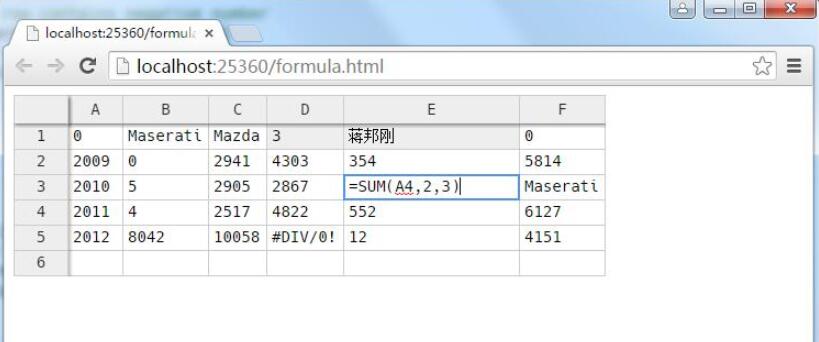
以上就是本文的全部內容,希望對大家的學習有所幫助,也希望大家多多支持。
小編推薦
熱門推薦