輕松實現JavaScript圖片切換
編輯:關於JavaScript
本文實例為大家介紹JavaScript圖片切換的實現方法,分享給大家供大家參考,具體內容如下
效果圖:
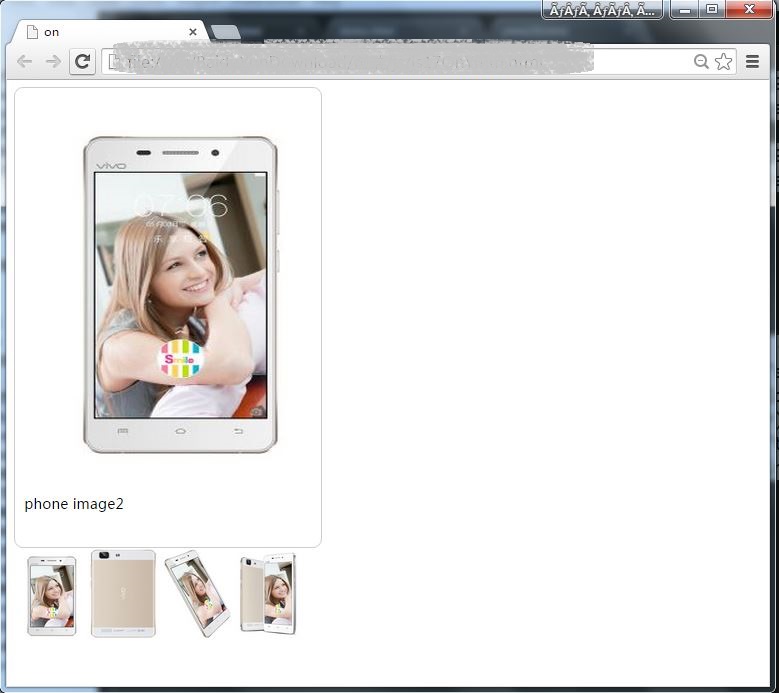
網頁看到非常常見的一個圖片切換效果:在淘寶、JD等購物時,介紹產品的圖片會有多張,一般是顯示一張,底下有一排小圖片,鼠標放到小圖片上大圖片會切換.參考vivo X5M 移動4G手機 .下面記錄一下實現的過程.
1. getElementById()
該方法是操作dom非常常用的一個方法,比如有一p標簽,id設為pid,通過getElementById(“pid”)就可以對該元素進行操作.
<!DOCTYPE html>
<html lang="en">
<head>
  <meta charset="UTF-8">
  <title>demo</title>
  <script type="text/javascript">
    function changeText(){
      document.getElementById("pid").innerHTML
      ="It works!";
    }
  </script>
</head>
<body>
  <p id="pid" onmouseover="changeText()">Hello word!</p>
</body>
</html>
上面代碼中在body中寫了一個p標簽,id為pid,當鼠標放到p標簽上方的時候觸發onmouseover事件,執行changeText()方法,將p標簽內的文檔改變.
2. setAttribute()和getAttribute()
getAttribute()方法用於獲取某一屬性的值,setAttribute()方法用於給某一屬性賦值。
<!DOCTYPE html>
<html lang="en">
<head>
  <meta charset="UTF-8">
  <title>demo</title>
  <script type="text/javascript">
    function changeUrl(){
      var baiduurl=document.getElementById("aid");
      baiduurl.getAttribute("href");
      baiduurl.setAttribute("href",
      "http://www.taobao.com");
      baiduurl.innerHTML="淘寶";
    }
  </script>
</head>
<body>
  <a href="http://www.baidu.com" id="aid" onmouseover="changeUrl()">百度首頁</a>
</body>
</html>
上面代碼中,body中有一個a標簽,通過getElementById()獲取a標簽,baiduurl.getAttribute(“href”)的值為默認的href屬性,通過baiduurl.setAttribute(“href”, “http://www.taobao.com“)設置以後,該屬性值改變.完整代碼:
<!DOCTYPE html>
<html lang="en">
<head>
  <meta charset="UTF-8">
  <title>on</title>
  <style type="text/css" media="screen">
  *{
     padding: 0;
  }
  body{
     font-family: 微軟雅黑;
  }
  #imgbox{
        width: 320px;
        height: 490px;
        padding: 10px;
        box-shadow: 5px;
        border: 1px solid #ccc;
        border-radius: 10px;
      }
 #phoneimg{
       padding: 10px;
       border-color: 1px solid #cccccc;
    }

  </style>


</head>
<body>
   <div id="imgbox">
    <img src="images/phone1.jpg" height="400" width="320" alt="phone" id="phoneimg">
    <p id="decimg">phone image1</p>
   </div>

   <table>
    <tbody>
      <tr>
        <td width="50px">
          <img src="images/phone2.jpg" height="100" width="80" title="phone image2" alt="" onmouseover="changeImg(this)" ></td>
        <td width="50px">
          <img src="images/phone3.jpg" height="100" width="80" title="phone image3" alt=""onmouseover="changeImg(this)" ></td>
        <td width="50px">
          <img src="images/phone4.jpg" height="100" width="80" title="phone image4" alt=""onmouseover="changeImg(this)" ></td>
        <td width="50px">
          <img src="images/phone5.jpg" height="100" width="80" title="phone image5" alt=""onmouseover="changeImg(this)" ></td>

      </tr>
    </tbody>
   </table>

   <script type="text/javascript">
     function changeImg(whichpic){
         var imgattr=whichpic.getAttribute("src");
         var phoneimg=document.getElementById("phoneimg");
         phoneimg.setAttribute("src",imgattr);
         var dectext=whichpic.getAttribute("title");
         document.getElementById("decimg").innerHTML=dectext;
     }
   </script>
</body>
</html>
下一步學習一下怎麼實現局部放大,大家有什麼好的方法嗎?可以一起探討。
小編推薦
熱門推薦