利用JavaScript判斷浏覽器類型及版本
編輯:關於JavaScript
本文將介紹如何使用Javascript來檢測浏覽器的類型以及版本號,包括獵豹浏覽器、搜狗浏覽器、傲游浏覽器、360極速浏覽器、360安全浏覽器、QQ浏覽器、百度浏覽器、IE,Firefox,Chrome,safari,Opera等。
效果圖
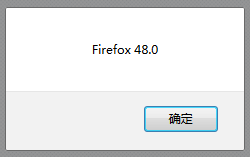
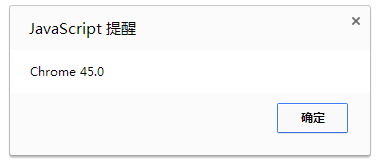
實例代碼
<!DOCTYPE html>
<html>
 <head>
 <meta http-equiv="Content-Type" content="text/html; charset=UTF-8">
 <title>JavaScript判斷浏覽器類型及版本</title>

 <script type= "text/javascript" >

/**
 * 獲取浏覽器類型以及版本號
 * 支持國產浏覽器:獵豹浏覽器、搜狗浏覽器、傲游浏覽器、360極速浏覽器、360安全浏覽器、
 * QQ浏覽器、百度浏覽器等.
 * 支持國外浏覽器:IE,Firefox,Chrome,safari,Opera等.
 * 使用方法:
 * 獲取浏覽器版本:Browser.client.version
 * 獲取浏覽器名稱(外殼):Browser.client.name
 * @author:xuzengqiang
 * @since :2015-1-27 10:26:11
**/
var Browser=Browser || (function(window){
   var document = window.document,
     navigator = window.navigator,
     agent = navigator.userAgent.toLowerCase(),
     //IE8+支持.返回浏覽器渲染當前文檔所用的模式
     //IE6,IE7:undefined.IE8:8(兼容模式返回7).IE9:9(兼容模式返回7||8)
     //IE10:10(兼容模式7||8||9)
     IEMode = document.documentMode,
     //chorme
     chrome = window.chrome || false ,
     System = {
       //user-agent
       agent : agent,
       //是否為IE
       isIE : /msie/.test(agent),
       //Gecko內核
       isGecko: agent.indexOf( "gecko" )> 0 && agent.indexOf( "like gecko" )< 0 ,
       //webkit內核
       isWebkit: agent.indexOf( "webkit" )> 0 ,
       //是否為標准模式
       isStrict: document.compatMode === "CSS1Compat" ,
       //是否支持subtitle
       supportSubTitle:function(){
         return "track" in document.createElement( "track" );
       },
       //是否支持scoped
       supportScope:function(){
         return "scoped" in document.createElement( "style" );
       },
       //獲取IE的版本號
       ieVersion:function(){
         try {
          return agent.match(/msie ([\d.]+)/)[ 1 ] || 0 ;
         } catch (e) {
          console.log( "error" );
          return IEMode;
         }
       },
       //Opera版本號
       operaVersion:function(){
         try {
           if (window.opera) {
             return agent.match(/opera.([\d.]+)/)[ 1 ];
           } else if (agent.indexOf( "opr" ) > 0 ) {
             return agent.match(/opr\/([\d.]+)/)[ 1 ];
           }
         } catch (e) {
           console.log( "error" );
           return 0 ;
         }
       },
       //描述:version過濾.如31.0.252.152 只保留31.0
       versionFilter:function(){
         if (arguments.length === 1 && typeof arguments[ 0 ] === "string" ) {
           var version = arguments[ 0 ];
             start = version.indexOf( "." );
           if (start> 0 ){
             end = version.indexOf( "." ,start+ 1 );
             if (end !== - 1 ) {
               return version.substr( 0 ,end);
             }
           }
           return version;
         } else if (arguments.length === 1 ) {
           return arguments[ 0 ];
         }
         return 0 ;
       }
     };

   try {
     //浏覽器類型(IE、Opera、Chrome、Safari、Firefox)
     System.type = System.isIE? "IE" :
       window.opera || (agent.indexOf( "opr" ) > 0 )? "Opera" :
       (agent.indexOf( "chrome" )> 0 )? "Chrome" :
       //safari也提供了專門的判定方式
       window.openDatabase? "Safari" :
       (agent.indexOf( "firefox" )> 0 )? "Firefox" :
       'unknow' ;

     //版本號
     System.version = (System.type === "IE" )?System.ieVersion():
       (System.type === "Firefox" )?agent.match(/firefox\/([\d.]+)/)[ 1 ]:
       (System.type === "Chrome" )?agent.match(/chrome\/([\d.]+)/)[ 1 ]:
       (System.type === "Opera" )?System.operaVersion():
       (System.type === "Safari" )?agent.match(/version\/([\d.]+)/)[ 1 ]:
       "0" ;

     //浏覽器外殼
     System.shell=function(){
       //遨游浏覽器
       if (agent.indexOf( "maxthon" ) > 0 ) {
         System.version = agent.match(/maxthon\/([\d.]+)/)[ 1 ] || System.version ;
         return "傲游浏覽器" ;
       }
       //QQ浏覽器
       if (agent.indexOf( "qqbrowser" ) > 0 ) {
         System.version = agent.match(/qqbrowser\/([\d.]+)/)[ 1 ] || System.version ;
         return "QQ浏覽器" ;
       }

       //搜狗浏覽器
       if ( agent.indexOf( "se 2.x" )> 0 ) {
         return '搜狗浏覽器' ;
       }

       //Chrome:也可以使用window.chrome && window.chrome.webstore判斷
       if (chrome && System.type !== "Opera" ) {
         var external = window.external,
           clientInfo = window.clientInformation,
           //客戶端語言:zh-cn,zh.360下面會返回undefined
           clientLanguage = clientInfo.languages;

         //獵豹浏覽器:或者agent.indexOf("lbbrowser")>0
         if ( external && 'LiebaoGetVersion' in external) {
           return '獵豹浏覽器' ;
         }
         //百度浏覽器
         if (agent.indexOf( "bidubrowser" )> 0 ) {
           System.version = agent.match(/bidubrowser\/([\d.]+)/)[ 1 ] ||
             agent.match(/chrome\/([\d.]+)/)[ 1 ];
           return "百度浏覽器" ;
         }
         //360極速浏覽器和360安全浏覽器
         if ( System.supportSubTitle() && typeof clientLanguage === "undefined" ) {
           //object.key()返回一個數組.包含可枚舉屬性和方法名稱
           var storeKeyLen = Object.keys(chrome.webstore).length,
             v8Locale = "v8Locale" in window;
           return storeKeyLen > 1 ? '360極速浏覽器' : '360安全浏覽器' ;
         }
         return "Chrome" ;
       }
       return System.type;
     };

     //浏覽器名稱(如果是殼浏覽器,則返回殼名稱)
     System.name = System.shell();
     //對版本號進行過濾過處理
     System.version = System.versionFilter(System.version);

   } catch (e) {
     console.log( "error" );
   }
   return {
     client:System
   };

})(window);
alert(Browser.client.name+ " " +Browser.client.version);
</script>
 </head>
 <body>

 </body>
</html>
總結
以上就是本文的全部內容,希望對大家的開發能有所幫助。如果有疑問可以留言討論。
小編推薦
熱門推薦