僅一個form表單 js實現注冊信息依次填寫提交功能
編輯:關於JavaScript
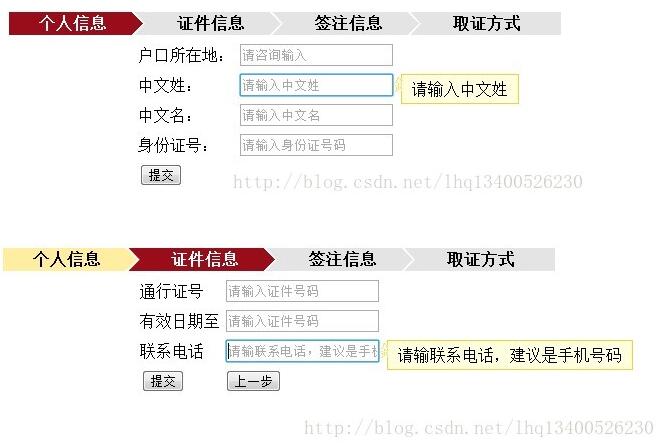
我們原先是一個很長的form表單,裡面有很多選項。客戶反饋這樣不夠友好,容易看花眼。因此進行改進,實現多步驟進度,多個提交的實現(其實只有一個form提交)。
實現的思路:將表單的選項裝入多個div中,一個顯示,其他隱藏。
實現效果如下:
1、JavaScript代碼
<script type="text/javascript" src="js/jquery.js"></script>
<script type="text/javascript" src="js/jquery-powerFloat.js"></script>
<link rel="stylesheet" href="css/powerFloat.css" type="text/css" />

<script type="text/javascript">
 $(function() {
 $(".pwdTrigger").powerFloat({
 eventType : "focus",
 targetMode : "remind",
 targetAttr : "placeholder",
 position : "2-1"
 });

 });
</script>

<script type="text/javascript">

 function one() {
 if (confirm("確定提交?")) {
 $("#one").hide();
 $("#two").show();
 $("#grxx").attr("class","current_prev");
 $("#zjxx").attr("class","current");
 }
 }

 function two() {
 if (confirm("確定提交?")) {
 $("#two").hide();
 $("#three").show();

 $("#grxx").attr("class","done");
 $("#zjxx").attr("class","current_prev");
 $("#qzxx").attr("class","current");
 }
 }

 function three() {
 if (confirm("確定提交?")) {
 $("#three").hide();
 $("#four").show();

 $("#grxx").attr("class","done");
 $("#zjxx").attr("class","done");
 $("#qzxx").attr("class","current_prev");
 $("#qzfs").attr("class","current");
 }
 }

 function reone() {
 if (confirm("確定返回?")) {
 $("#one").show();
 $("#two").hide();
 $("#grxx").attr("class","current");
 $("#zjxx").attr("class","");
 }
 }
 function retwo() {
 if (confirm("確定返回?")) {
 $("#three").hide();
 $("#two").show();
 $("#grxx").attr("class","current_prev");
 $("#zjxx").attr("class","current");
 $("#qzxx").attr("class","");
 }
 }
 function rethree() {
 if (confirm("確定返回?")) {
 $("#four").hide();
 $("#three").show();
 $("#grxx").attr("class","done");
 $("#zjxx").attr("class","current_prev");
 $("#qzxx").attr("class","current");
 $("#qzfs").attr("class","last");;
 }
 }
</script>
2、CSS代碼
<style type="text/css">
.flow_steps ul li { float:left; height:23px; padding:0 40px 0 30px; line-height:23px; text-align:center; background:url(img/barbg.png) no-repeat 100% 0 #E4E4E4; font-weight:bold;}
.flow_steps ul li.done { background-position:100% -46px; background-color:#FFEDA2;}
.flow_steps ul li.current_prev { background-position:100% -23px; background-color:#FFEDA2;}
.flow_steps ul li.current { color:#fff; background-color:#990D1B;}
.flow_steps ul li.last { background-image:none;}
</style>
3、HTML代碼
<body>
 <table width="600px">
 <tr>
  <td>
  <div class="flow_steps">
   <ul style="list-style-type:none">
    <li id="grxx" class="current">個人信息</li>
    <li id="zjxx" >證件信息</li>
    <li id="qzxx">簽注信息</li>
    <li id="qzfs" class="last">取證方式</li>
   </ul>
  </div>
  </td>
 </tr>

 <tr><td>
  <form action="">

  <div id="one">
   <table align="center">
    <tr>
 <td>戶口所在地:</td>
 <td><input class="pwdTrigger" type="text" placeholder="請輸入戶口所在地" /></td>
 </tr>
 <tr>
 <td>中文姓:</td>
 <td><input class="pwdTrigger" type="text" placeholder="請輸入中文姓" /></td>
 </tr>
 <tr>
 <td>中文名:</td>
 <td><input class="pwdTrigger" type="text" placeholder="請輸入中文名" /></td>
 </tr>
 <tr>
 <td>身份證號:</td>
 <td><input class="pwdTrigger" type="text" placeholder="請輸入身份證號碼" /></td>
 </tr>
 <tr>
  <td colspan="2">
 <button type="button" onclick="one()">提交</button>
 </td>
 </tr>

   </table>
 </div>

 <div id="two" style="display: none">

 <table align="center">
  <tr>
  <td>通行證號</td>
  <td><input class="pwdTrigger" type="text" placeholder="請輸入證件號碼" /></td>
  </tr>
  <tr>
  <td>有效日期至</td>
  <td><input class="pwdTrigger" type="text" placeholder="請輸入證件號碼" /></td>
  </tr>
  <tr>
  <td>聯系電話</td>
  <td><input class="pwdTrigger" type="text" placeholder="請輸聯系電話,建議是手機號碼" /></td>
  </tr>
  <tr >
  <td >
   <button type="button" onclick="two()">提交</button>
  </td>
  <td>
   <button type="button" onclick="reone()">上一步</button>
  </td>
  </tr>
 </table>

 </div>

  <div id="three" style="display: none">
  <table align="center">
   <tr>
   <td>簽注類別</td>
   <td><input class="pwdTrigger" type="text" placeholder="請輸入簽注類別" /></td>
   </tr>
   <tr>
   <td>前往地</td>
   <td><input class="pwdTrigger" type="text" placeholder="請輸入前往地" /></td>
   </tr>
   <tr>
   <td>簽證種類</td>
   <td><input class="pwdTrigger" type="text" placeholder="請輸入簽注種類" /></td>
   </tr>
   <tr >
  <td >
   <button type="button" onclick="three()">提交</button>
  </td>
  <td>
   <button type="button" onclick="retwo()">上一步</button>
  </td>
  </tr>
  </table>
 </div>

 <div id="four" style="display: none">
 <table align="center">
  <tr>
  <td>取證方式</td>
  <td><input class="pwdTrigger" type="text" placeholder="請輸入取證方式" /></td>
  </tr>
  <tr >
  <td >
   <button type="button" onclick="">提交</button>
  </td>
  <td>
   <button type="button" onclick="rethree()">上一步</button>
  </td>
  </tr>
 </table>
 </div>

 </form>
 </td>
 </tr>
</table>

</body>
</html>
源碼下載:http://xiazai.jb51.net/201606/yuanma/JavaScript-formshow(jb51.net).rar
以上就是本文的全部內容,希望對大家學習JavaScript程序設計有所幫助。
小編推薦
熱門推薦