javascript動態獲取登錄時間和在線時長
編輯:關於JavaScript
本文實例介紹了javascript動態獲取登錄時間和在線時長的相應代碼,分享給大家供大家參考,具體內容如下
效果圖:
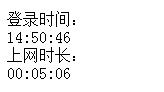
實現代碼:
<html>
 <head>
 <title>online</title>
 <script language=javaScript>
 ///這裡是獲得登錄時候的時間,用來和動態的時間做差來求時長
 var s = new Date();

 function clockon() {
 var thistime = new Date();
 //時間差
 diff = new Date();
 diff.setTime(Math.abs(thistime.getTime() - s.getTime()));
 timediff = diff.getTime();
 hos = Math.floor(timediff / (1000 * 60 * 60));
 mins = Math.floor(timediff / (1000 * 60));
 secs = Math.floor(timediff / 1000);
 //end
 var hours = thistime.getHours();
 var minutes = thistime.getMinutes();
 var seconds = thistime.getSeconds();

 if (eval(hours) < 10) {
  hours = "0" + hours;
 }
 if (eval(minutes) < 10) {
  minutes = "0" + minutes;
 }
 if (seconds < 10) {
  seconds = "0" + seconds;
 }
 thistime = hours + ":" + minutes + ":" + seconds;
 bgclockshade.innerHTML = thistime//這裡動態的嵌入當前的時間
 //如果不取余的話,秒數是一直上升的,所以在達到一個60的時候就取余就可以解決這個問題了
 if (secs > 59) {
  secs = secs % 60;
 }
 if (mins > 59) {
  mins = mins % 60;
 }
 if (eval(secs) < 10) {
  secs = "0" + secs;
 }
 if (eval(mins) < 10) {
  mins = "0" + mins;
 }
 if (eval(hos) < 10) {
  hos = "0" + hos;
 }
 jishi.innerHTML = hos + ":" + mins + ":" + secs;
 var timer = setTimeout("clockon()", 200);
 }
</script>
 </head>
 <body onload="clockon();">
 登錄時間:
 <div id="bgclockshade"></div>
 上網時長:
 <div id="jishi"></div>
 </body>
</html>
以上就是本文的全部內容,希望對大家的學習有所幫助。
小編推薦
熱門推薦