基於javascript實現listbox左右移動
編輯:關於JavaScript
本文實例講解了javascript實現listbox左右移動的詳細代碼,分享給大家供大家參考,具體內容如下
效果圖:
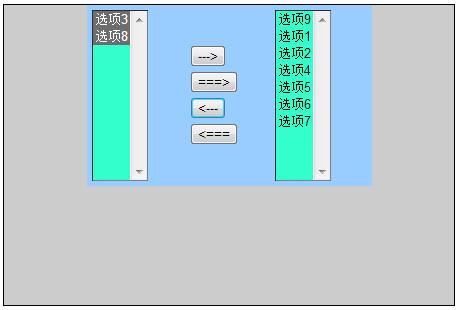
具體代碼:
<html>
<head>
<meta http-equiv="Content-Type" content="text/html; charset=gb2312" />
<title>listbox左右移動</title>
</head>

<body>

<div style="background-color:#CCC; width:450px; height:300px; margin:150px,0,0,450px; border:1px solid">
  <table align="center" width="285" height="169" bgcolor="#99CCFF">
  <tr>
   <td width="100">
    <select name="first" id="first" size="10" multiple="multiple" style="background-color:#3FC;">
     <option value="選項1">選項1</option>
     <option value="選項2">選項2</option>
     <option value="選項3">選項3</option>
     <option value="選項4">選項4</option>
     <option value="選項5">選項5</option>
     <option value="選項6">選項6</option>
     <option value="選項7">選項7</option>
     <option value="選項8">選項8</option>
    </select>
   </td>
   <td width="85" valign="middle">
    <input name="add" id="add" type="button" value="--->"/>
    <input name="add_all" id="add_all" type="button" value="===>"/>
    <input name="remove" id="remove" type="button" value="<---"/>
    <input name="remove_all" id="remove_all" type="button" value="<==="/>
   </td>
   <td width="100" align="left">
    <select name="second" id="second" size="10" multiple="multiple" style="background-color:#3FC;">
    <option value="選項9">選項9</option>
    </select>
   </td>
  </tr>
  </table>
</div>

</body>
<script type="text/javascript">
 //左移右

  /*<input name="add" id="add" type="button" value="--->"/>*/
  document.getElementById("add").onclick = function add()
  {
   var firstSel = document.getElementById("first");
   var option = firstSel.getElementsByTagName("option");
   //javascript的數組是動態數組,長度是可以變的。
   //所以先取得下拉列表的長度,避免option被移走後長度變小,導致後面循環終止,出現beg
   var oplength=option.length;
   var secondSel = document.getElementById("second");
   for(i=0;i<oplength;i++)
   {
     /*
      selectedIndex: 該下標返回下拉列表的索引值
      注: 如果有多個被選中的情況下,永遠返回第一個選中的索引值,索引最小的那個
         如果沒有被選中的情況下,返回-1
         selectedIndex是<select>的屬性
     */
     if(firstSel.selectedIndex!=-1)
     {
       secondSel.appendChild(option[firstSel.selectedIndex]);
     }
   }

  }

  /*<input name="add_all" id="add_all" type="button" value="===>"/>*/
  document.getElementById("add_all").onclick = function addAll()
  {
   var firstSel = document.getElementById("first");
   var option = firstSel.getElementsByTagName("option");
   //javascript的數組是動態數組,長度是可以變的。
   //所以先取得下拉列表的長度,避免option被移走後長度變小,導致後面循環終止,出現beg
   var oplength=option.length;
   var secondSel = document.getElementById("second");
   for(i=0;i<oplength;i++)
   {
    /*因為javascript的數組是動態數組,長度是可以變的。所以當移走全部把數
    組的值移走(一個一個的移走,數組長度馬上-1,所以數組下標也是-1.因次我們要把每次移的是走下標為0的那個
    數,這樣才保證可以全部移走)*/
    secondSel.appendChild(option[0]);
   }
  }

  /*雙擊後把option移到右邊*/
  document.getElementById("first").ondblclick = function dblclick()
  {
    /*方法一*/
    /*
   var firstSel = document.getElementById("first");
   var option = firstSel.getElementsByTagName("option");
   //javascript的數組是動態數組,長度是可以變的。
   //所以先取得下拉列表的長度,避免option被移走後長度變小,導致後面循環終止,出現beg
   var oplength=option.length;
   var secondSel = document.getElementById("second");
   for(i=0;i<oplength;i++)
   {
      //雙擊可以看成:第一次點擊選中,第二次點擊移動
      secondSel.appendChild(option[firstSel.selectedIndex]);
   }
   */

   /*方法二*/
   /*
   this: this表示document.getElementById("first")  下拉列表
      this.selectedIndex表示下拉列表選中的項
   */
    var secondSel = document.getElementById("second");
    secondSel.appendChild(this[this.selectedIndex]);
  }


  //右移左


  /*<input name="remove" id="remove" type="button" value="<---"/>*/
  document.getElementById("remove").onclick = function remove()
  {
   var secondSel = document.getElementById("second");
   var firstSel = document.getElementById("first");
   var option = secondSel.getElementsByTagName("option");
   //javascript的數組是動態數組,長度是可以變的。
   //所以先取得下拉列表的長度,避免option被移走後長度變小,導致後面循環終止,出現beg
   var oplength=option.length;
   for(i=0;i<oplength;i++)
   {
     /*
      selectedIndex: 該下標返回下拉列表的索引值
      注: 如果有多個被選中的情況下,永遠返回第一個選中的索引值,索引最小的那個
         如果沒有被選中的情況下,返回-1
         selectedIndex是<select>的屬性
     */
     if(secondSel.selectedIndex!=-1)
     {
       firstSel.appendChild(option[secondSel.selectedIndex]);
     }
   }

  }

  /*<input name="remove_all" id="remove_all" type="button" value="<==="/>*/
  document.getElementById("remove_all").onclick = function remove_all()
  {
   var secondSel = document.getElementById("second");
   var firstSel = document.getElementById("first");
   var option = secondSel.getElementsByTagName("option");
   //javascript的數組是動態數組,長度是可以變的。
   //所以先取得下拉列表的長度,避免option被移走後長度變小,導致後面循環終止,出現beg
   var oplength=option.length;
   for(i=0;i<oplength;i++)
   {
    /*因為javascript的數組是動態數組,長度是可以變的。所以當移走全部把數
    組的值移走(一個一個的移走,數組長度馬上-1,所以數組下標也是-1.因次我們要把每次移的是走下標為0的那個
    數,這樣才保證可以全部移走)*/
    firstSel.appendChild(option[0]);
   }
  }

  /*雙擊後把option移到右邊*/
  document.getElementById("second").ondblclick = function dblclick()
  {
    /*方法一*/
    /*
   var secondSel = document.getElementById("second");
   var firstSel = document.getElementById("first");
   var option = secondSel.getElementsByTagName("option");
   //javascript的數組是動態數組,長度是可以變的。
   //所以先取得下拉列表的長度,避免option被移走後長度變小,導致後面循環終止,出現beg
   var oplength=option.length;
   for(i=0;i<oplength;i++)
   {
      //雙擊可以看成:第一次點擊選中,第二次點擊移動
      firstSel.appendChild(option[secondSel.selectedIndex]);
   }
   */

   /*方法二*/
   /*
   this: this表示document.getElementById("second")  下拉列表
      this.selectedIndex表示下拉列表選中的項
   */
    var firstSel = document.getElementById("first");
    firstSel.appendChild(this[this.selectedIndex]);
  }
</script>
</html>
代碼注釋很詳細,希望可以幫到大家。
以上就是本文的全部內容,希望對大家學習javascript程序設計有所幫助。
小編推薦
熱門推薦